

A countdown app, widget and all, prompt by prompt

Founder, Newly
A countdown app is the ten-minute app. One list, one number per row, a date picker, done. The build behind this page took seven minutes for that part and we typed 163 characters. What is worth writing down is the part that never fits in a browser preview: the home screen widget, and later the lock screen. Below is what one session actually did for each, the three prompts as typed, the error it threw at itself and cleared, what the Swift it wrote contains, and the one file it left out. Among the app examples on this site it is a short build with a long checklist at the end, and the checklist is the reason to read it.
Key Takeaways
- One prompt, four screens, seven minutes. A 163-character brief produced the events list, a detail screen, the Add and Edit sheets and a Swift widget target, and it asked nothing first.
- The widget is real code with one file missing. targets/widget/index.swift is 213 lines of WidgetKit that reads an App Group, but there is no expo-target.config.js and no App Group entitlement, so as generated the plugin would not build it.
- It crashed itself, then fixed itself. Four minutes in, the preview read useEvents must be used within EventsProvider. It read its own Expo logs, thought for 90 seconds and cleared the error before we touched anything.
- A question costs a build. Asking whether it could show the countdown on the lock screen got 14 frontend actions, a native Swift module in three new files and no reply, two and a half minutes later.
The brief
Someone has a holiday booked for next July, a retirement date circled, and Christmas, which comes round on its own. They want the days left where they will see them without opening anything, which means the home screen, and they want their own photo behind each number. That is the whole product. The phrase people search for, countdown clock timer app, muddles two things: a timer counts minutes down to zero, this counts days down to a date, and the second one is a list with a widget on the end of it.
If a number on the home screen is all you want, an app you can install today will get you there faster than any build, and this page will not argue with that. Build when the countdown belongs to something of yours: a set of events with your own photos you want to hand to family, a countdown app for retirement with nobody else’s branding on the lock screen, or a countdown that is one screen inside a bigger app. A Christmas countdown app, a vacation countdown app and a retirement countdown are the same app with three rows in it, and the seed we asked for later is exactly those three.
Read this part before you build anything. The app is nearly free. The widget is the job, and you will not see it in the browser, in Expo Go, or in an Android APK. It appears for the first time on an iOS build installed through TestFlight, which needs an Apple Developer Program membership at $99 a year. Decide now whether you will pay that, because every minute of this page after the first seven is about the widget.
The map
Two surfaces, one payload, one missing file
A feature list says widget. The build says one file on the app side that writes a payload, two files in a widget target that read it, a native module for the lock screen, and a plugin that is supposed to turn the target into an extension when the app is built. Drawn out, the gap is obvious: everything on the device side was written, and the configuration that makes the plugin build it was not.
Home screen widget
Files
targets/widget/index.swift (213 lines)targets/widget/Info.plistRead in the code view
import WidgetKit, @main struct MomentumWidget: Widget, StaticConfiguration(kind: kind, provider: MomentumProvider()), .supportedFamilies([.systemSmall, .systemMedium]), a TimelineProvider that refreshes at midnight and reads UserDefaults(suiteName: "group.com.placeholder.app") key next_event as JSON with name, daysLeft and date. Info.plist carries NSExtensionPointIdentifier com.apple.widgetkit-extension.
Missing or never seen
targets/widget/ holds only these two files. There is no expo-target.config.js, which the plugin's README says every target folder needs, so as generated the plugin would not produce this target at prebuild. No accessory (lock screen) family, no ActivityKit.
The session
Three prompts, no questions, one crash it fixed itself
One session in Newly on 19 September 2026, 20:03 to 20:26, in the order it happened. The prompts are what we typed, not a tidied version. The screenshots are the browser window as it was.
Twenty-three minutes, in order
- 20:03Prompt 1 sent
163 characters from the home page box, Plan mode off. No question came back. The page moved to the project and ran Setting up your app, Connecting to workspace, Loading your files, Creating your app icon, Analyzing your idea.
- 20:04Named itself, planned one line
The header changed from Untitled to Momentum Countdown. A PLAN card with a single item: 1. Build countdown app frontend (events list, add/edit, detail, widget). Accounts and a database never came up.
- 20:07Render Error in the preview
useEvents must be used within EventsProvider, full screen inside the phone frame, just after it wrote app/(tabs)/(home)/index.ios.tsx for the second time.
- 20:08It read its own logs
A Logs section opened by itself: Reading Expo logs, Thought for 90s, four files read back, status Starting sub-task. We did not press Retry and did not type.
- 20:09Error gone
After edits to app.json and utils/storage.ts, two shell commands and a lint, the preview showed the app.
- 20:10Build finished
3 agents, 21 file changes, 33 actions. It also installed @expo-google-fonts/nunito on its own and wrote targets/widget/index.swift and targets/widget/Info.plist.
- 20:15Prompt 2 sent
Three example events with photos. Done at 20:16: five reads, two edits of contexts/EventsContext.tsx.
- 20:16Three cards, one bug
Christmas 97 days, Summer Holiday 294, Retirement 1351, each with an Unsplash photo it chose. The Countdowns header printed across the first photo.
- 20:19Prompt 3 sent, as a question
Can it also show the countdown on my lock screen as a live activity? Still in Build mode.
- 20:21It answered by building
14 frontend actions, a native Swift module in three new files, index.swift and Info.plist rewritten. No reply to the question.
- 20:22Preview back
Reloading, Rebuilding preview, then the three events and no error. A native module change restarts the preview.
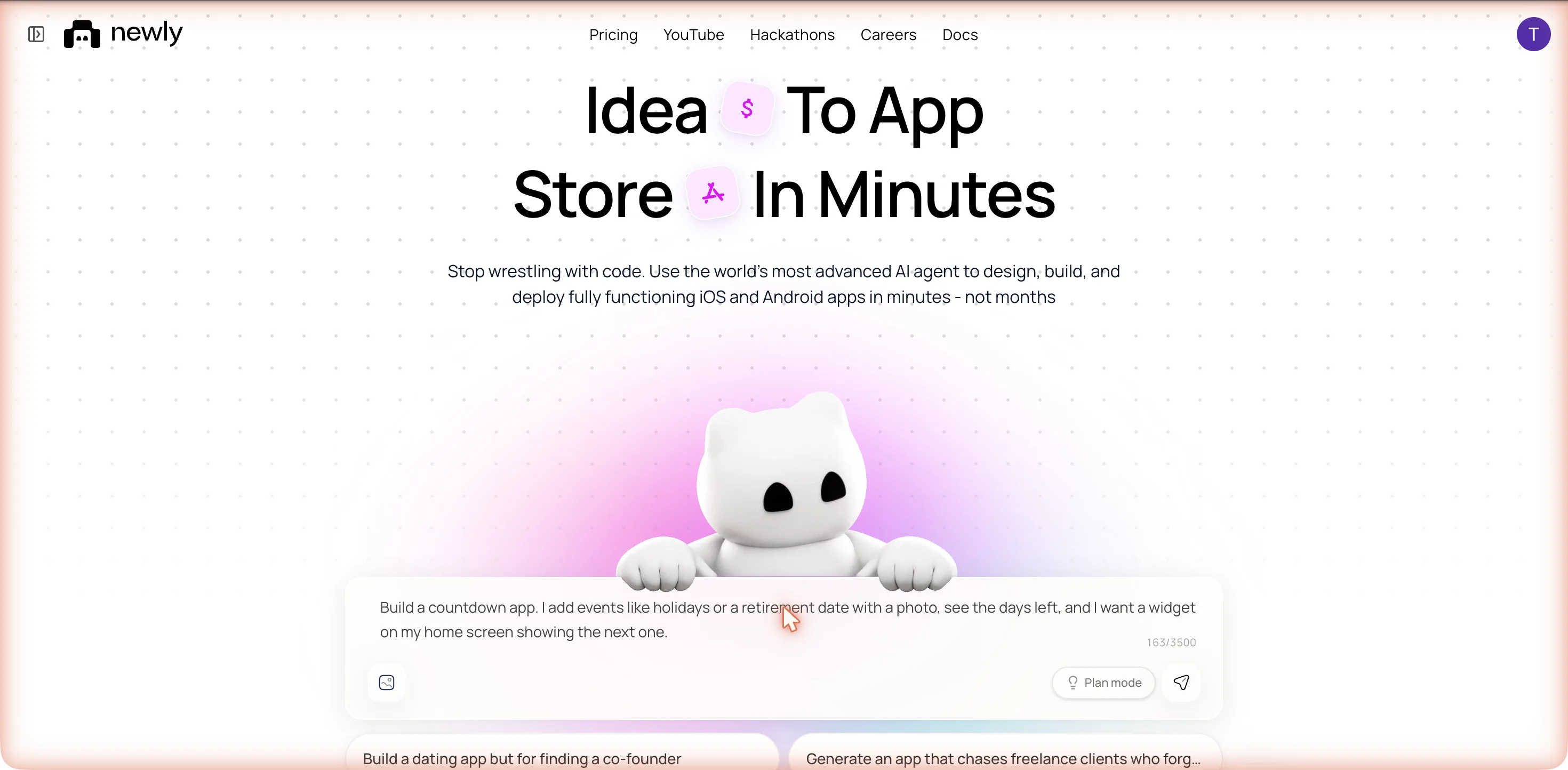
Prompt 1
Build a countdown app. I add events like holidays or a retirement date with a photo, see the days left, and I want a widget on my home screen showing the next one.
10 September, employee app
The same box stopped before a line was written and asked: Supabase or mock data?
19 September, this build
No question. Straight to a one-line PLAN card, and a name we never gave it.
The first thing it read is the tell for this page. Before writing anything, the reading list included contexts/WidgetContext.tsx, a file that already existed in the starter project, alongside app.json, the tab layouts and package.json. The widget plumbing was there before the prompt. What the prompt had to produce was the widget itself.
Then it fell over
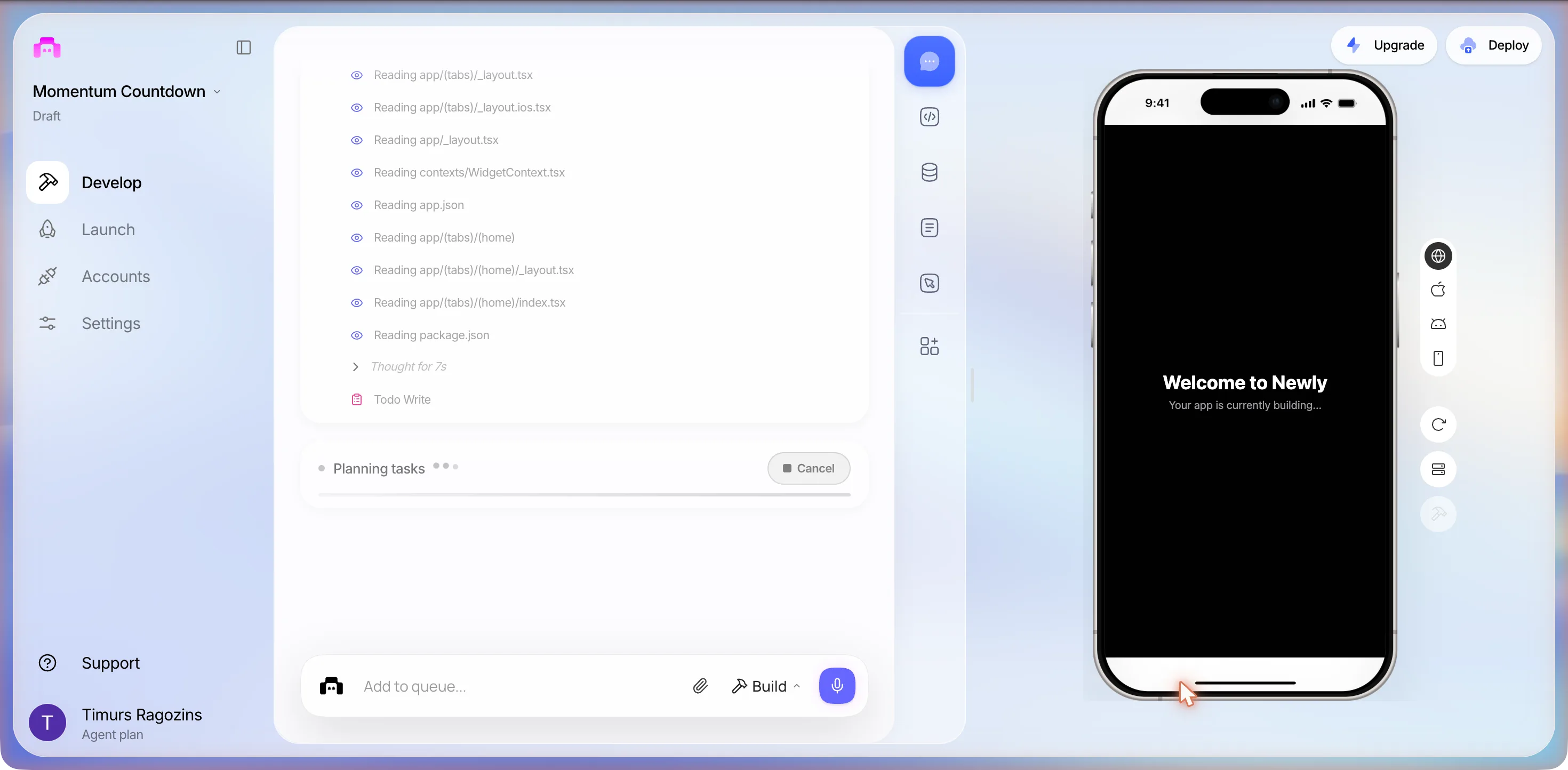
At 20:07, four minutes after send, files were still landing when the phone preview went red. Not a toast: a full-screen Expo error inside the phone frame.
Render Error
Error
useEvents must be used within EventsProvider
SOURCE  File index.ts  Platform web
COMPONENT STACK  <HomeScreen />  <Suspense /> <anonymous>  <Route />  <BaseRoute />  <StaticContainer />  <EnsureSingleNavigator />
CALL STACK  (empty)
Retry
What the user sees
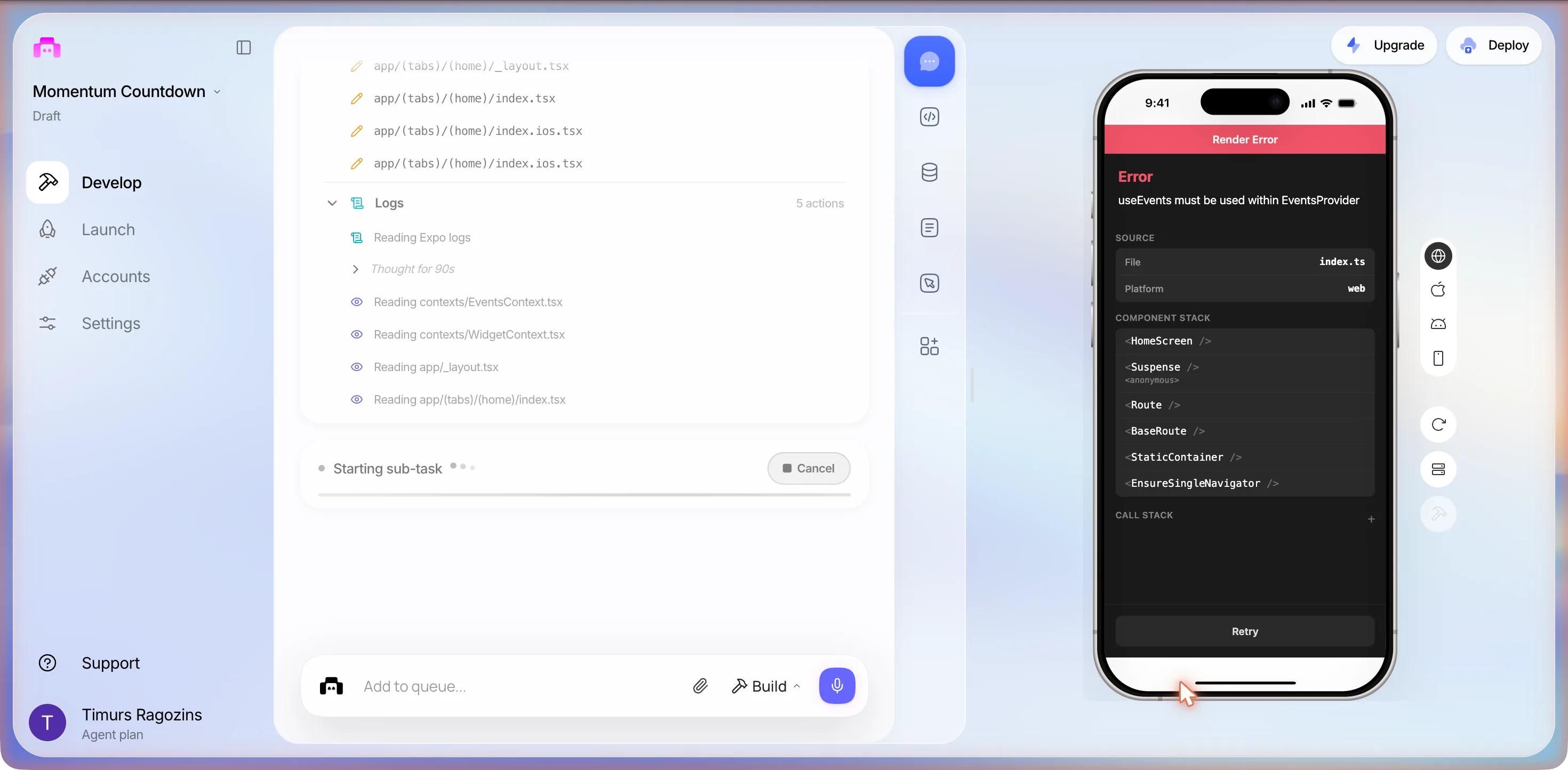
What it did on its own, 20:08 to 20:09
- Opened a collapsible Logs section: Reading Expo logs, Thought for 90s.
- Read back contexts/EventsContext.tsx, contexts/WidgetContext.tsx, app/_layout.tsx and the home index.
- Status row changed to Starting sub-task.
- Edited app.json; ran two shell commands to look at the fonts folder and the installed Google Fonts package.
- Edited utils/storage.ts and ran lint.
- By 20:09 the error had cleared and the preview showed the app.
If this screen appears during a first build, wait one minute before doing anything.
What one prompt produced
The build finished at 20:10, about seven minutes from send: 15 actions for the planner, 32 for Frontend, a Typecheck line, and 10 for Logs, whose last row was bunx tsc. The closing summary, sorted by screen:
Screen 1
Events list
- Cards with photos, or gradient placeholders
- Countdown numbers go purple, then yellow, then pink as the date nears, green on the day
- Swipe to delete, with undo
Screen 2
Detail
- Full-bleed hero photo
- Days, weeks and months breakdown
- A Today! state on the day
Screens 3 and 4
Add and Edit sheets
- Photo picker and date picker
- Validation
- Destructive delete on Edit
Widget target
iOS home screen widget
- Reads the next upcoming event from shared App Group storage
- Name and days remaining on a dark navy-to-purple gradient
- Small and medium sizes
One line in the summary is a decision, not a feature: "All data is stored locally on-device via SecureStore". No backend, no accounts, no sync. It never asked whether that was what we wanted. For a countdown it is the right default.
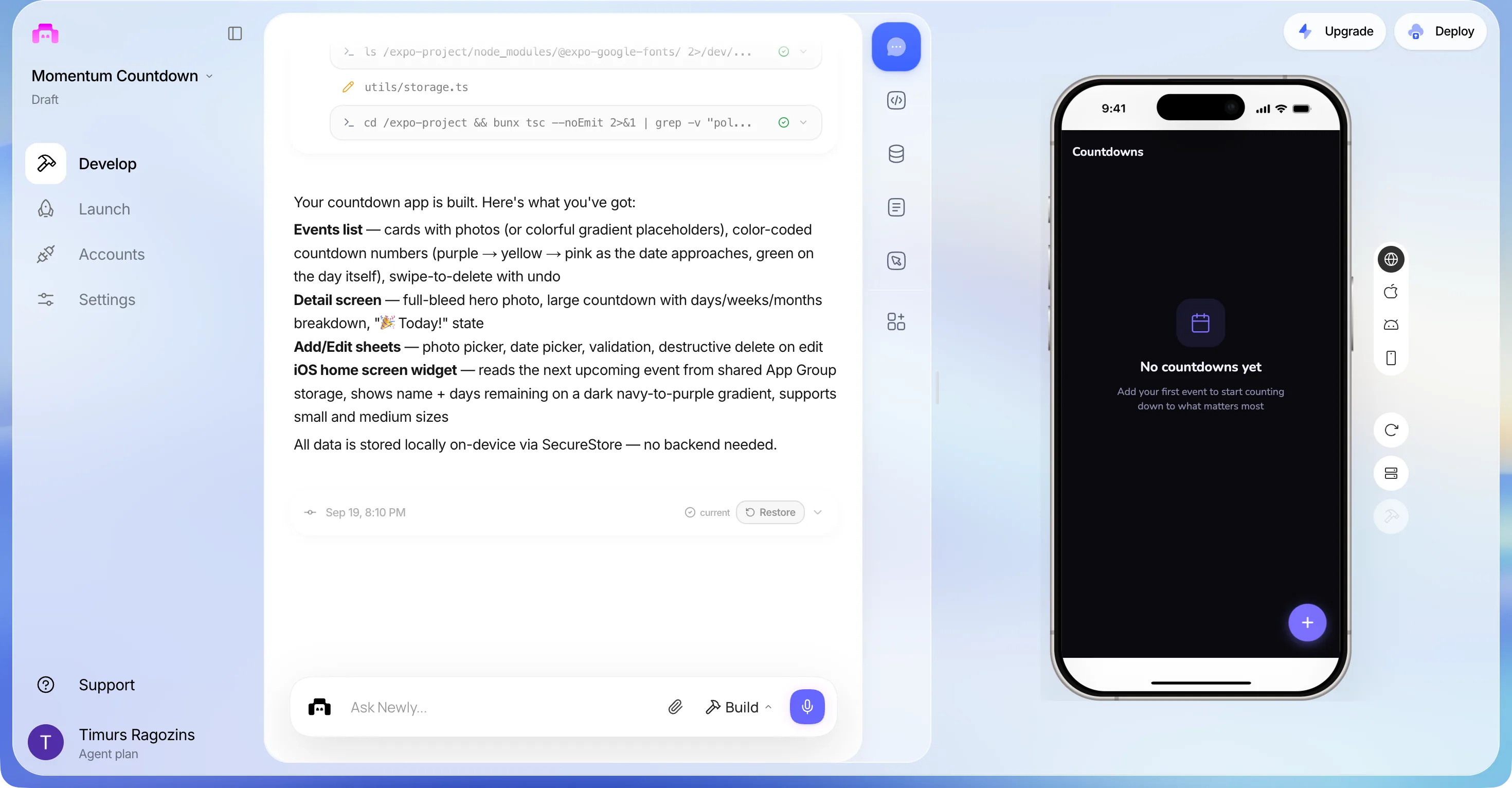
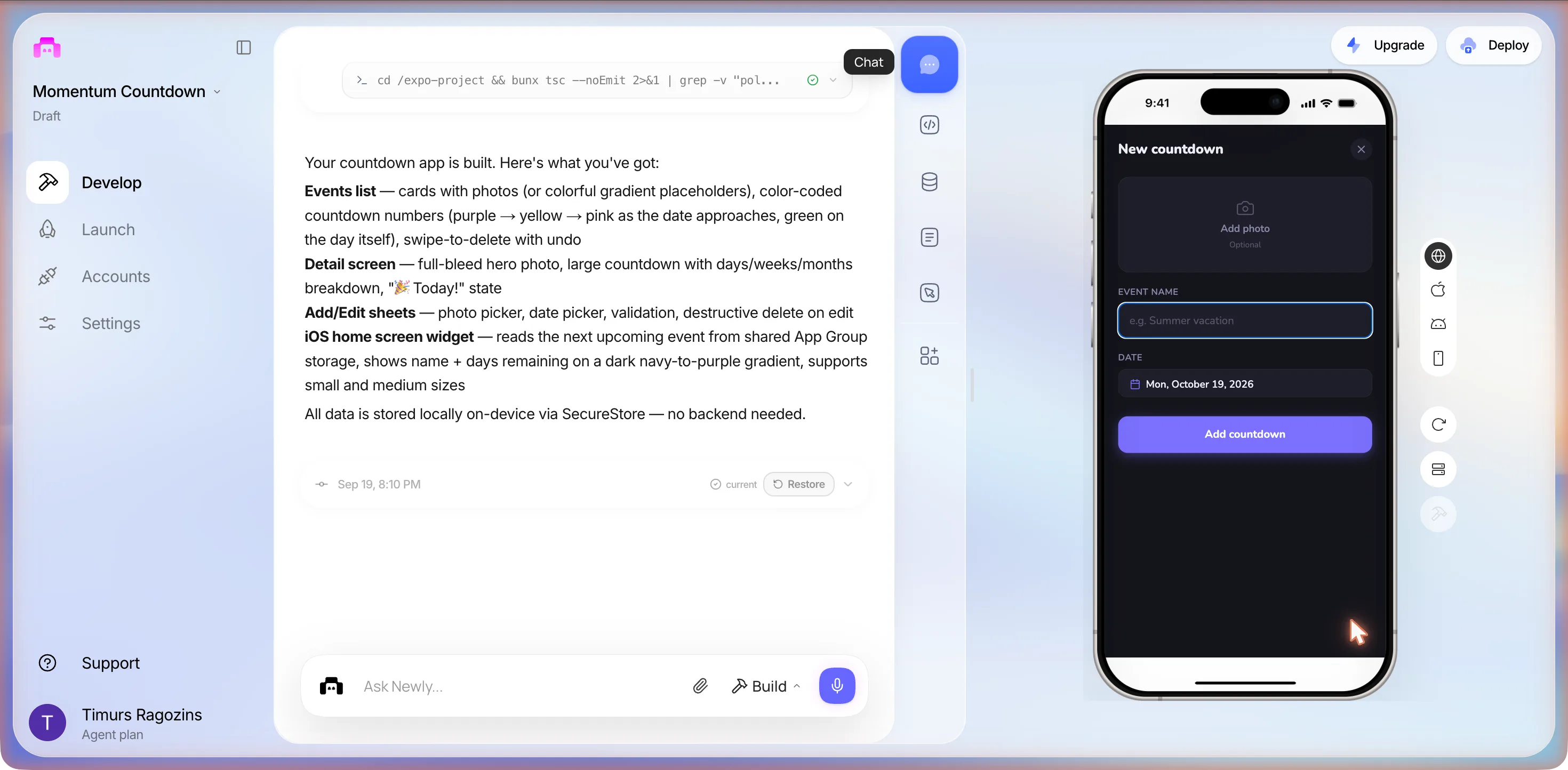
It arrived empty. The list, the detail screen and the widget all sit in their empty state until you add something, which is why prompt 2 exists. The preview took clicks in this session, which the 10 September build did not.
What it decided for us
Everything a short brief leaves open, it filled, and it filled confidently.
| App name | Momentum Countdownin app.json; we never gave it a name |
|---|---|
| Slug and scheme | momentum-countdown, momentumcountdown |
| Bundle identifier | com.placeholder.appleft as the placeholder on both platforms |
| App Group | group.com.placeholder.appderived from the bundle id, so the widget reads a placeholder group |
| Theme | Dark navy with a purple accent |
| Font | Nunitoinstalled @expo-google-fonts/nunito on its own |
| Icon | Orange calendar tile with a 7Regenerate with AI counter went 1198 to 1195 of 1200: three regenerations for one icon |
| Storage | SecureStore, on deviceno accounts, no sync, nothing to set up |
From app.json, the Settings page and the closing summary, 19 September 2026.
Nothing here is worth a login. If your list is words rather than dates, the journal app is the same shape with a lot more riding on that one storage decision.
Prompt 2: three events, and a header on top of a photo
Add three example events so I can see how it looks: Christmas, a summer holiday starting 10 July 2027, and my retirement on 1 June 2030, each with a photo.
Christmas
Dec 25, 2026
97days
Summer Holiday
Jul 10, 2027
294days
Retirement
Jun 1, 2030
1351days
- Each with a photo was satisfied by hotlinking three images from images.unsplash.com in a getSeedEvents() list inside contexts/EventsContext.tsx, with a getChristmasDate() helper that rolls Christmas to next year after 25 December. It picked the photos itself; the picker in the sheet was never used.
- The seed exposed a layout bug the empty screen had hidden: the list scrolls under a transparent header, so the word Countdowns is printed straight across the Christmas photo.
What the user sees
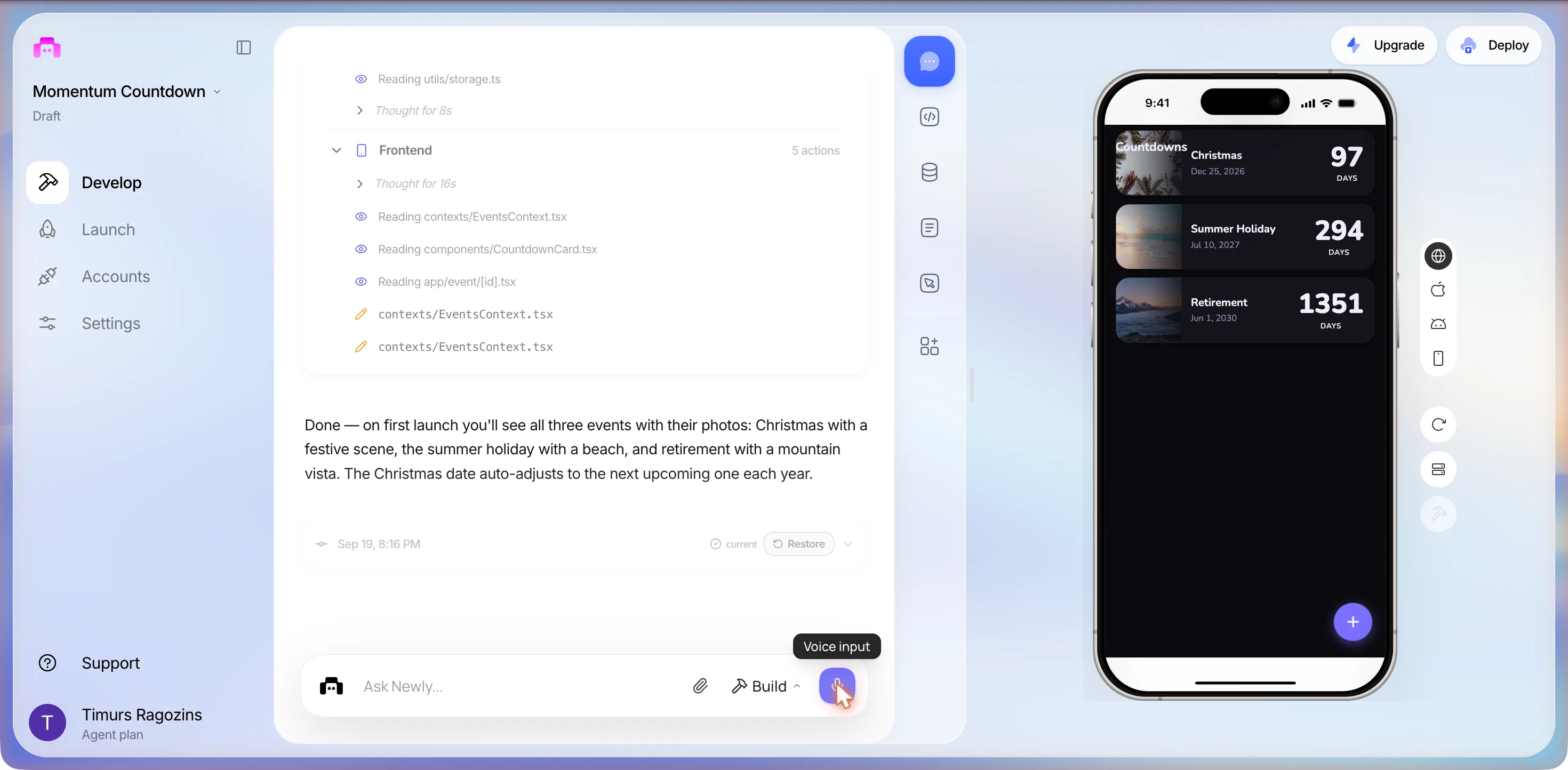
Prompt 3: a question it answered by building
Can it also show the countdown on my lock screen as a live activity?
What we asked
Whether it could. A yes or a no.
What it did
- Read its building-native-ui skill; searched its own docs twice
- Read targets/widget, index.swift, Info.plist, app.json, WidgetContext.tsx
- 14 frontend actions; rewrote index.swift and Info.plist
- New local Expo module: modules/live-activity/index.ts, expo-module.config.json, ios/LiveActivityModule.swift
- No clarifying question, no answer to the question as asked
If you want a yes or no, do not send it as a Build prompt. Its closing text described a lock screen banner with the event name, date and days remaining on the same gradient as the widget, a Dynamic Island compact view with a calendar icon and the days count, an expanded view with the full name, and an auto-managed activity that starts when you open the app, updates when you add or edit events, and ends when there are no more upcoming events. Then the caveat, in its words:
"Because this uses a native Swift module, it requires a custom build (not Expo Go)" and "you'll need to trigger an iOS build from the Deploy panel to see it on a real device."
The preview went to Reloading... with the mascot and Rebuilding preview…, and came back at 20:22 with the three events and no error. We did not open LiveActivityModule.swift, and nobody has seen this activity on a phone: the widget is an iOS-only WidgetKit target, the web preview does not run it, Expo Go cannot load a custom native target, and no iOS build was started. What ActivityKit needs from an app to keep one alive is the subject of the iOS Live Activities guide; this page stops at what was written.
What the session cost
Three Build prompts, one of which we meant as a question. The credits page read 0 of 100 used at 19:56, before the first prompt, and we did not go back to it afterwards, so the honest number is three prompts rather than a credit count. The Deploy panel’s Fix with AI button is labelled Uses 1 prompt; we did not press it, and the two blockers it would have spent that prompt on are listed below.
The check
Did it build a real widget, or a view that looks like one?
This is the question the page was built to answer, so here is the answer with file names. We opened the code view (the </> icon in the right-hand rail; the editor is CodeMirror, and the first open runs a 12-step File Explorer tour we skipped) and copied five files out of it: app.json, targets/widget/index.swift, targets/widget/Info.plist, contexts/WidgetContext.tsx and package.json. Below is what the widget needs against what the project holds.
| Piece | In the project | Status |
|---|---|---|
| Widget code | targets/widget/index.swift, 213 lines: import WidgetKit; @main struct MomentumWidget: Widget; StaticConfiguration(kind: kind, provider: MomentumProvider()); .supportedFamilies([.systemSmall, .systemMedium]); a TimelineProvider that refreshes at midnight and reads UserDefaults(suiteName: "group.com.placeholder.app"), key next_event, as JSON with name, daysLeft and date. | Written |
| Extension manifest | targets/widget/Info.plist, with NSExtensionPointIdentifier set to com.apple.widgetkit-extension. | Written |
| App side | contexts/WidgetContext.tsx, 72 lines. Lazy-requires @bacons/apple-targets, writes new ExtensionStorage("group.com.placeholder.app").set("next_event", payload), then ExtensionStorage.reloadWidget(). Returns early when Platform.OS is not ios. It was in the starter before the build began. | Written |
| Plugin | app.json lists @bacons/apple-targets among its plugins, after expo-font, expo-router, expo-web-browser and expo-secure-store. package.json pins "@bacons/apple-targets": "^3.0.2". | Written |
| Target config | No expo-target.config.js (or .json) anywhere in targets/widget/, which holds only the two files above. The plugin README: each sub-directory should have a expo-target.config.js file that defines the target settings. The explorer shows dotfiles such as .eslintignore, so it is not hidden. | Missing |
| App Group entitlement | No ios.entitlements com.apple.security.application-groups array in app.json. The README says targets that can use App Groups mirror that array from app.json if it is defined; Apple says the App Groups capability is added to the target and the container id must begin with group. | Missing |
| Apple Team ID | No ios.appleTeamId in app.json. The README: if you already know your Apple Team ID, then set it under the ios.appleTeamId property in your app.json. | Missing |
| Lock screen family | supportedFamilies lists systemSmall and systemMedium only. None of Apple's accessory families, accessoryCircular, accessoryRectangular or accessoryInline, is present, so this target puts nothing on the lock screen. The prompt asked for the home screen, so this is by design. | Missing |
| Live Activity | No ActivityKit import, no accessory family and no Live Activity anywhere in index.swift after prompt 1. Prompt 3 added modules/live-activity with ios/LiveActivityModule.swift, which we did not open. | Not read |
So: Newly wrote the widget and not the wiring. The Swift is the hard part and it is there, 213 lines of it, with the timeline provider and the App Group read a hand-written widget would have. The three pieces of configuration that make the plugin generate the target when the app is built are not, and by the plugin’s own README a targets folder without expo-target.config.js is not a target. Nothing in the Deploy checklist looks for them either: it passed iOS Bundle Identifier with com.placeholder.app still in app.json and never mentions the target or the App Group. Until they are added, an iOS build from this project would, as far as the README goes, ship the app without its widget, and the first place you would find out is a phone you have already paid Apple to put it on.
The sizes it chose are also worth knowing before you ask for more. supportedFamilies lists systemSmall and systemMedium, the two home screen sizes; the accessory families that put a widget on the lock screen are not in the list. That is not a fault, the prompt said home screen, but it is why the lock screen took a third prompt and a different mechanism. The iOS widgets guide covers what each family is and how often the system actually refreshes one, which a timeline that reloads at midnight also depends on.
Launch
85 percent ready, and the widget is not on the list
Launch in the left nav opens the Deploy panel: Where do you want to deploy? with iOS Simulator, TestFlight and App Store, and Android Simulator, APK, AAB and Play Store. App Store was pre-selected. The readiness ring read 85%, 2 issues blocking App Store, 2 blocking · 2 recommended · 9 passed, with a Fix with AI button labelled Uses 1 prompt. The two blockers: Missing Permission: NSPhotoLibraryUsageDescription, because expo-image-picker requires it and it is not declared in expo.ios.infoPlist, with the warning that the app will crash or be rejected; and Apple Credentials, Connect your Apple Developer account for iOS builds and submissions. The recommended pair was Missing Layout File, twice. The nine that passed: App Icon, App Name, App Slug, iOS Bundle Identifier, Splash Screen, App Version, URL Scheme, Encryption Compliance, App Icon Transparency.
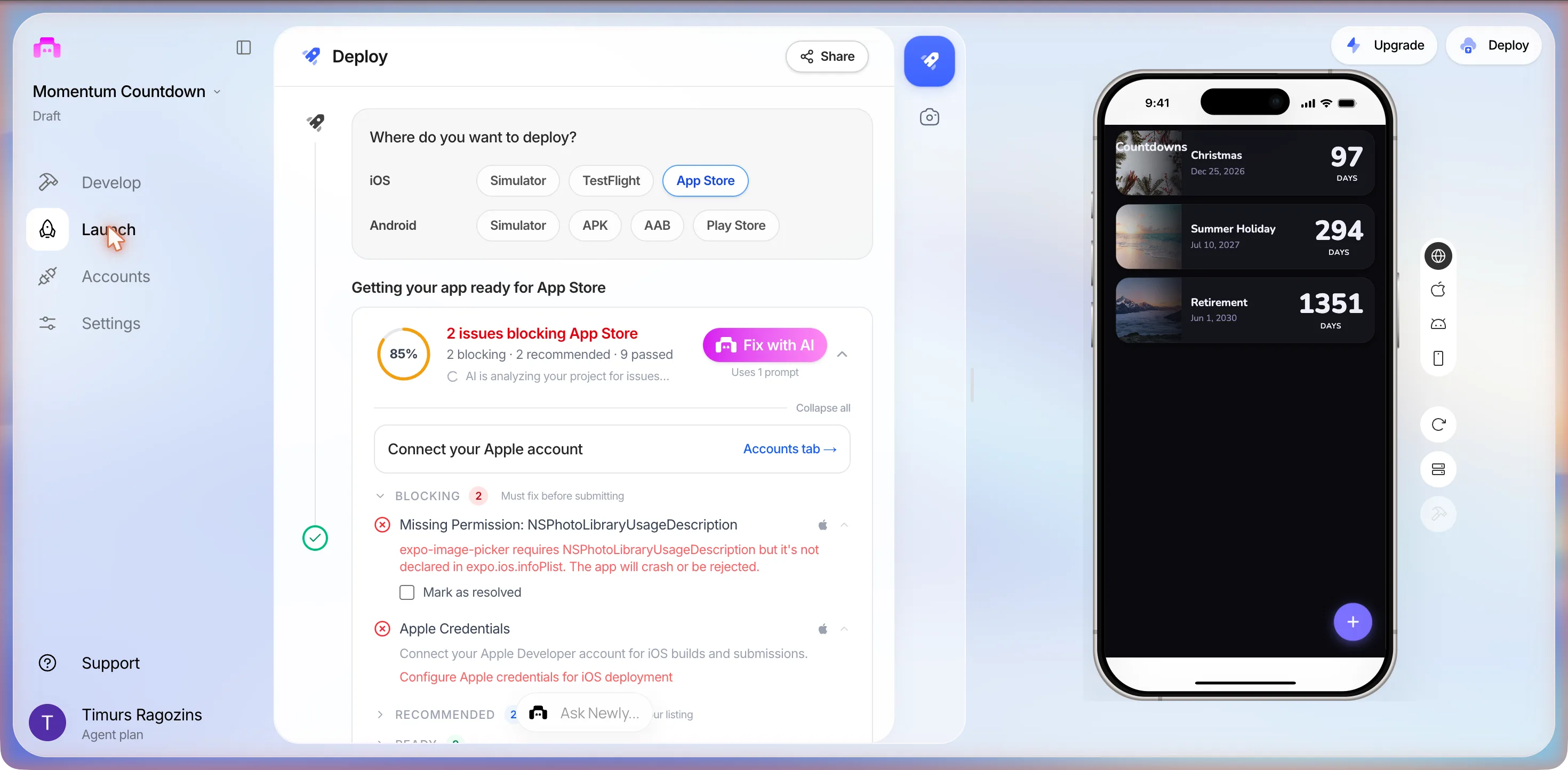
Switch to APK and the ring goes to 92%, 1 issue blocking APK build: Missing Permission: READ_MEDIA_IMAGES, the Android half of the same photo picker. So a countdown app for Android from this project is one permission away from a build, and it is the same four screens with no widget at all: nothing in the files the session wrote touches an Android widget, and the app-side code returns early on anything that is not iOS.
For a countdown app on iPhone the route is the one in the submission guide, and the guide is right about the order. Apple Developer Program at $99 a year, with enrollment taking anywhere from a few hours to a couple of days. Connect the Apple account once in the Deploy modal. Confirm the bundle identifier before building, because changing it later is a two-step process, and this project still says com.placeholder.app. Build, 5 to 15 minutes, submitted to App Store Connect automatically. Then TestFlight on a real iPhone, which for this app is not the optional step the guide calls it: it is the first time the widget can exist anywhere. Review typically takes 1 to 3 days. On Android, $25 once, an AAB, a signing key you must keep, and for personal accounts registered after November 2023 a closed test with at least 12 testers for 14 consecutive days before production.
The catches
Three things nobody mentions until you hit them
The placeholder bundle id is now inside the widget
com.placeholder.app is not just a field to change later. The App Group name is derived from it, and group.com.placeholder.app is now a string in index.swift and a string in WidgetContext.tsx, with the entitlement that would make it real still unwritten. The Deploy checklist passes the bundle identifier anyway. Rename it before the first build, then search the project for the old string, because the submission guide is clear that changing the bundle id after the fact is a two-step process, and the App Group does not rename itself.
“Each with a photo” was met with hotlinks
The three seeded photos are URLs on images.unsplash.com with ?w=800&q=80 on the end, chosen by the model. They look right in the preview and they need a network connection to look like anything. The photo picker in the sheet, the thing the brief was actually about, was never exercised by the seed, and the Deploy panel warns that the app will crash or be rejected on either platform until NSPhotoLibraryUsageDescription and READ_MEDIA_IMAGES are declared. So the first real photo through this app will be the first test of its main feature.
You cannot check the widget without paying Apple
Every surface this page is about is invisible from where the build happens. The web preview shows the app and returns early before the widget code runs. Expo Go cannot load a custom native target. The Android APK never touches it. The Swift only exists inside a native iOS build, which needs Apple credentials, which need the $99 membership. That is fine if you were going to publish anyway. It is the whole cost if you only wanted to see whether the widget works, and it is the reason the code check above matters: it is the only check available before the money.
Checklist
Before you build for TestFlight
Seven checks. The first three are the widget; the rest are the app the Deploy panel already knows about.
- Add targets/widget/expo-target.config.js with the widget type and the App Group entitlement. The plugin's README says every target folder needs one, and this folder has only index.swift and Info.plist.
- Declare the App Group in app.json under ios.entitlements, and set ios.appleTeamId. Without the first, the suite the Swift reads exists nowhere.
- Replace com.placeholder.app before the first store build, then search the project for group.com.placeholder.app: it is in index.swift and WidgetContext.tsx. The submission guide calls a later bundle id change a two-step process.
- Add NSPhotoLibraryUsageDescription for iOS and READ_MEDIA_IMAGES for Android. The Deploy panel lists both as blocking and says the app will crash or be rejected without them.
- Replace the three Unsplash hotlinks in getSeedEvents() with photos chosen through the sheet, or accept that the seeded cards need a network connection to show a picture.
- Fix the list header. After the seed, the word Countdowns is printed across the first card's photo. One prompt, but do it before the store screenshots.
- Install the first build through TestFlight and look at the home screen, not just the app. It is the first place the widget can exist, and the only way to learn whether the target was built at all.
FAQ
The questions that come up every time
Yes, and the widget is the part to check. In the session behind this page one 163-character prompt produced the events list, a detail screen, the Add and Edit sheets and a Swift WidgetKit target (targets/widget/index.swift, 213 lines, small and medium sizes) in about seven minutes, with no clarifying question. What it did not write was the target's expo-target.config.js, the App Group entitlement in app.json or an Apple Team ID, and without those the plugin that turns the Swift into a real extension would not build it. You also cannot see a widget in the browser preview, in Expo Go or in an Android APK; the first place it can exist is an iOS build installed through TestFlight.
Sources
- docs.newly.app, App Store Submission, Step by Step
The $99 a year Apple membership, the 5 to 15 minute store build, TestFlight, the 1 to 3 day review, the $25 Google fee and the 12-tester closed test. Read 20 September 2026.
- expo-apple-targets README (EvanBacon on GitHub)
The expo-target.config.js requirement, the App Group entitlement mirroring, ios.appleTeamId and ExtensionStorage.reloadWidget(). Read 19 and 20 September 2026.
- Apple Developer Documentation, WidgetFamily
The system families the generated widget supports and the accessory families it does not. Read 20 September 2026.
- Apple Developer Documentation, Configuring app groups
Why the App Groups capability has to be added to the target, why the container id starts with group. and how init(suiteName:) reads it. Read 20 September 2026.
Everything else on this page comes from the session itself: the project files as read in the code view on 19 September 2026, the Deploy panel as it read that evening, and the screenshots above. Apple and Google prices are the ones the submission guide states and can change.
Seven minutes is the app. The widget is the afternoon.
Copy the first prompt, change the three events, and you will have the list in less time than it took to read this. Then open the code view and look for expo-target.config.js before you pay Apple anything. If you want to see what other builds of this kind came back with, the examples are the place to look.