

An employee management app, prompt by prompt

Founder, Newly
An employee management app is smaller than the phrase suggests. Five screens. Two roles. One place where those roles touch the same record, which is where every build of this kind gets difficult. This is the whole thing written down, the screen flow, the prompt behind each screen, what each one writes to the database, and the parts that cost more than one attempt. It is the same shape as most internal business apps, so the method travels even if your app is not about staff.
Key Takeaways
- One prompt, five screens. Roster, employee detail, shift assignment, time-off request and approval came from a single 268-character brief.
- The clarifying question decides what you get. Newly asked Supabase or mock data first; answering “mock data” is why the app arrived with eight invented employees.
- It guessed a coffee shop. From “a small team” it invented baristas and 06:00 shifts; the correction crashed the preview for a moment, then worked.
- Below about fifteen people, buy Deputy. Per-seat pricing only becomes an argument for building somewhere above that, and building costs your time.
The brief
Someone keeps the schedule in a spreadsheet and takes time-off requests by text message. That works right up until two people are off on the same Tuesday and nobody notices until 7am. They do not need an HR system. They need the spreadsheet to stop being a spreadsheet. The build below is an eight-person office team, because that is the one I actually ran; the cost comparison further down uses 40 staff, because that is roughly where paying per seat starts to hurt.
So the app has to do four things: show who is on today, hold the details for each person, let her assign a week of shifts, and take a time-off request through to a decision that changes the schedule. Everything else, payroll, onboarding, documents, benefits, is out of scope on purpose. A custom employee management app is only worth building when it is smaller than the product you would otherwise buy, not bigger.
Read this part before you build anything. If your team runs ordinary shifts and ordinary time off, buy Deputy or When I Work and close this tab. They are cheap, they are finished, and they have done the labour-compliance work you have not. The costs are further down and they are not flattering to building your own in year one. Build when the process is the thing that does not fit.
The map
Draw the lanes before you draw the screens
Every feature list for this kind of app is a flat set of bullets. The build is not flat. Four screens belong to one manager and never leave her phone; one screen belongs to everybody else. Where those two sides meet is a single arrow, and that arrow is the reason this app is harder than a to-do list.
Roster
Writes
employeejob_titlestatusphoto_initialsHarder than it looks
Status is not a column you type into. It is derived from whether a shift is running right now and whether an approved leave request covers today, so it has to be computed on read or it goes stale the moment someone clocks off.
How it got built
Every screen on this map came out of a single prompt. No screen here was asked for individually.
Read that prompt and what it got wrong ↓The session
Two prompts, one wrong guess, two crashes
What follows is one session on 10 September 2026, in the order it happened. The prompts are what I typed, not a tidied version. The app you see is what came back.
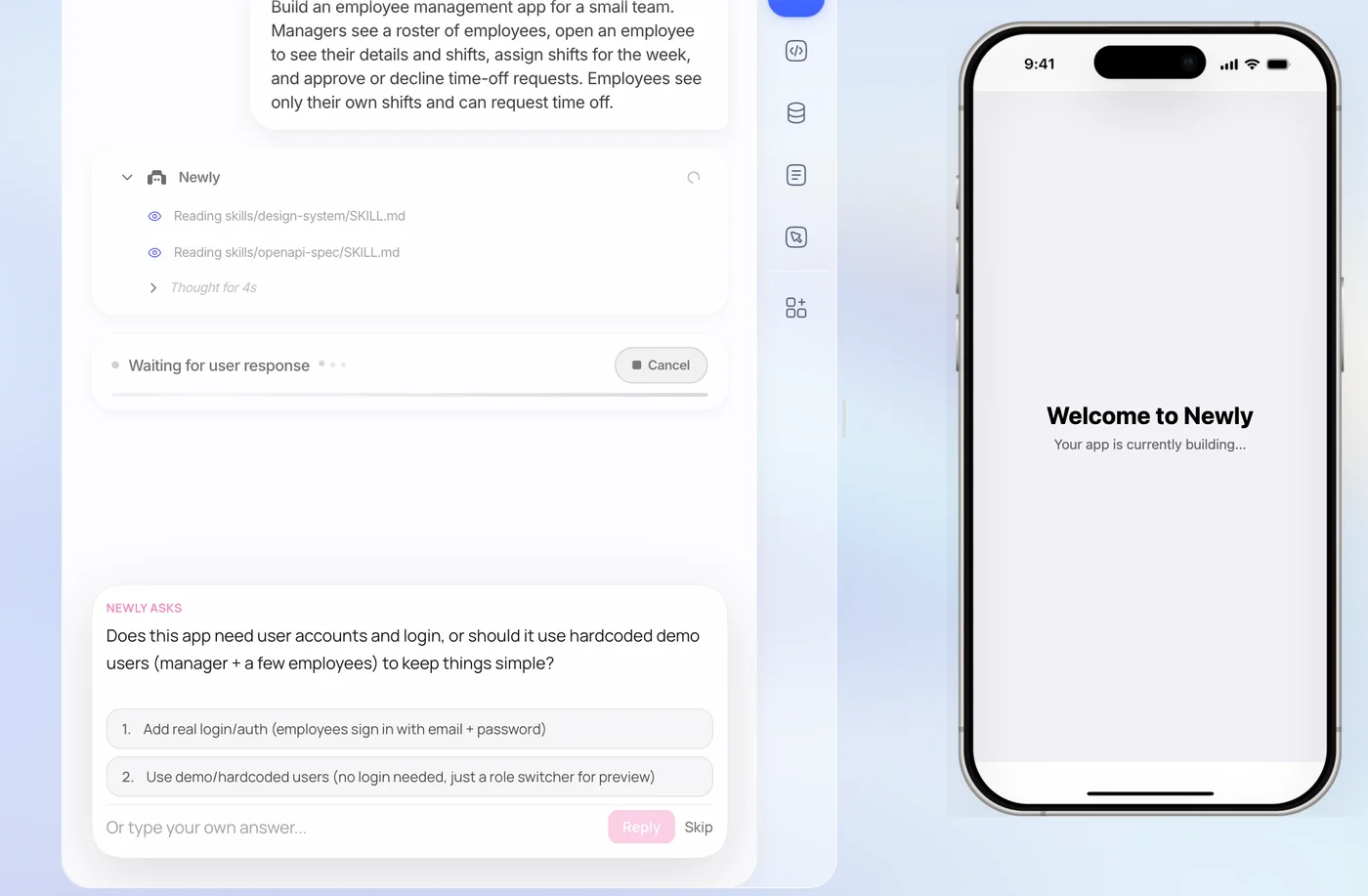
Build an employee management app for a small team. Managers see a roster of employees, open an employee to see their details and shifts, assign shifts for the week, and approve or decline time-off requests. Employees see only their own shifts and can request time off.
It did not start building. It read two of its own instruction files, an OpenAPI spec and a design system, thought for eleven seconds, then eighteen, and asked me something:
Newly asks
This app needs user accounts so managers and employees can log in with different roles. Would you like to connect Supabase for the database and auth, or should I build it as a local/demo app first (with mock data, no real login)?
- 1. Connect Supabase (real login, persistent data)
- 2. Build with mock data first (no login required)
This is the most useful thing that happened all session and it is not in any documentation. A tool that guesses here costs you an afternoon. I took option two, because I wanted to see screens before I wired up an auth provider, and because the answer to “do I need real logins” on an internal rota app is usually no for longer than people expect.
Then it fell over
The composer changed to Connection lost, reconnecting… and a toast appeared in the corner saying it was trying to restore the connection. The progress list stopped on Planning tasks. The phone preview never got past Loading preview…. That lasted about three minutes, which is long enough to assume you have wasted a credit.
Reloading the page fixed it. The build had carried on server-side the whole time and was finished by the time the page came back. It happened again later in the session, and that one cleared text I had typed but not sent. So: if it stalls, reload rather than re-prompt, and do not leave a long prompt sitting unsent in the box.
What one prompt actually produced
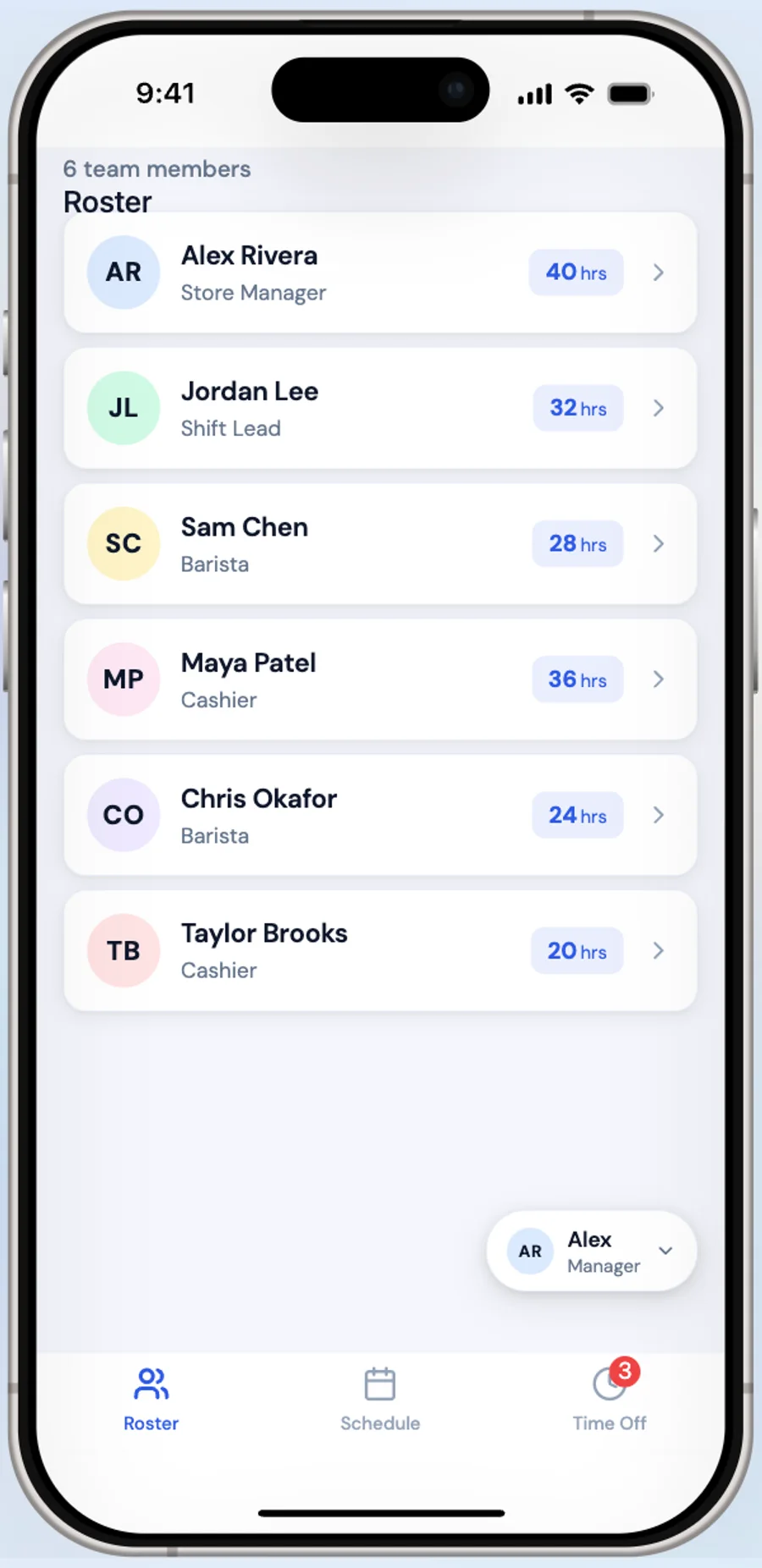
A working roster of eight people, each with initials, a job title and their hours, a search field, a Day Off badge, and a Roster / Schedule / Time Off tab bar. In the header, a Manager / Employee toggle that switches the whole app between the two views. The frontend took 47 actions and one stretch of 118 seconds of thinking. It named the project ShiftSync without being asked.
And the part I did not ask for
I wrote “a small team.” It built a coffee shop. Marcus Johnson, Barista, 14:00-22:00. Tom Rivera, Shift Lead, day off. Mei Lin, Cashier. Shifts running 06:00 to 22:00 across the day, because that is what a café rota looks like.
Nothing about that is wrong, exactly. It filled a gap I left, and it filled it plausibly. But it is the thing to expect from a short brief: the model will invent the parts you did not specify, and it will invent them confidently. Naming your industry in the first prompt costs four words and saves a round trip.
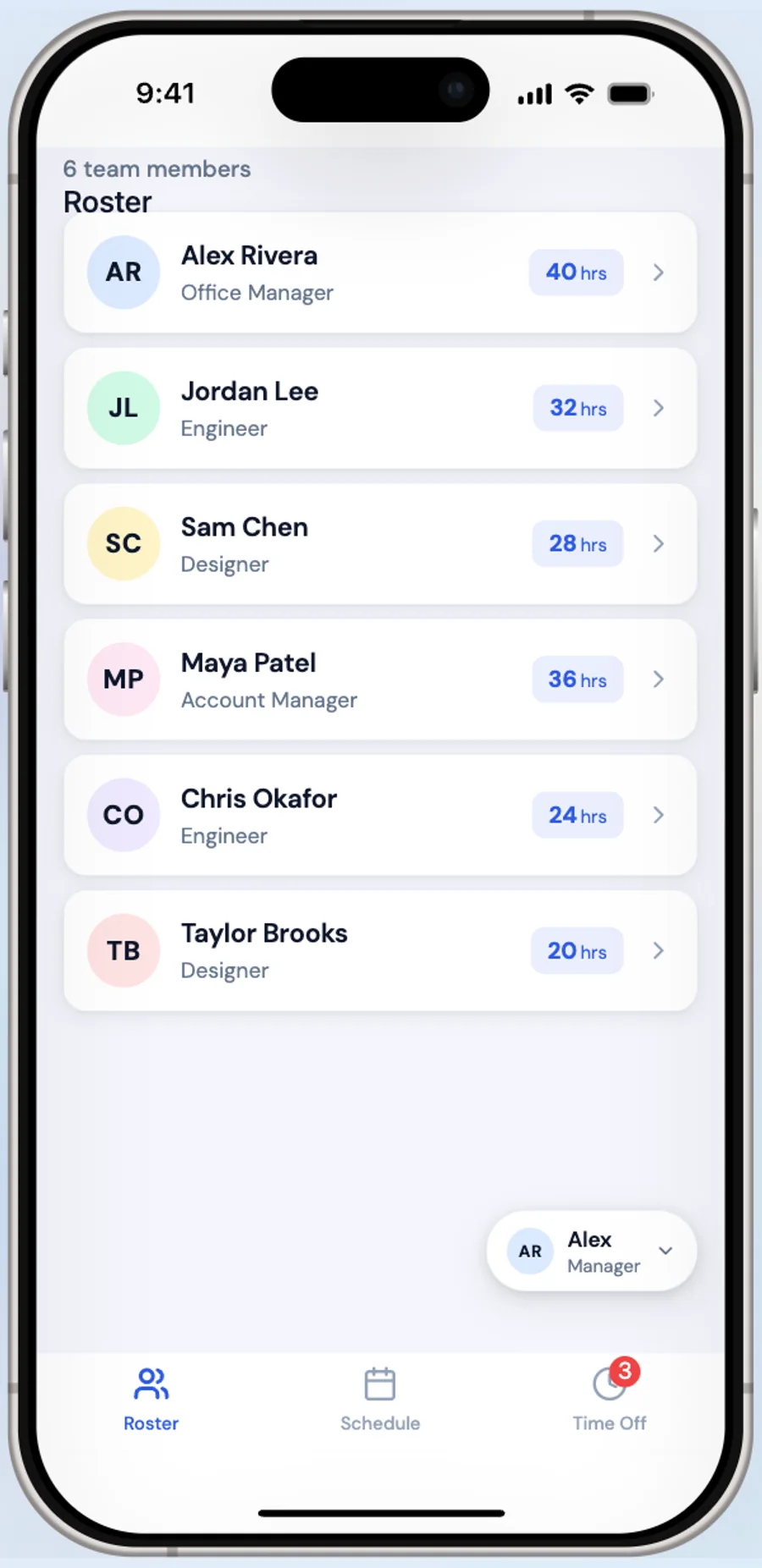
This is an office team, not a coffee shop. Change the roles to Designer, Engineer, Account Manager and Office Manager, and make the shifts normal working hours.
While that edit was landing, the preview went red:
Cannot read properties of undefined (reading 'start_time')
Full source view and call stack, on the phone, where the app had been a second earlier. It cleared itself once the edit finished, the preview hot-reloads while files are still being written, so it was briefly rendering new data against old code. The error toast stayed in the corner afterwards, which made it look worse than it was.
Then it was right: Sarah Chen, Office Manager, 09:00-17:00. Marcus Johnson, Senior Engineer. Priya Patel, Designer. Aisha Williams, Engineer, 13:00-17:00, it kept one part-time pattern from the original rota, which I had not asked it to keep and would have missed if I were skimming.
What the session cost
Two Build prompts. A credit each, whether the answer is the one you wanted or a coffee shop. The two crashes cost nothing but nerve. Plan and Ask prompts are a tenth of a credit, so the cheapest habit is to argue about the shape of a screen in Plan mode and spend Build prompts on decisions already made.
The maths
What this costs against what you would otherwise buy
Per-seat pricing is the argument for building, and it only becomes one somewhere north of about fifteen people. Below that, the incumbents are cheap enough that your time is the expensive part. Prices below were read off each vendor’s own pricing page on 10 September 2026.
| Deputy Core | When I Work Pro | BambooHR Core | Build it yourself | |
|---|---|---|---|---|
| What it is | Shift scheduling and time clock | Shift scheduling and time clock | HR system of record | Whatever the five screens are |
| List price | $6.50 per user / month (Core) | $5 per user / month (Pro) | $10 per employee / month (Core) | $25 / month, 50 credits |
| Minimum | $30 per month per invoice | None stated | $250 / month flat under 25 employees | None, price does not move with headcount |
| At 40 staff | $260 / month | $200 / month | $400 / month | $25 / month plus your build time |
| Changing a workflow | Configure what is configurable | Configure what is configurable | Configure, or buy the tier above | One prompt, any weekday |
| Payroll export | Built in, integrations included | Built in, integrations included | Built in, plus benefits and onboarding | You build it or you export CSV |
| Someone to call | Yes, vendor support | Yes, vendor support | Yes, vendor support | You |
Read the bottom three rows before the price rows. Deputy and When I Work hand you a payroll export, a support line and a decade of labour-compliance work for the price of a few coffees per employee. You are trading that away. The trade is worth it when the process is unusual enough that no configuration screen reaches it, and it is a bad trade the week your pay run is wrong and the person to call is you.
The catches
Three things nobody mentions until you hit them
You cannot try this for nothing
The limitation to know before you start, stated plainly: Newly has no free plan. Not a limited one, none. Send a prompt without a subscription and it refuses outright with “You need prompts to create a project,” which is a blunt first impression for anyone who just wanted to see whether the thing works. It begins at $25 a month for 50 credits, one credit per Build prompt. Fifty is comfortably more than this build needs. It is not comfortably more than this build plus a fortnight of second thoughts, so do the arguing in Plan mode at a tenth of a credit and spend Build prompts on decisions you have already made. If you do run dry, top-up credits are sold separately in blocks and stay valid for twelve months from purchase.
Distribution has its own costs and neither builder can waive them: $99 a year for the Apple Developer Program, $25 once for Google Play. For an internal app there is a shortcut on one platform only, Launch → Deploy produces a signed APK, about six minutes on the build behind this page, that installs straight onto any Android phone, so a team on Android can have the app without a store listing at all. On iOS there is no equivalent side door.
Deleting a shift is a records decision
The US Department of Labor requires employers to preserve payroll records for at least three years, and the records the wage computations were based on, time cards, wage rate tables, work and time schedules, for two. A shift row in your app is one of those. So the obvious delete button is the wrong default: mark the row removed and keep it. This is one of the few places where the boring answer is also the legally safer one, and it costs you a single clause in a prompt if you decide it early.
Where the data lives is a decision, not a default
An app like this comes with a database attached, Liquid Backend, included in the subscription, and it is easy to never think about it again. Think about it once, now. Newly supports moving to Supabase instead, and its own documentation is blunt about the price: switching means permanently deleting your Liquid Backend database. That is a cheap decision in week one and an expensive one after three months of rota. This article stops at the app; the argument about choosing where the employee data lives is a different one, and it belongs to your first afternoon rather than your first audit.
Checklist
Before you hand it to the team
Six checks, and the first one catches more problems than the other five together.
- Sign in as a member of staff, not as yourself, and try to open the pay rate. If you can see it, the rule is in the interface and not in the database.
- Set the timezone on shift records explicitly. A shift stored without one is correct until your first employee travels or your first clock change.
- Soft-delete shifts and requests. Under the FLSA these are wage computation records, and a delete button that really deletes is the wrong default.
- Install it on a real phone through Expo Go before anyone else sees it. The web preview gets layout right and lies about scroll and keyboard behaviour.
- Decide who can lock out the last manager, then make it impossible. Someone will demote themselves at 6pm on a Friday.
- Save the Android signing key and its credentials file somewhere that is not the laptop you built on. Without both, you cannot ship an update.
FAQ
The questions that come up every time
Describe one screen at a time instead of the whole app at once. An employee management app is five screens, a roster, an employee detail view, a shift assignment week view, a time-off request form, and an approvals inbox, and each one is a single prompt in an AI app builder like Newly. Start with a brief that names the two roles and what each can see, then add the screens in the order a manager would use them. Newly has three chat modes: Build sends a full prompt and costs one credit, while Plan and Ask cost a tenth of a credit each, so it is cheap to talk through a screen before you spend a build on it.
Sources
- US Department of Labor, Fact Sheet #21: Recordkeeping under the FLSA
The three-year and two-year retention rules quoted above.
- Deputy pricing
Lite, Core and Pro per-user prices and the $30 monthly minimum. Checked 10 September 2026.
- When I Work pricing
Essentials, Pro and Premium per-user prices. Checked 10 September 2026.
- BambooHR pricing
Core, Pro and Elite per-employee prices and the flat rate under 25 employees. Checked 10 September 2026.
Retention rules here are US federal and are the floor, not the whole picture. Vendor prices move; each was read off the page linked above on the date given, and none of these vendors is affiliated with Newly.
Six prompts is one afternoon
The five screens on the map are the whole app, and each one is a paragraph of plain English. Copy the prompts above, change the headcount and the roles to match your team, and start at the roster. If it turns out you needed Deputy after all, you will know by screen three, and you will have spent an afternoon finding out.