

A video chat app in one prompt, and nobody on the other end

Founder, Newly
A video chat app is two products wearing one icon. The half you can see is ordinary screens: a contacts list, a call button, mute and camera flip, a history of calls. The half you cannot see is what gets your face onto somebody else’s phone, and it belongs to a provider: signalling, STUN and TURN servers, a media server relaying streams, and a bill counted in participant-minutes. Which provider, and what it charges, is the real decision, and it is the decision a first prompt does not make for you. We found that out by asking Newly’s classic builder for exactly this app in 136 characters, just after 1am on 20 September 2026. The visible half came back in about six minutes and worked. The call connected to nobody. This is the session as it happened, and it sits with the other app examples built and recorded the same way.
Key Takeaways
- One 136-character prompt built the visible half in about six minutes. A contacts list with Online and Offline states, a call screen with four controls and a Recents tab, with the first contacts list in the preview three minutes after send.
- It installed a camera, not a call. The only packages it added were expo-camera and async-storage; its own plan card said Build video chat app UI, and no WebRTC library or provider SDK appeared anywhere in the 51 frontend actions.
- The call was a timer over initials. Tapping Sofia Reyes started a counter at 0:01 with nobody on the other end; we hung up at 0:21 and the call landed in Recents above nine invented ones.
- Pushed, it named three SDKs, picked Daily, then stopped for a backend. Prompt 2 changed no files. At Daily’s list rate a 10-minute 1:1 call is $0.08, and free until 10,000 participant-minutes a month are used up.
The brief
The reader for this page is not the one typing good app for video chat or video chat best app into a search box. FaceTime, WhatsApp and Google Meet have that covered, and if the job is calling your mother, the best app is whichever one she already has installed. This page is for the other reader, the one whose own product needs a call inside it: a tutor whose lessons happen on video, a clinic doing follow-ups, a marketplace where the expert’s time is the thing being sold. For that reader an off-the-shelf app is the wrong shape. The call has to sit next to their contacts, their bookings and their history, and the way it gets there is a provider’s SDK inside an app they control. That is what video calling app development actually is: the SDK does the call, you build everything around it.
So the brief was the smallest app that has the shape: a contacts list, tap a person to start a video call, mute and flip the camera during it, and a history of calls. Mock contacts were fine. What we wanted to see was not the list. It was which provider the builder would reach for without being told, because that choice sets the per-minute bill for the life of the app, and whether the preview would show a call at all.
Read this part before you build anything. Realtime video is a provider decision wearing an app. The screens you will ask for are the easy half, and any builder will produce them. The hard half, two phones on two networks finding each other and exchanging video, is something WebRTC deliberately leaves to you; the specification does not even name a transport for signalling. A provider hosts that half and charges per participant-minute. Decide the provider before the first prompt, and write it in.
The map
Where the call actually lives
Every feature list for a video chat app is a flat set of bullets: contacts, call, mute, flip, history. None of them is the call. The call is the box in the middle of this diagram, and the bill is the arrows: one stream up from every phone, one stream down for every other person in the room, every minute of it counted per participant. Switch the room size and the arithmetic changes in front of you.
Two phones, one stream up and one down each. The provider relays both and bills two participant-minutes for every minute the call lasts.
- Streams per phone
- 1 up, 1 down
- A 10-minute call bills
- 20 participant-min
- Daily, list rate
- $0.08
- Agora, HD video
- $0.08
Before any of that, the free allowance: 10,000 participant-minutes a month on Daily and on Agora is 5,000 minutes of this call, about 83 hours; LiveKit Cloud's Build plan includes 5,000, so 2,500 minutes, about 42 hours. The rates are each provider's own page on 20 September 2026, Daily at $0.004 per participant-minute and Agora at $3.99 per 1,000, rounded to the cent here.
Two consequences fall out of the picture. The first is that a four-person room is not twice as hard as a 1:1 call, it is the same provider work with a bigger bill, so build the pair and the room comes almost free. The second is that one phone talking to thousands of viewers is not this diagram at all; that is a live streaming app, a different topology with a different bill, and asking a builder for a video chat app when you mean broadcast is a wasted session.
The session
One prompt built it, the second one stopped
What follows is one session in the classic builder on 20 September 2026, 01:23 to 01:40, Plan mode off, in the order it happened. The prompt is what we typed, not a tidied version. The app is what came back.
Make a video chat app. A contacts list, tap someone to start a video call, mute and camera flip during the call, and a history of calls.
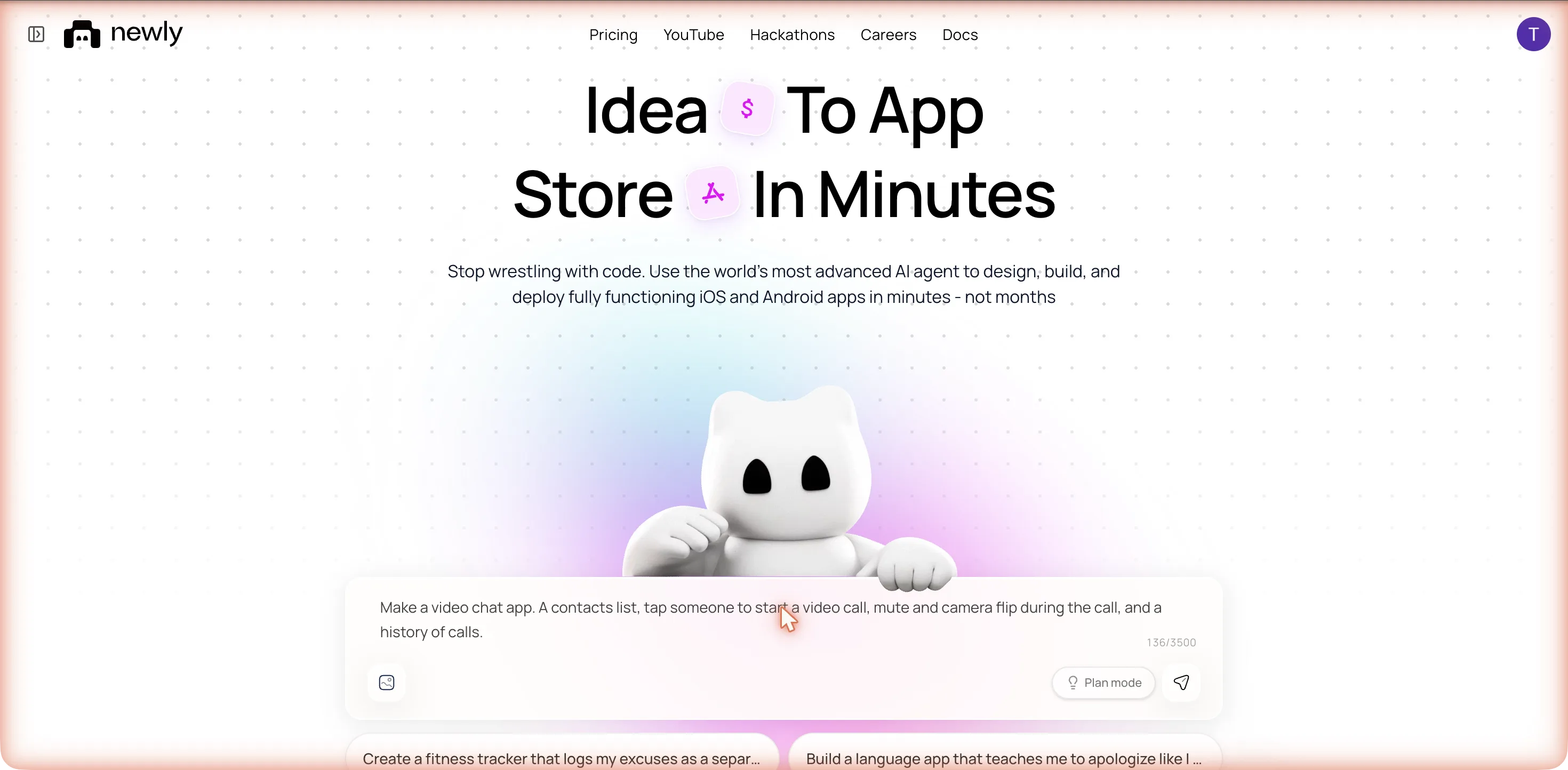
It named the project VioLink within 40 seconds and started reading its own instruction files: an OpenAPI skill, the tab layouts, a native UI skill. No question came back. A minute in, the plan card read one line: 1. Build video chat app UI, then a dash, then contacts, call screen, history. The word to notice is UI. Nothing in the plan mentioned WebRTC, a provider, or the second phone.
The provider decision, made in one row
At 01:27, after eleven seconds of thinking, the frontend agent posted Searching: async-storage|expo-camera and then Installing: @react-native-async-storage/async-storage, expo-camera. That row is the provider decision, and the decision was none. expo-camera is, in Expo’s own words, a React component that renders a preview for the device’s front or back camera. It shows you your own face. async-storage saves things on the phone. Neither package can put a second person on the screen, and no WebRTC library, no Daily, Agora, LiveKit, Twilio or Stream package appeared in the log at any point.
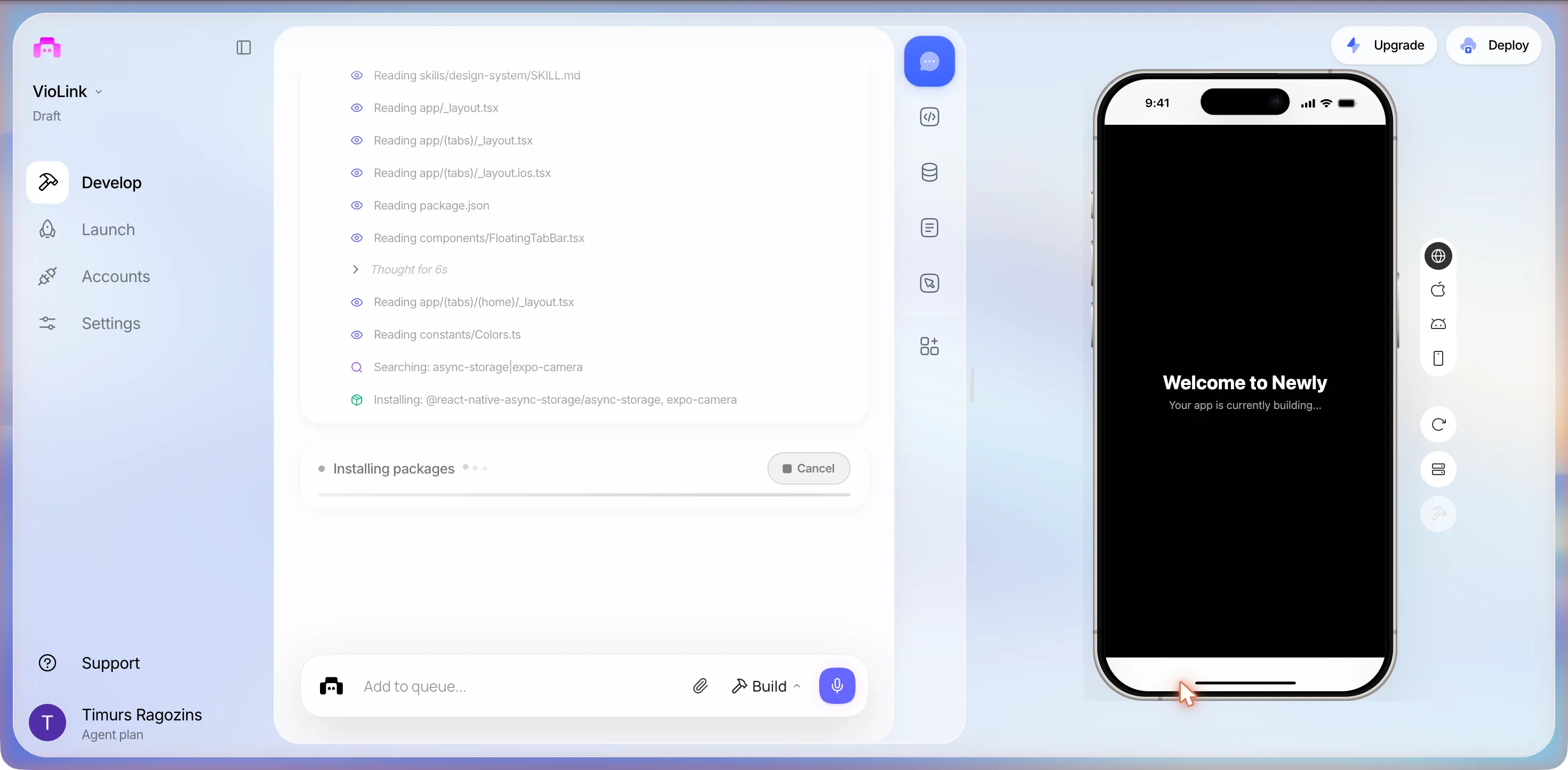
Then it wrote the app: utils/contacts.ts and utils/callHistory.ts, three tab folders for Contacts, Recents and Settings, and app/call/[id].tsx for the call itself. It read and deleted the template’s home tab to make room. It linted, typechecked, and spent a run of shell rows grepping node_modules for icon names and expo-router APIs, which is the kind of thing you only see if you watch the log. The preview had a dark contacts list before the build was half done, and the header title Contacts was drawn straight over the first row, Aria Chen, a layout slip it never fixed.
The build finished at 01:30, about six minutes after send: two agents, 8 actions and 51, with one stretch of 155 seconds of thinking on the frontend side. Its closing summary is worth quoting in full, because it is confident: VioLink is built. You’ve got a searchable contacts list with online/offline status, a full-screen call screen with a draggable local camera PiP, mute/speaker/flip/end-call controls, and a Recents tab that logs every call with direction and duration, then a dash, then all persisted locally. Read it again with two phrases underlined: local camera PiP, persisted locally. It is describing an app in which the only camera is yours and the only storage is your phone. It calls that a call screen, and nothing in the message says nobody is on the other end.
What one prompt produced
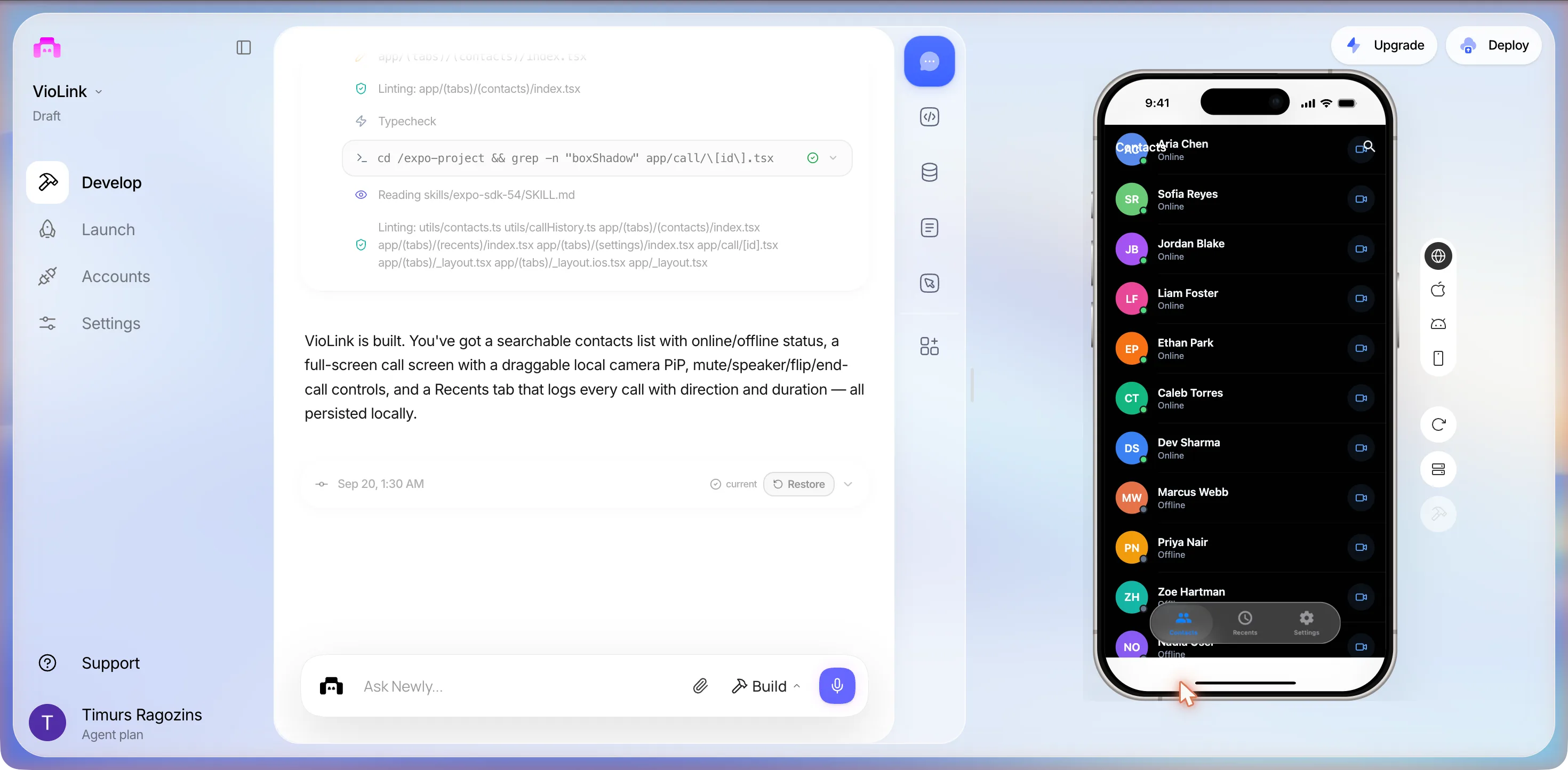
Names it invented: Aria Chen, Sofia Reyes, Jordan Blake, Liam Foster, Ethan Park, Caleb Torres, Dev Sharma, Marcus Webb, Priya Nair, Zoe Hartman and more below the fold, seven of them Online with a green dot, the rest Offline. A search icon. A Settings tab nobody asked for. This is the part any builder gets right, and it is the part that matters least: a contacts list is a contacts list.
The call
We tapped the camera button beside Sofia Reyes. A full-screen call opened at once: her name at the top, a timer already running from 0:01, a large green SR disc with a glow where a face would be, an X in the top left, and four round buttons along the bottom: microphone, a red hang-up, a camera-flip arrow and a speaker. No connecting state, no ringing, no answer. The timer simply started, because there was nothing to wait for.
The app did ask for a camera. The moment the call screen opened, Chrome raised its permission bubble over the chat column: Use available cameras (1), a live thumbnail from MacBook Air Camera, and Allow while visiting the site, Allow this time, Never allow. We never answered it, so the app never got the camera: no video, no local PiP, and the timer counted on regardless. The bubble stayed open on every later capture until the tab left the project, which is why three of the screenshots below were retaken at 02:00 without it; in those the header reads the renamed project, SEO-D-115-video-chat-app, rather than VioLink, and the chat beside the phone shows the end of the session rather than the middle. That is the honest state of a first build: a call screen that does not need a camera to run, because it is not sending anything anywhere.
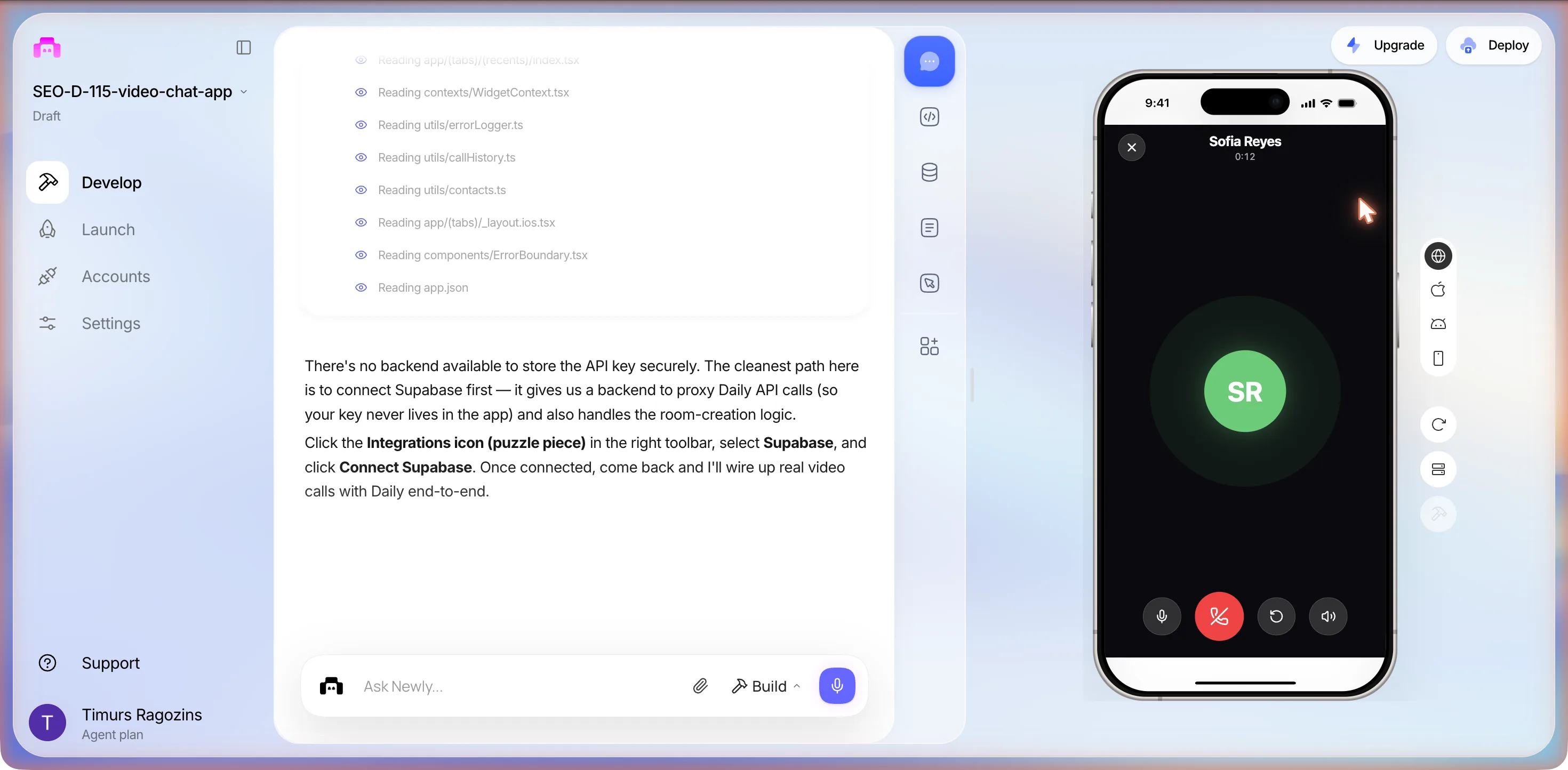
We tapped the microphone, which switched to a muted state, and hung up at 0:21. Back to Contacts.
Recents: one real row and nine invented ones
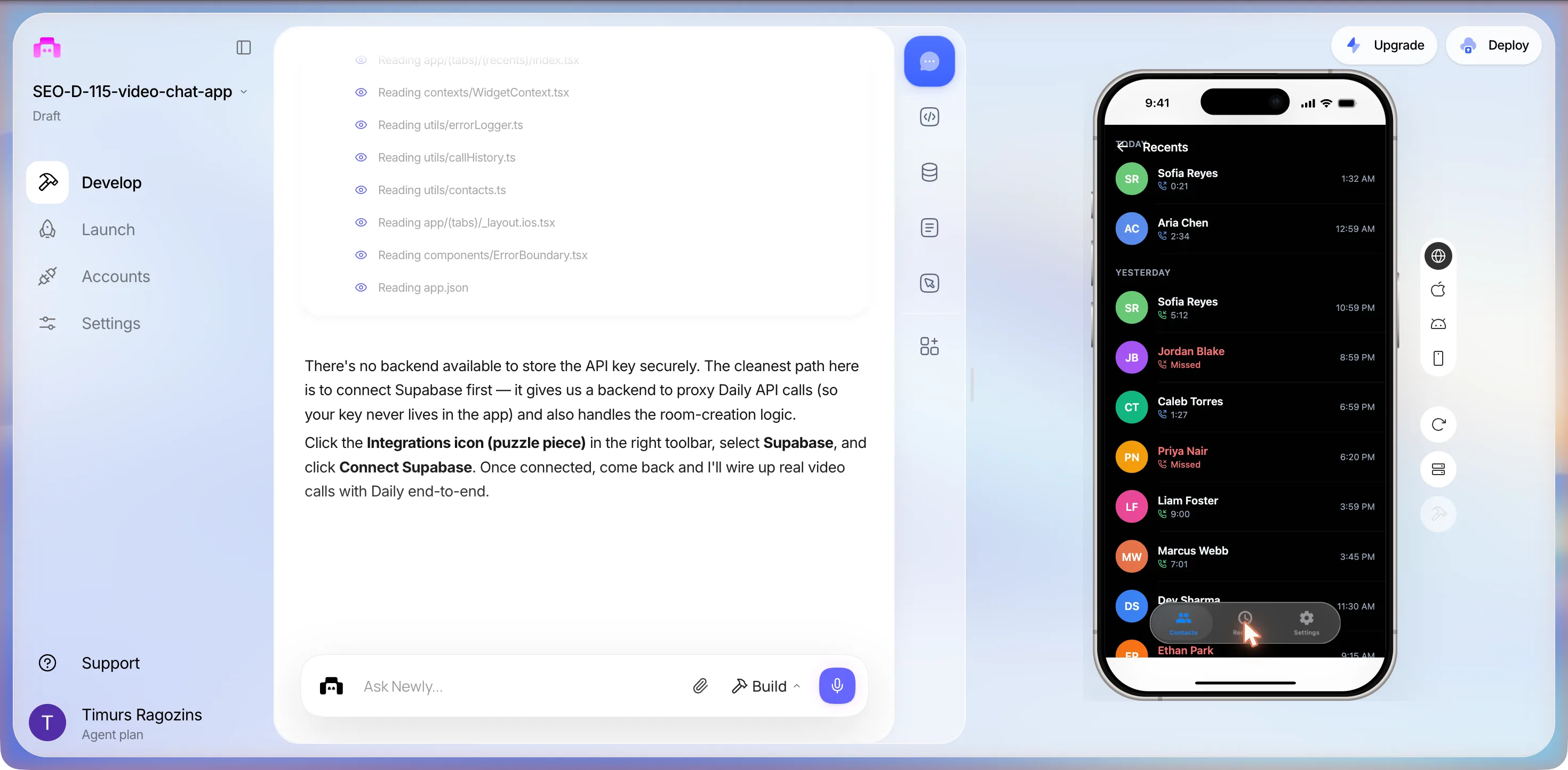
The history worked, in the sense the prompt meant: at 01:33 the call we had just ended was at the top, logged with its direction and its 21 seconds. It also arrived with a past. Aria Chen, 2:34, at 12:31 AM, before the project existed. Under YESTERDAY: Sofia Reyes 5:12, Jordan Blake Missed in red, Caleb Torres 1:27, Priya Nair Missed, Marcus Webb 7:01, Liam Foster 9:00, then Dev Sharma and Ethan Park. Plausible, tidy, and fiction. When we reopened the project at 02:00 to retake the shot, our 0:21 call was still there, so the history really is persisted, and the invented rows had moved: Aria Chen now at 12:59 AM, because the fake history is generated relative to the current time. A short brief gets its gaps filled confidently; if you do not want a fake history in the build you ship, say so in the prompt, because removing seed data later is a prompt of its own.
Prompt 2: does this actually connect?
I tapped Sofia and it just showed her initials with a timer, no video. Does this actually connect two phones? I need real video calls between two people.
It did not build. It went straight to a question card, status Waiting for user response, and the question is the most useful thing in the session, because it is the builder saying plainly what the first build was not.
NEWLY ASKS
Real video calls between two devices require a signaling server and WebRTC: that needs a backend. Do you have a Supabase project to connect, or would you like to set one up?
The Show me how drawer, unfolded
Real-time video calling between two phones requires:
- 1. A signaling server to exchange WebRTC offer/answer/ICE candidates between peers
- 2. A STUN/TURN server for NAT traversal
- 3. WebRTC peer connection on the client
Without a backend, only the local camera can be shown: there’s no way to connect two devices.
- 1. I have a Supabase project: I’ll connect it via the Integrations panel
- 2. I don’t have Supabase yet: tell me how to set one up
- 3. Skip the backend: just make the local camera preview look better for now
Under the options: a field reading Or type your own answer..., a Reply button, and Skip. The dashes in the original card are colons here; the words are the card’s.
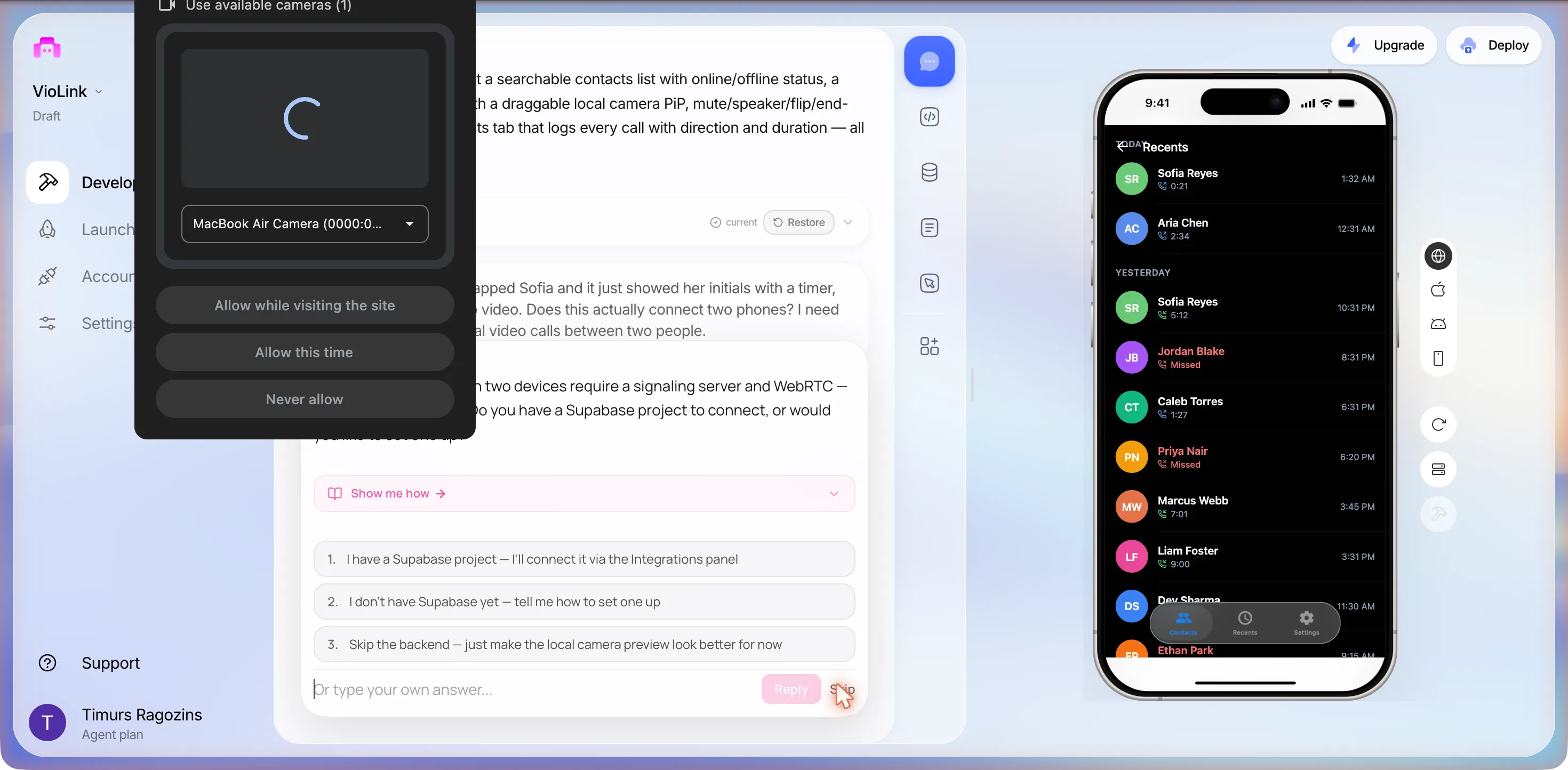
Note option three. The builder’s own fallback for a video chat app with no backend is to make the local camera preview look better, which is an admission, not a plan. We did not want a signalling server of our own, and we wanted to see which service it would reach for when pushed, so we typed an answer instead of picking one.
I do not want to run my own signalling server. Can you use a video service like Daily, Agora or LiveKit for the calls instead?
The second card
Which video SDK would you like to use? All three support real peer-to-peer video calls on iOS and Android.
- 1. Daily (daily.co): simple REST API, no server needed
- 2. Agora: very low latency, widely used
- 3. LiveKit: open source, self-hostable or cloud
Three options, presented as equals, one line of positioning each. Keep the Daily line in mind: no server needed.
Whichever is easiest for a beginner, you choose.
At 01:36 it chose Daily and stopped. Its closing text, in full: There’s no backend available to store the API key securely. The cleanest path here is to connect Supabase first, then a dash, then it gives us a backend to proxy Daily API calls (so your key never lives in the app) and also handles the room-creation logic. And: Click the Integrations icon (puzzle piece) in the right toolbar, select Supabase, and click Connect Supabase. Once connected, come back and I’ll wire up real video calls with Daily end-to-end.
So the option that said no server needed needed a server two minutes later. Both statements are true in their own sense: Daily runs the media servers, which is what you pay it for, and you still need somewhere that is not the app bundle to keep the API key and create rooms. Newly is right to refuse to bake a key into the app. It is also the end of the road for a session with no Supabase project and no Daily account, so we stopped here, with the provider answer on record: none unprompted, Daily when pushed, and nothing wired. The preview reloaded to the same contacts list.
What the session cost
Two Build prompts and two typed answers. The Usage tab on the pricing page read Credits Used 0 / 100 before the night’s builds and 0 / 100 after; the plan balance went from 1,198 credits to 1,191 across the five apps recorded that night, and nothing in the interface attributes credits to a prompt. Whatever this one cost, it was a handful of credits for a working contacts list and a straight answer about what it would take to make the call real.
The deploy panel, for the record
We opened Launch, then Deploy, with App Store selected. The panel scored the project before building anything: a ring at 85%, 2 issues blocking App Store, 2 blocking · 2 recommended · 9 passed, and a Fix with AI button marked Uses 1 prompt. The first blocker is the one this app earned: Missing Permission: NSCameraUsageDescription, explained as expo-camera requires NSCameraUsageDescription but it’s not declared in expo.ios.infoPlist. The app will crash or be rejected. Apple’s documentation says the same in one line: the key is required if your app uses APIs that access the device’s camera. The second blocker was Apple Credentials, the developer account that has to be connected before an iOS build, which the panel points at the Accounts tab. Two things it did not flag: no microphone permission, although the call screen has a mute button, and nothing to say that a video chat app with no provider has no call to ship yet. We pressed nothing.
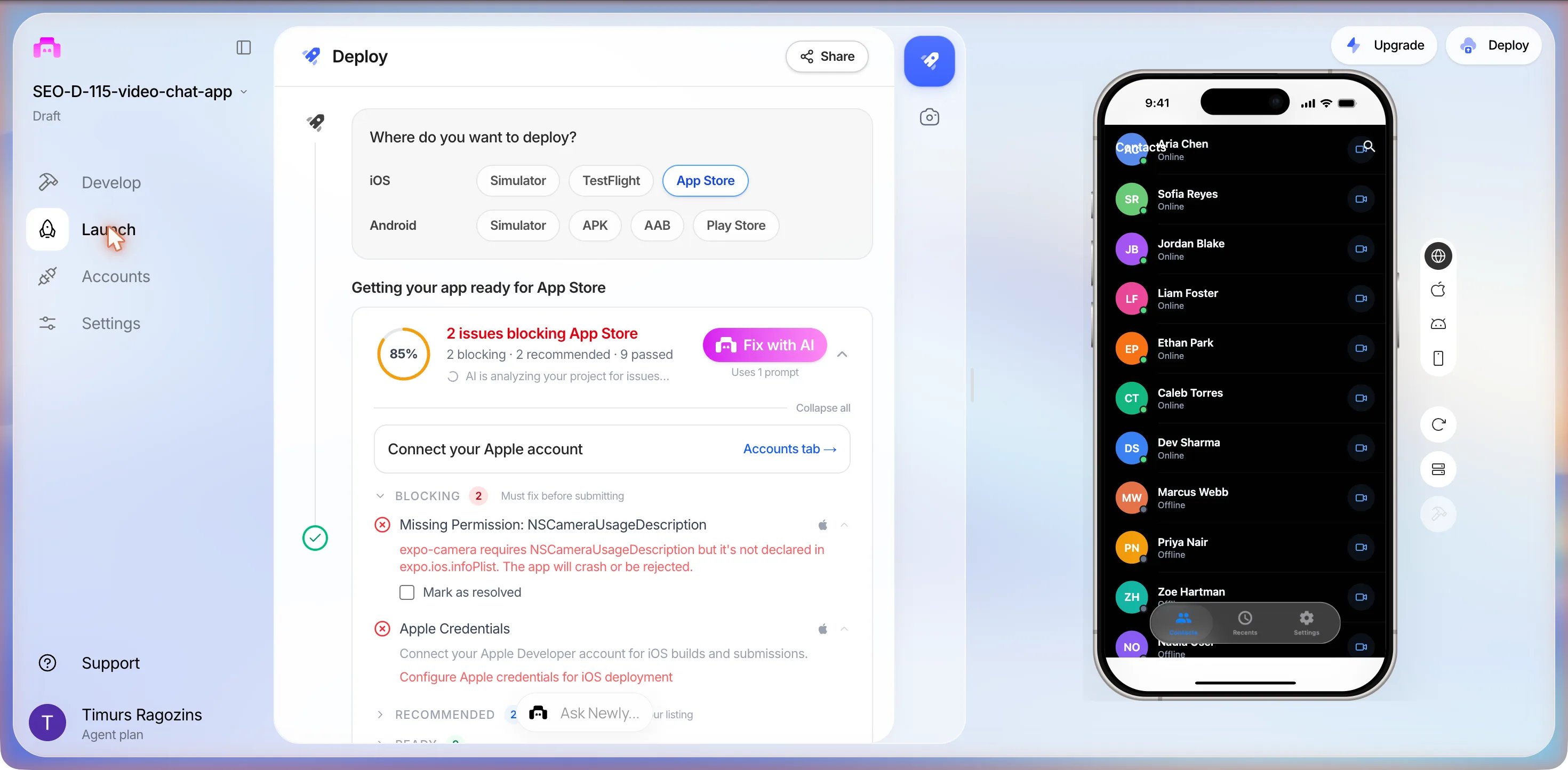
The permission string is a one-line fix and the panel offers to make it for a prompt. What the camera can and cannot do on each platform once you have the permission, and why the microphone needs its own string, is a longer story, covered in camera access in mobile apps. This page stops at the panel.
The numbers
What the session produced, and what a minute costs
Four numbers from the log, then the three providers the builder named, read off their own pricing pages the same night. The provider table is the one to keep, because it is the only line in a video chat app that grows with use.
| Daily | Agora | LiveKit Cloud | What you build | |
|---|---|---|---|---|
| What it is | Hosted calls, billed per participant-minute | Hosted calls, billed per 1,000 participant-minutes by resolution | Hosted WebRTC on plans with minutes included | Contacts, presence, the call button, in-call controls, history |
| Free every month | 10,000 minutes | 10,000 minutes | 5,000 WebRTC minutes on Build, at $0 a month | Nothing to meter |
| Then | $0.004 per participant-minute at list, graduated down to $0.0015 above 50 million | $3.99 per 1,000 HD video minutes; $0.99 audio, $8.99 Full HD, $15.99 2K | Ship from $50 a month with 150,000 included, then $0.0005 a minute; Scale from $500 with 1.5 million | $25 a month for the classic builder, flat |
| A 10-minute 1:1 call | $0.08 at list, free inside the allowance | $0.08 in HD, free inside the allowance | Free inside the allowance, $0.01 over on Ship | A timer over initials until one of these is wired |
| Audio only | $0.00036 to $0.00099 per participant-minute | $0.99 per 1,000 minutes | Billed as WebRTC minutes | The mute button already exists |
| Where the session got to | Named, then chosen, then blocked on a backend | Named as an option | Named as an option | Built, in about six minutes |
Read the table as participant-minutes, never as calls. A 10-minute 1:1 call is 20 minutes on the invoice: 8 cents at Daily’s list rate, 8 cents in HD on Agora, and nothing at all on any of the three until the free allowance is gone, 10,000 minutes a month on Daily and Agora, 5,000 on LiveKit’s Build plan. The two pricing pages Agora publishes disagree on the entry figure, $0.59 per 1,000 minutes on the summary page against $0.99 for audio on the detailed one, so the detailed page is what the table quotes. The builder itself is the small part of the money: the classic builder starts at $25 a month, and getting the app onto a phone that is not yours adds an Apple Developer Program membership at $99 a year and a one-time $25 Google Play registration, both from the builder’s own publishing guide in the sources.
The catches
Three things the first build will not tell you
A first build calls itself finished
The plan card said UI. The closing summary said call screen. Both were accurate and neither said the thing that matters, which is that nothing leaves the phone. If you want to build a realtime video application rather than a picture of one, the question to ask after the first build is the one we asked second: does this connect two phones? Better, put the answer in the first prompt. Name the provider, say that two people on two devices must see each other, and the plan card will say something other than UI.
The key has to live somewhere
A provider does the media, and the media is not the whole job. Somebody still has to create the room and hand each phone a token, and that somebody holds the API key, which must not ship inside the app. That is why the session ended at a Supabase prompt rather than a call, and it is not a quirk of one builder: any honest tool stops at the same place. If the call is one feature inside a bigger product, the backend is already there and this step is small; the social media app builder page covers that shape, where the call is a button on a profile rather than the app. If the call is the product, decide the backend before the first prompt, because it is the first thing you will be asked for.
You cannot test a call in the preview
The web preview can prove the contacts list, the controls and the history. It cannot prove a call, and it could not have in this session even with a provider wired, because a call needs a second device with a camera. The route to one is the classic builder’s own publishing guide: Deploy, then Build & Deploy, then iOS; the required keys are auto-provisioned, the compile typically takes 5 to 15 minutes, and the build lands in App Store Connect for TestFlight on a real iPhone. Apple’s $99 a year comes first, and so does the camera permission string the deploy panel flagged, or the build crashes on the first tap of the call button. Plan the two-device test as part of the build, not as a step after it.
Checklist
Before you wire a provider
Six checks, and the first one is the whole difference between this session and a working call.
- Name the provider in the first prompt and say that two phones must see each other. Leave it out and you get what we got: a call screen that starts a timer and sends nothing.
- Decide where the API key lives before the first build. The builder will stop for a backend anyway; arriving with a Supabase project or an answer saves the round trip.
- Test on two real devices. The web preview can only ever show your own camera, and in our session it did not show that either, because Chrome's permission dialog was never answered.
- Add the camera and microphone purpose strings before the first iOS build. The deploy panel caught the missing camera one and said the app would crash or be rejected; it said nothing about the microphone behind the mute button.
- Budget per participant-minute, not per call. A 10-minute 1:1 call is 20 minutes on the bill; the same 10 minutes with four people is 40.
- Strip the invented contacts and history before anyone else sees the app. Nine of the ten rows in Recents were fiction, dated before the project existed.
FAQ
The questions that come up every time
Not one you build. If the job is calling family or a colleague, the good app for video chat is whichever one the other person already has installed, and FaceTime, WhatsApp, Google Meet and Zoom have all done the hard part, signalling, NAT traversal and media servers, at a scale nobody matches from scratch. This page is for a different reader: someone whose own product needs a call inside it, a tutoring app, a clinic's follow-up app, a marketplace with a consultation step. For that reader an off-the-shelf app is the wrong shape, because the call has to sit next to their own contacts and data, and a provider SDK is how it gets there.
Sources
- Daily, Video SDK pricing
10,000 free minutes a month, $0.004 per participant-minute at list with graduated discounts to $0.0015, audio-only rates. Read 20 September 2026.
- Agora, Video Calling pricing
Per 1,000 participant-minutes: $0.99 audio, $3.99 HD, $8.99 Full HD, $15.99 2K, $35.99 2K+; 10,000 free minutes a month. Read 20 September 2026.
- LiveKit Cloud pricing
Build at $0 with 5,000 minutes, Ship from $50 with 150,000, Scale from $500 with 1.5 million; overage $0.0005 and $0.0004 a minute. Read 20 September 2026.
- Apple Developer Documentation, NSCameraUsageDescription
The key the deploy panel flagged: required if your app uses APIs that access the device's camera.
- Expo documentation, Camera
What the build installed instead of a provider: a component that renders a preview for the device's front or back camera, with its cameraPermission and microphonePermission plugin settings.
- MDN, Signaling and video calling
Why the builder asked for a backend: WebRTC does not specify a transport for signalling, and two devices on different networks need a third, mutually agreed-upon server.
- docs.newly.app, App Store Submission, Step by Step
The iOS route from the classic builder: Deploy, Build & Deploy, iOS, keys auto-provisioned, 5 to 15 minutes to compile, TestFlight on a real iPhone. $99 a year for Apple, $25 once for Google Play.
Provider prices move; each was read off the page linked above on the date given, and none of these vendors is affiliated with the builder. The session itself is the chat transcript and preview of one project on 20 September 2026, quoted as recorded; three screenshots were retaken at 02:00 the same night to remove a browser dialog, and the captions say which.
Name the provider in the first prompt
The half of this app you can see took one prompt and six minutes, and it will take you about the same. The half you cannot see is a provider, a backend to hold its key, and two phones to test on, and the session above is what happens when the prompt leaves all three out. Copy the prompt, add the provider and the second phone, and start there. The bill for the call, once it exists, is cents per ten minutes on any of the three, and nothing until the monthly allowance runs out.