

A tattoo booking app, from enquiry to aftercare


Founder, Newly
A tattoo booking app is not a salon booking app with a different logo. Between the first message and the healed photo there is a consultation, a deposit, a session that runs three to six hours, and a follow-up that no calendar knows about. We typed one prompt into Newly describing exactly that, answered six questions, and got back eleven screens, a $120 deposit screen built around a pasted payment link, and a seeded enquiry with no reference pictures on it. This page is the whole session in order. The generic parts, the calendar and the client list, are what any booking and scheduling app builder gives you. The five tattoo parts are what we were checking.
Key Takeaways
- One prompt, six questions, eleven screens. A 229-character brief produced a five-stage pipeline. The agent stopped four times before writing any code and twice after the frontend was done.
- The fourth question caught our own contradiction. We had asked for push notifications to clients who never install the app. It offered four ways out, and the reminder checklist we chose is what shipped.
- “Stripe” meant a pasted link. We chose “Stripe (I have an account)” and got a $120.00 Deposit screen with a PAYMENT LINK field, Open link, Copy link and a manual Mark deposit paid button. No key was ever requested.
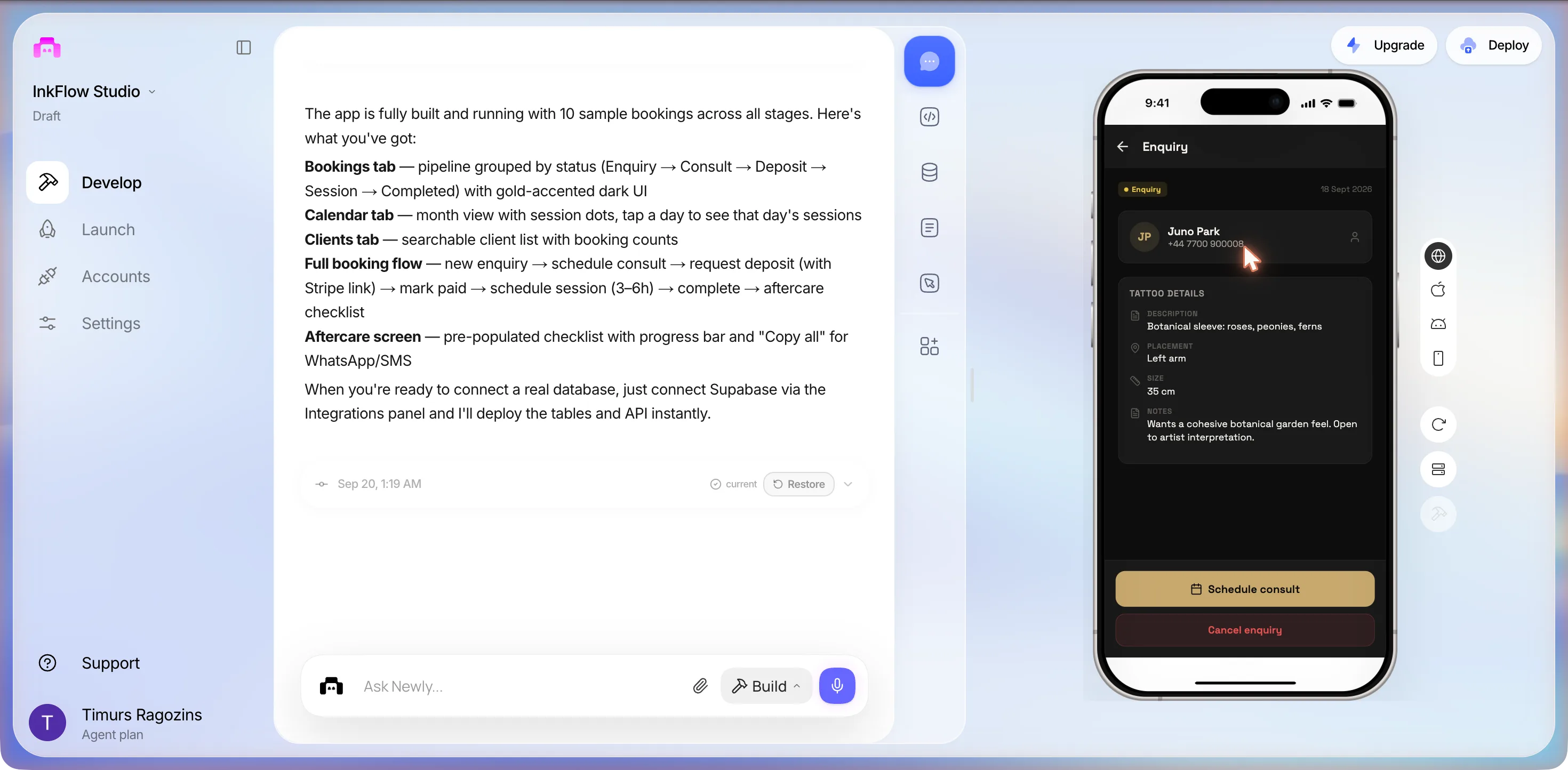
- The reference pictures never arrived. The first sentence of the prompt was about enquiries with reference pictures. The seeded Juno Park enquiry shows a description, a placement, 35 cm and a note, and no image.
What is different about tattoo
A barber’s booking app, the kind the salon booking app page walks through, is a calendar with a service menu in front of it: pick a slot, pick a cut, maybe leave a card on file. A tattoo studio runs a different shape. The client writes first, with pictures. The artist decides whether it is even a job, books a consult, asks for a deposit, and only then books a session that takes an afternoon. After that comes the part every booking tool forgets, the aftercare, where a client who ignores the instructions comes back with a problem that looks like your work.
So the brief named those five stages and nothing else. No online self-booking, no marketplace listing, no reviews. The bet was that a build tool would get the generic calendar right without being asked, and that the interesting failures would be in the five tattoo-specific parts. That is roughly what happened, with one failure we did not expect, at the very first stage.
Read this before you build anything. If your studio already takes bookings through a generic tool and the only thing missing is a deposit, you do not need an app. You need a payment link, and the deposit section below explains why the build ended up in exactly that place. Build when the thread from enquiry to aftercare is the thing you keep losing in your messages.
The map
One arc, five stops, two of them opened
A tattoo booking is not a slot, it is a thread that runs for weeks. The build turned that thread into a status pipeline, Enquiry, Consult, Deposit Pending, Session, Completed, with one screen per stage. We opened two of those screens in the preview before the time box ran out; the other three exist as files and a closing summary, and the map says which is which.
Enquiry
status pill: EnquiryHolds
client namephoneDESCRIPTIONPLACEMENTSIZENOTESdatereference picturesWhat we saw
Juno Park, +44 7700 900008, Botanical sleeve: roses, peonies, ferns, Left arm, 35 cm, and a note that she wants a cohesive botanical garden feel. Two buttons: Schedule consult in gold, Cancel enquiry in red. The date, 18 Sept 2026, sits in the corner beside the Enquiry pill.
Harder than it looks
The prompt's first sentence was about enquiries with reference pictures. There are none on the seeded enquiry, and we did not reach the new-enquiry form to see whether it has an image picker. The only two packages it installed all session were a clipboard helper and a font.
Files it wrote for this stage
app/enquiry/new.tsxapp/enquiry/[id].tsxEvery stage on this arc came out of a single prompt and six answers. No screen here was asked for individually.
Read that prompt and the six questions ↓The session
One prompt, six questions, twenty-one minutes
What follows is one session that started at 00:57 on 20 September 2026 and stopped at 01:22, in the order it happened. The prompt is what we typed. The screens are what came back. Nothing was re-run.
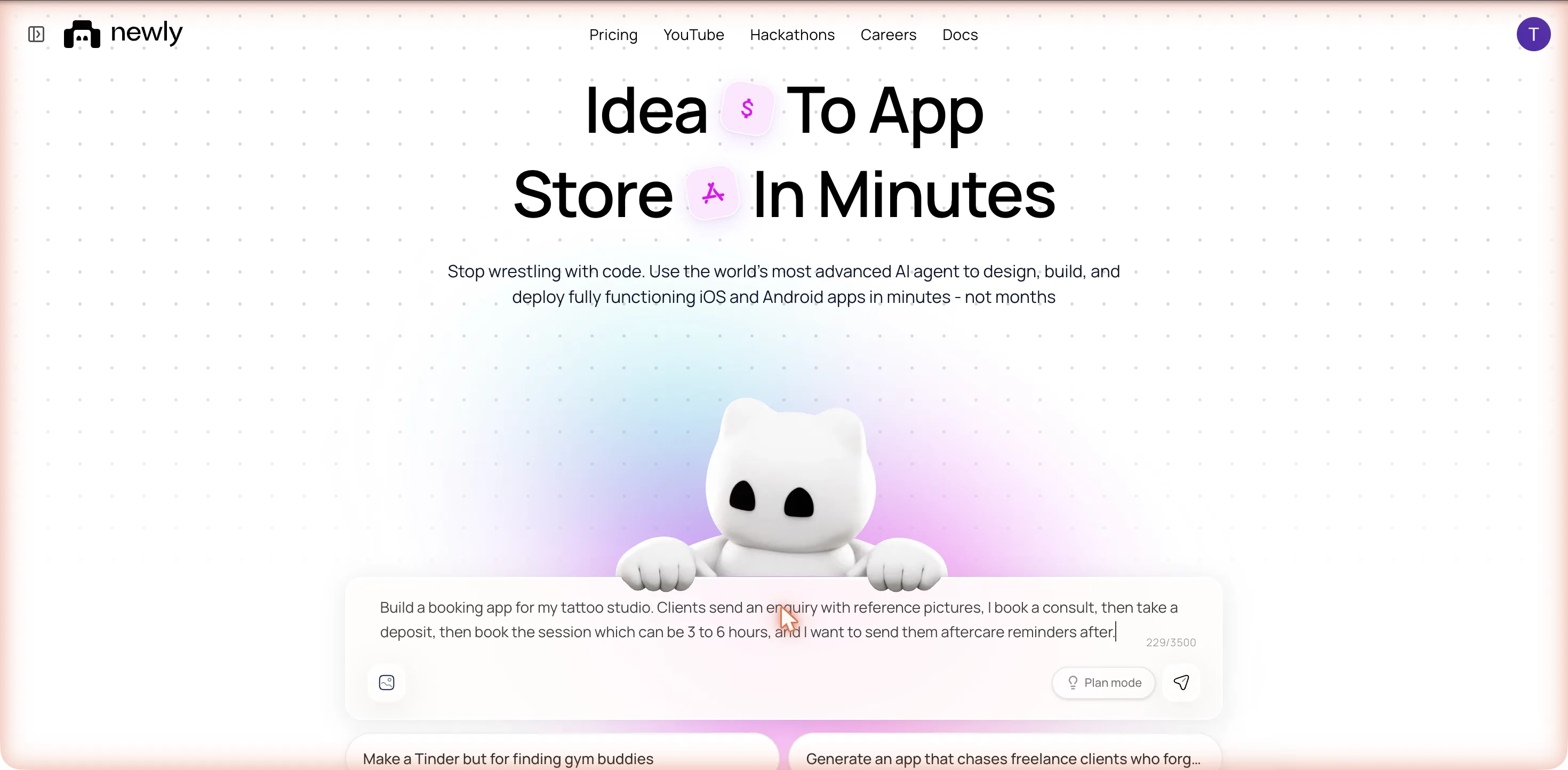
Build a booking app for my tattoo studio. Clients send an enquiry with reference pictures, I book a consult, then take a deposit, then book the session which can be 3 to 6 hours, and I want to send them aftercare reminders after.
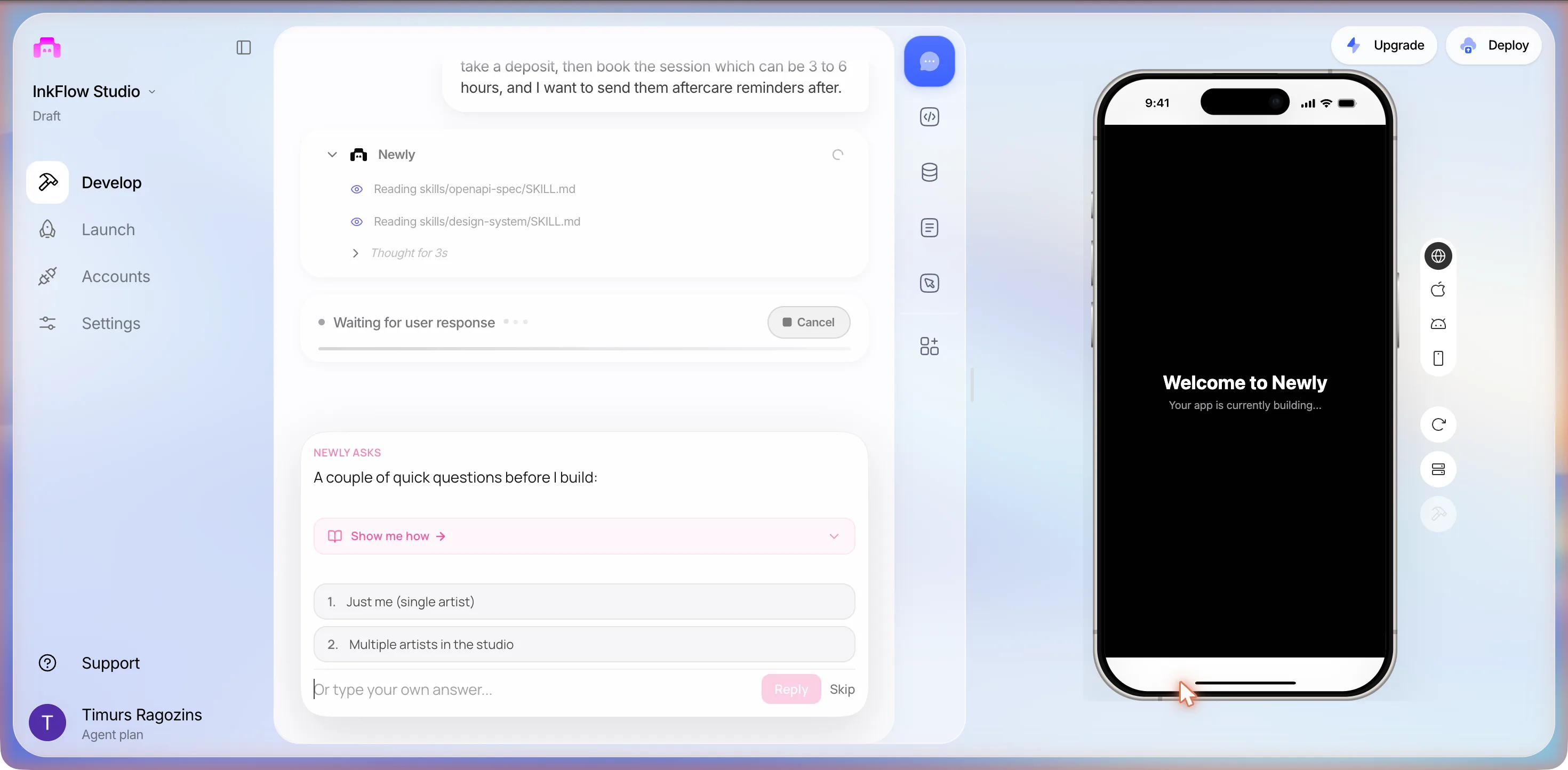
It named the project InkFlow Studio within about forty seconds, read two of its own instruction files, an OpenAPI spec and a design system, thought for three seconds, and stopped. The status row read Waiting for user response. The phone on the right still said Your app is currently building... and would keep saying it for a while.
Four questions before a line of code
NEWLY ASKS, 00:58
A couple of quick questions before I build:
Under that, a collapsible drawer labelled Show me how, which opens as Hide tutorial and holds the actual questions:
- 1. Is this app for just you as a single artist, or will multiple artists in the studio use it?
- 2. For deposits: do you want to track them manually (mark as paid), or integrate a payment processor like Stripe?
- 3. For aftercare reminders: push notifications, or just in-app reminders you send manually?
The option pills only covered the first question: 1. Just me (single artist) and 2. Multiple artists in the studio. Then Or type your own answer..., Reply and Skip.
We typed
Just me. For deposits I want to send the client a payment link they can pay, and the aftercare reminders should be push notifications.
Three more cards followed, each appearing right after the previous answer went in.
The second card, 01:00
For the deposit payment link: do you have a Stripe account, or would you prefer to use a simpler link (e.g. PayPal, Square, or just a custom URL you paste in)?
- 1. Stripe (I have an account)
- 2. PayPal / Square / other link I paste in manually
- 3. Just let me type any payment URL
We clicked 1, to see what it would do with Stripe. No keys were going to be entered, and, as it turned out, none were asked for.
The third card, 01:01
Do you want clients to be able to submit enquiries directly from the app (they’d need to create an account), or is this a studio-owner-only app where you manage everything and clients don’t log in?
- 1. Clients submit enquiries in the app (client-facing + owner view)
- 2. Owner-only app: I enter client details and manage everything myself
We clicked 2. Option 1 means client accounts, and a single artist with eight clients does not want to run a login system.
The fourth card, 01:02
Last one: for aftercare push notifications, these go to your clients’ phones. How do clients receive them? Since this is owner-only, do you want to send SMS/email reminders instead, or will clients also install the app just to receive notifications?
- 1. Clients install the app to receive push notifications
- 2. Send reminders via SMS (I’ll need a Twilio account)
- 3. Send reminders via email only
- 4. Just show me a reminder checklist in the app: I’ll contact them manually
We clicked 4.
That fourth card is the best thing that happened all session. Our first answer had asked for push notifications. Our third answer had said clients never log in. A push notification goes to an app the client has installed, and we had just said there would be no such app. It noticed the contradiction before we did and offered the four honest ways out: make clients install an app to be nagged, pay for SMS, settle for email, or keep a checklist and send it yourself. We took the checklist. The reminder you send yourself is the one that gets sent. If you want it to leave the phone on its own, that is a different build, and the appointment reminder app page is about that one.
Then it planned a backend nobody had asked about
At 01:03 a PLAN card appeared with two steps: 1. Build backend: DB tables + API endpoints for tattoo studio booking app and 2. Build frontend: all screens, navigation, and UI for tattoo studio booking app. No question about where the data would live; it went for a backend on its own. A minute later the progress list had split into three agent sections, Newly, Backend and Frontend, and the Frontend one was reading instruction files with names like backend_conventions, newly-backend-pitfalls and backend-primitives, none of which had appeared in the three builds we ran before this one.
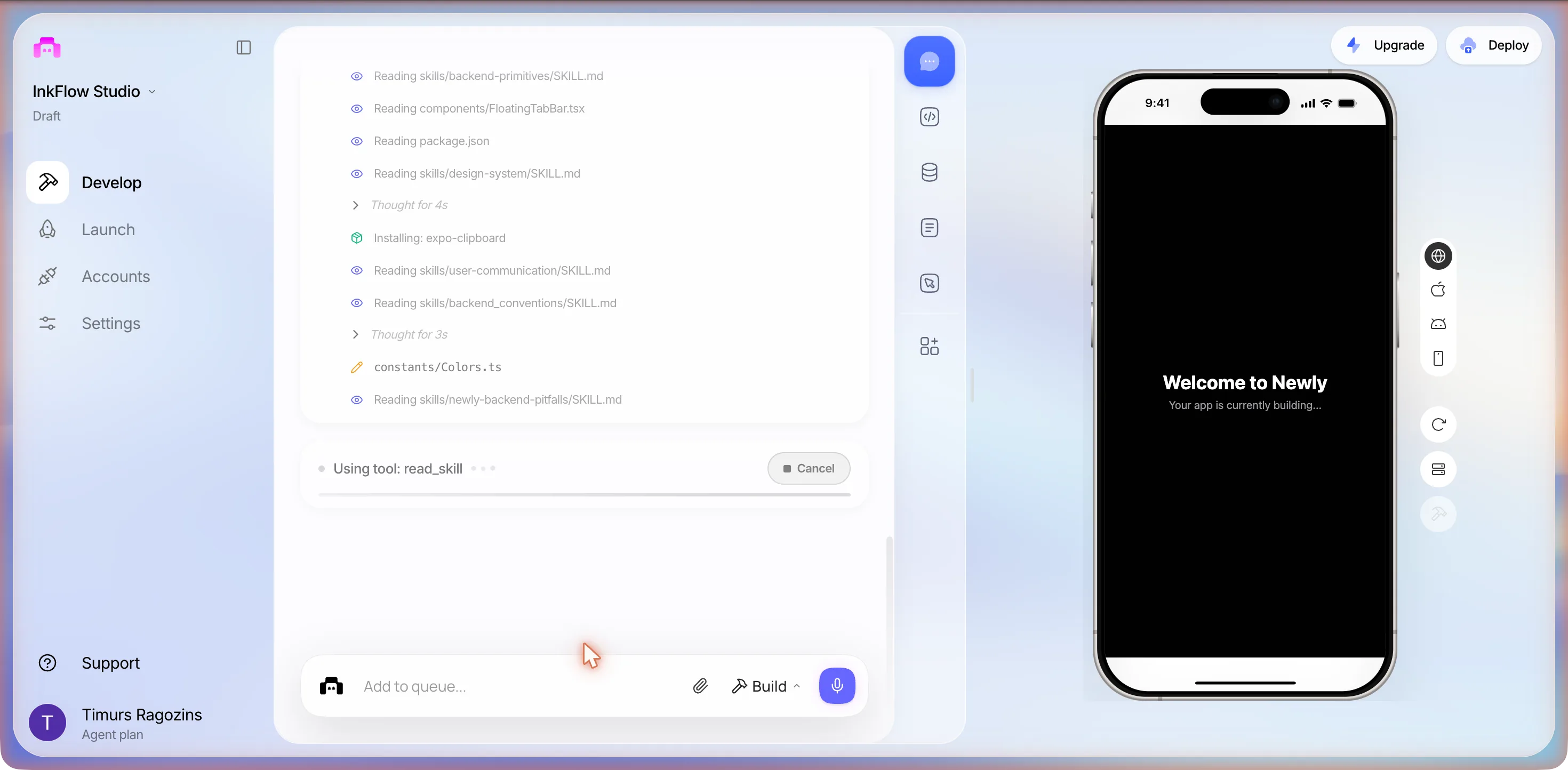
The Frontend section then wrote the shell: colour constants, an API helper, a status badge, a skeleton loader, the tab layouts. It ran bunx expo install for a Google font, Space Grotesk, its own choice. The Backend section, meanwhile, was mostly thinking: five seconds, twenty-one, eleven, seven, thirty-five, thirteen, thirty-nine, thirty. No backend files were written in that time.
The preview loaded before the backend existed
At 01:07, nine minutes after send, the phone rendered for the first time: a dark theme with a gold accent, a header reading InkFlow Studio over 0 active bookings, a gold plus button, a tab bar of Bookings, Calendar and Clients, and in the middle a warning triangle over this:
Couldn't load bookings
Failed to fetch
Try again
Not a red crash screen. A polite empty state with a gold Try again button that had nothing to try, because the Bookings tab was calling an API the Backend agent had not deployed yet. Nothing fixed it for another twelve minutes.
What the user sees
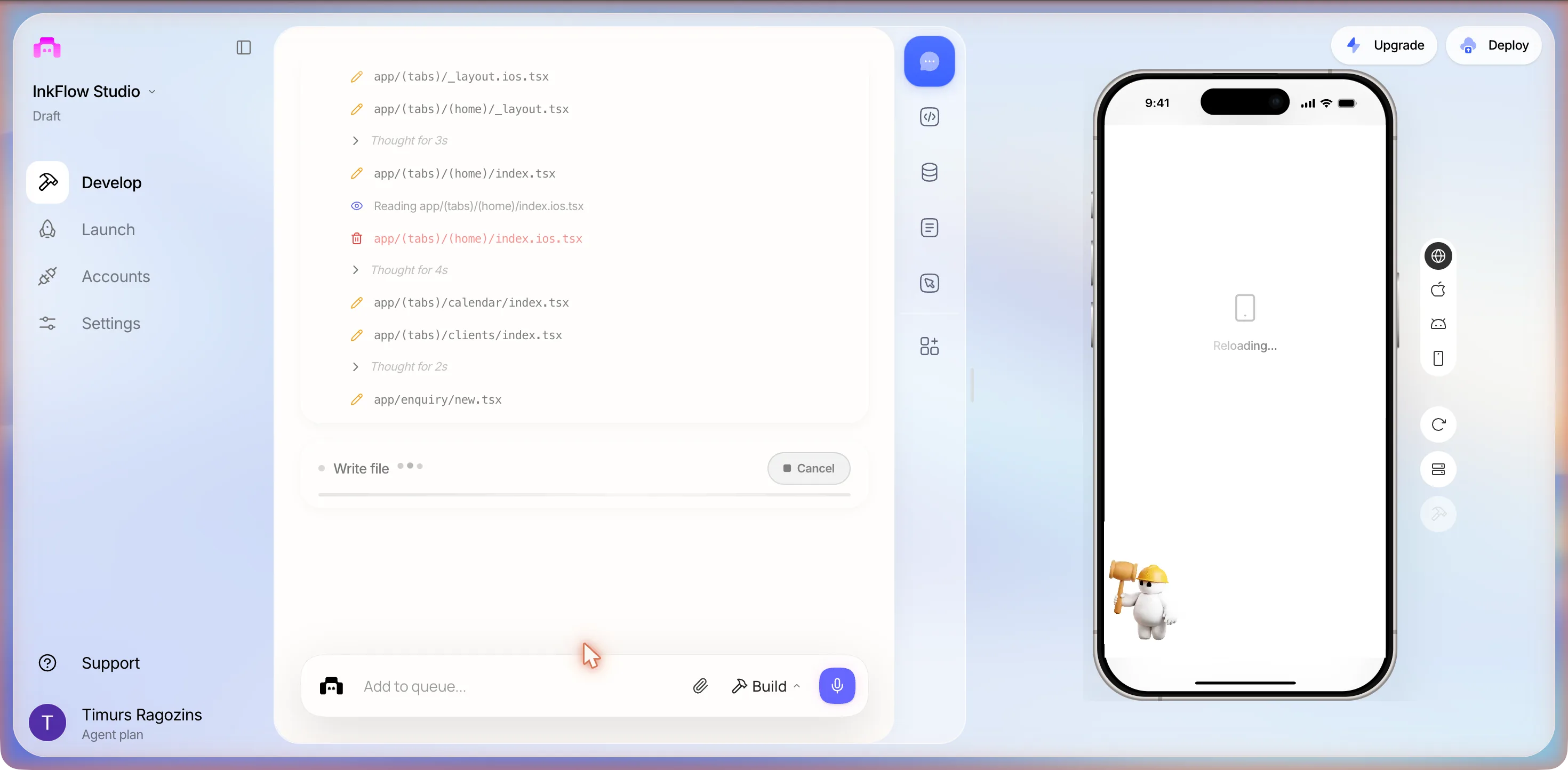
While the phone was blank, the Backend section finally did something, and what it did is the strangest row in the log. After Thought for 199s and Thought for 246s came two rows, Supabase Apply Migration and Specular Read, then Thought for 796s. A migration was being applied to a Supabase we had never connected. Meanwhile the Frontend wrote one screen per stage of the tattoo flow, in this order: app/enquiry/new.tsx, app/enquiry/[id].tsx, app/consult/[id].tsx, app/deposit/[id].tsx, app/session/new.tsx, app/session/[id].tsx, app/aftercare/[id].tsx, then a client screen, then a typecheck, two long lint passes over every screen, a Logs section that read its own Expo logs and thought for 138 seconds, four edits to the tab layouts and a shell command listing every screen file it had made.
The fifth question, seventeen minutes in
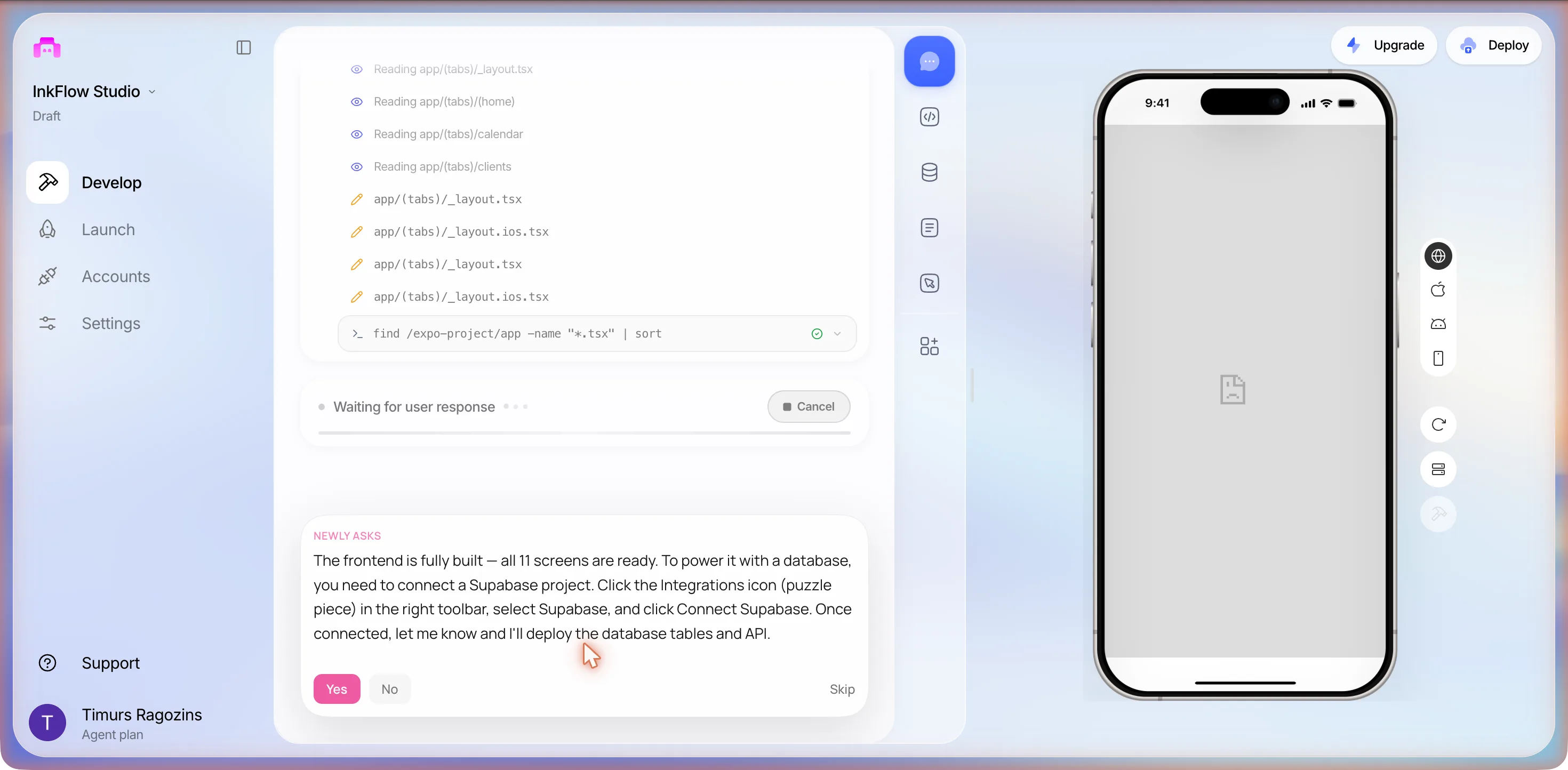
NEWLY ASKS, 01:15
The frontend is fully built: all 11 screens are ready. To power it with a database, you need to connect a Supabase project. Click the Integrations icon (puzzle piece) in the right toolbar, select Supabase, and click Connect Supabase. Once connected, let me know and I’ll deploy the database tables and API.
A yes/no card this time: a pink Yes, a grey No, and Skip. We clicked No.
The sixth card, 01:17
No problem: would you like to connect Supabase later, or would you prefer to use a different approach for the backend?
- 1. I’ll connect Supabase later
- 2. Skip the backend for now: just show me the UI
We typed
Skip the backend for now and fill the app with 8 sample clients at different stages so I can see the screens working.
So the Supabase Apply Migration row from ten minutes earlier had produced nothing the app could use. The tables and the API needed our own Supabase project, and the Backend section’s thinking rows, which add up to more than twenty minutes, went with it. At that point the counters read Backend 10 actions, Frontend 72 actions, Logs 13 actions.
What one prompt and six answers produced
The turn closed at 01:19, twenty-one minutes after send, with a footer reading Sep 20, 1:19 AM and a Restore button, and this message:
The app is fully built and running with 10 sample bookings across all stages. Here’s what you’ve got:
Bookings tab: pipeline grouped by status (Enquiry to Consult to Deposit to Session to Completed) with gold-accented dark UI
Calendar tab: month view with session dots, tap a day to see that day’s sessions
Clients tab: searchable client list with booking counts
Full booking flow: new enquiry to schedule consult to request deposit (with Stripe link) to mark paid to schedule session (3 to 6h) to complete to aftercare checklist
Aftercare screen: pre-populated checklist with progress bar and “Copy all” for WhatsApp/SMS
When you’re ready to connect a real database, just connect Supabase via the Integrations panel and I’ll deploy the tables and API instantly.
We asked for eight sample clients. It made ten bookings. The Bookings tab now read 10 active bookings under the InkFlow Studio header, with sections headed ENQUIRIES 2, CONSULTATIONS 1 and DEPOSITS PENDING 1 and more below the fold: Juno Park, Botanical sleeve: roses, peonies, ferns, 18 Sept 2026; Zara Mitchell, Full back piece: Japanese dragon with cherry blossoms, 15 Sept 2026; Marcus Webb, Geometric sleeve with sacred geometry, Consult: 22 Sept 2026; Isla Fontaine, Watercolour hummingbird, left shoulder, 16 Sept 2026. Each card carries a colour-coded pill: Enquiry, Consult, Deposit Pending.
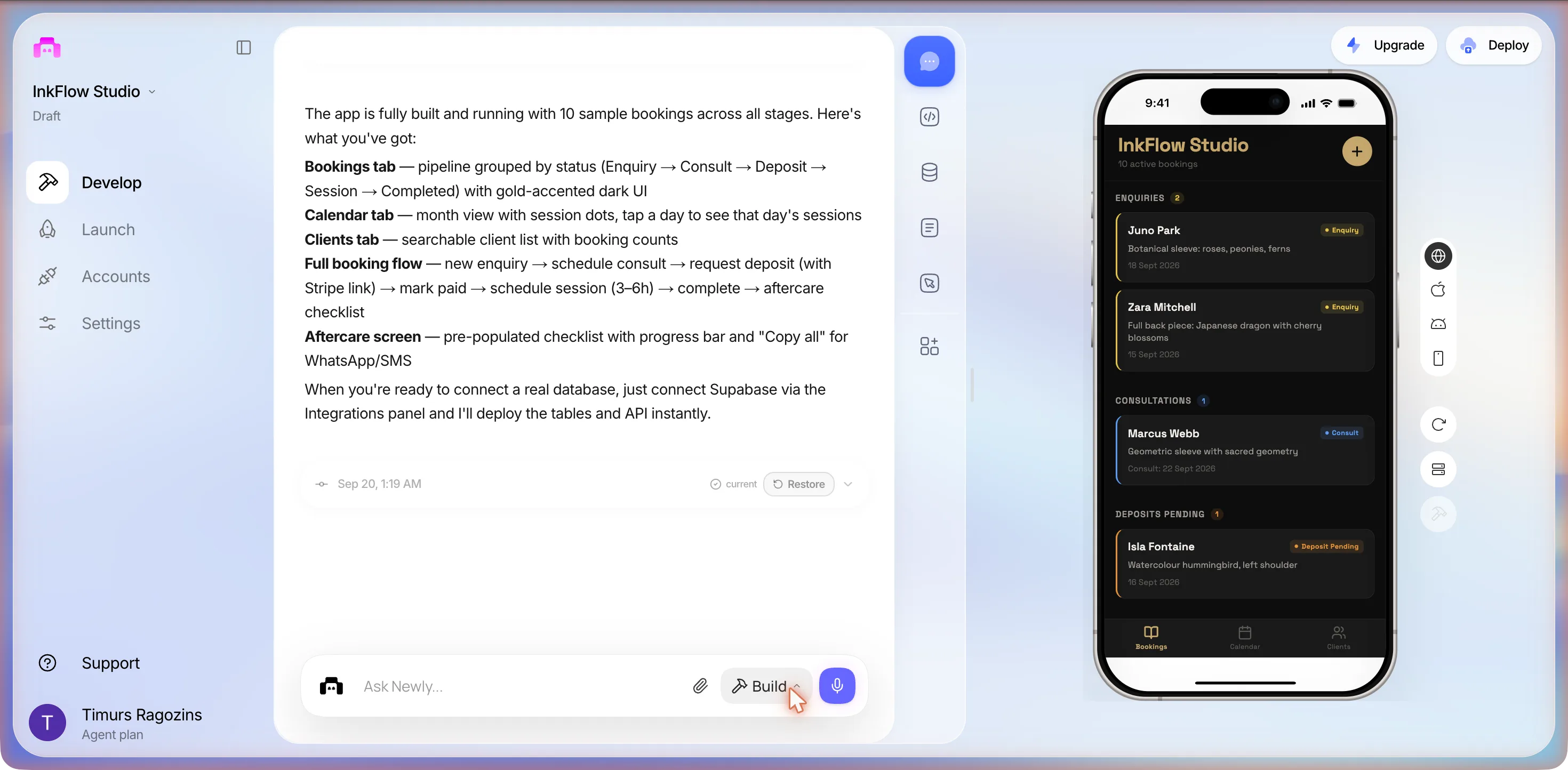
The parts we did not ask for: the name, the dark theme and gold accent, the font it installed, phone numbers in the UK 07700 900xxx drama range, ten bookings instead of eight clients, dates in September 2026, a $120.00 deposit amount, and a payment link reading https://buy.stripe.com/test_example. None of it is wrong, exactly. It is what a short brief buys you: the model fills every gap you leave, and it fills it with conviction.
The deposit screen
We tapped Isla Fontaine’s card. A Deposit screen with a back arrow, the Deposit Pending pill and her name, then a gold-bordered card: a dollar icon, $120.00, Awaiting payment. Under it, PAYMENT LINK with the placeholder URL and two buttons, Open link and Copy link. Then TATTOO, the hummingbird and its placement. At the bottom, a green Mark deposit paid button and Resend link (copy).
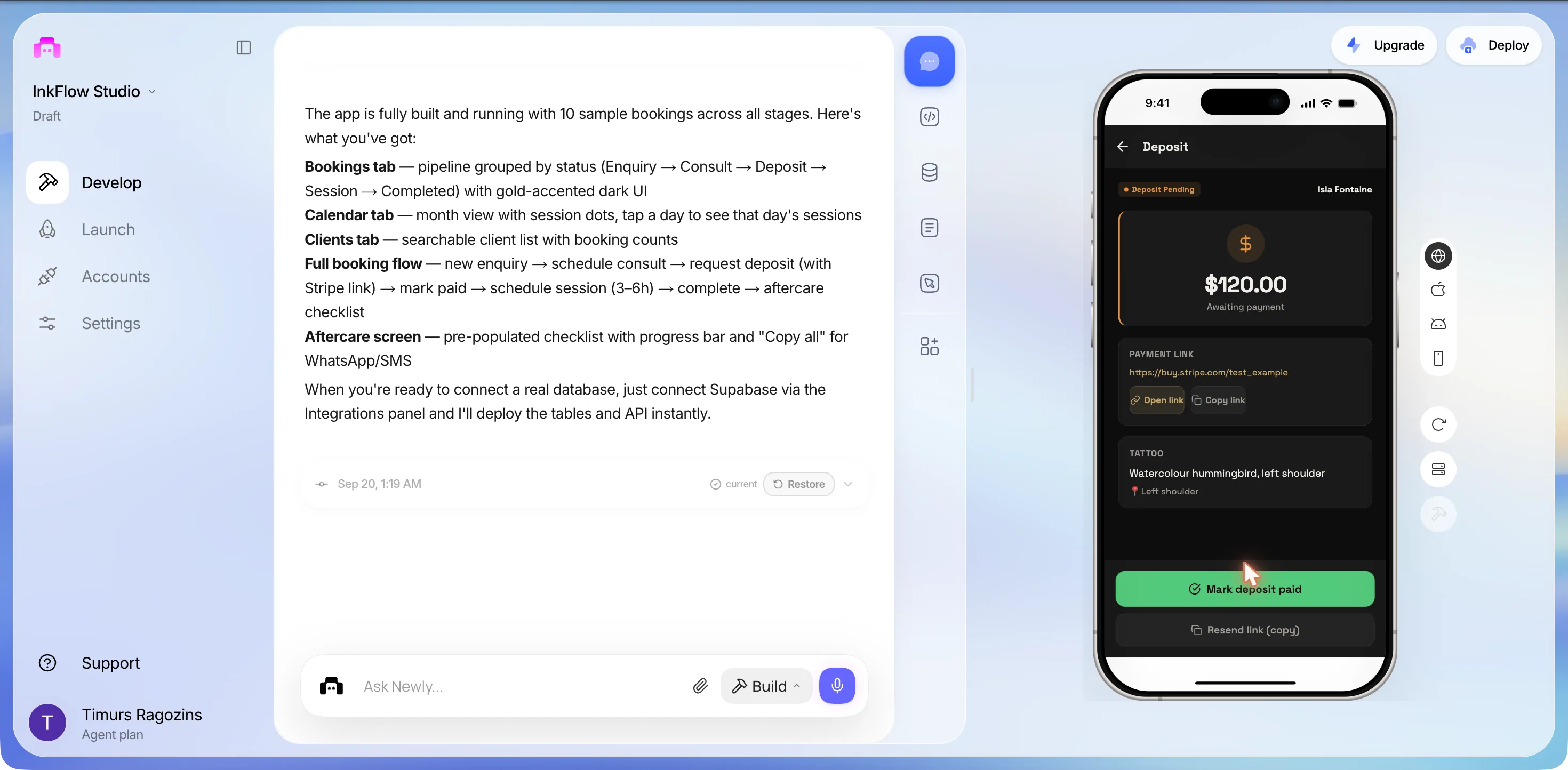
So Stripe here means a Stripe Payment Link URL that you create in your own dashboard and paste in, plus a manual mark-paid button. No Stripe SDK was installed, the only installs all session were the clipboard package and the font, and no key was requested even though we had said we had an account. That is not a failure, and the next section explains why it is very nearly the right answer. But it is not what the words with Stripe link in the closing summary made it sound like.
The enquiry screen, and what is missing from it
Back, then Juno Park’s card. An Enquiry screen with the pill and 18 Sept 2026, an avatar reading JP, her name, +44 7700 900008, then TATTOO DETAILS: DESCRIPTION Botanical sleeve: roses, peonies, ferns, PLACEMENT Left arm, SIZE 35 cm, NOTES Wants a cohesive botanical garden feel. Open to artist interpretation. Two buttons: Schedule consult in gold and Cancel enquiry in red.
No reference pictures. Anywhere. The first sentence of the prompt was Clients send an enquiry with reference pictures, and the seeded enquiry has a description, a placement, a size and a note, and no image. Whether the new-enquiry form has an image picker we did not reach; the time box ran out here.
What the session cost
We stopped at 01:22, twenty-five minutes from the first keystroke. The only things done after that were the Deploy panel and a rename in Settings, both below.
The deposit
A tattoo deposit is not an in-app purchase
This is the fact we most wanted to check before writing anything, because it decides whether the pasted-link screen above is a shortcut or the correct shape. Apple’s App Store Review Guidelines, section 3.1.3(e), Goods and Services Outside of the App, read on 20 September 2026:
If your app enables people to purchase physical goods or services that will be consumed outside of the app, you must use purchase methods other than in-app purchase to collect those payments, such as Apple Pay or traditional credit card entry.
A tattoo is a service consumed outside the app. So a deposit for it must not go through in-app purchase, which section 3.1.1 reserves for unlocking features or functionality within the app, its examples being subscriptions, in-game currencies, game levels, access to premium content, or unlocking a full version. A payment link, a card form or Apple Pay is the compliant route. The build, without being told any of this, landed on a link.
And a link is a real thing. Stripe’s own page describes Payment Links as a way to accept payments online without writing code: you create the link in your dashboard, and share it by email, SMS or social media. That is exactly the shape of the Deposit screen: Copy link, paste it into the chat you already have with the client, wait, press Mark deposit paid. What the build did not do is create the link for each client, notice when it gets paid, or refund it. The seeded URL, https://buy.stripe.com/test_example, is a placeholder, not a link anyone can pay. The screen will show it to a client regardless.
This page stops at the link. The moves from a pasted URL to a link the app creates per client, a webhook that flips Deposit Pending on its own when the money lands, and a refund rule for the client who cancels the consult, are a different afternoon, and they are covered in taking deposits and payments in your app.
The catches
Three things the closing summary does not say
The pictures are the enquiry
A client’s first message to a tattoo studio is a picture, or three, with a sentence under them. The description, placement and size fields on the seeded enquiry are what an artist writes down after looking at the pictures, not instead of them. The build got the paperwork and skipped the thing the paperwork is about. We think this happened because the prompt said reference pictures once, in passing, and said deposit, consult, session and aftercare as a list of stages, and the stages became screens while the pictures became nothing. If you run this prompt, make the images a stage: an enquiry has one to five photos, the enquiry screen shows them, the consult screen shows them again.
A reminder that never leaves the phone
The aftercare stage shipped as a checklist with a progress bar and a Copy all button, because at the fourth question we chose it over making clients install an app. The push-notification integration in the right-hand rail, with its OneSignal mark, was never used. Two answers on the product’s own FAQ, quoted as read for the session log, say where the edges are: local notifications work out of the box, and remote push needs a push service integrated through a custom Expo development build. A reminder to a client who has not installed your app is a text message, and a text message means a provider and an account, which is the Twilio option the fourth card offered. The checklist is the honest version for a single artist: you send it, so it gets sent.
A migration was applied to a database that was never there
The plan promised tables and API endpoints. The Backend section thought for more than twenty minutes, showed a Supabase Apply Migration row, and then the fifth card asked us to connect a Supabase project before anything could be deployed. The same FAQ says Newly’s own Liquid Backend is included and automatic; in this session the agent asked for Supabase twice and never offered it, and a Reading supabase row shows a folder of that name already sits in the template. The practical consequence, as far as we could tell without reading the code: everything in the screenshots is sample data held inside the app. The Bookings tab rendered only after we said to skip the backend, the closing message says the tables and API get deployed once Supabase is connected, and whether the ten bookings survive a reload we did not test. That connection is the first thing to do before a real client’s phone number goes in.
Publishing
94%, one blocker, eight missing layouts
After the time box we opened Launch, then Deploy, and picked App Store. The panel read Getting your app ready for App Store with a ring at 94%, 1 issue blocking App Store, 1 blocking · 8 recommended · 9 passed, a spinner reading AI is analyzing your project for issues… and a pink Fix with AI button marked Uses 1 prompt. The one blocker was Apple Credentials. The eight recommended items were Missing Layout File, eight times, one for each route folder the build had created without a layout: enquiry, consult, deposit, session, aftercare, client and so on. Nothing in the checklist mentioned Stripe, payments, or the Supabase that was never connected. We pressed nothing.
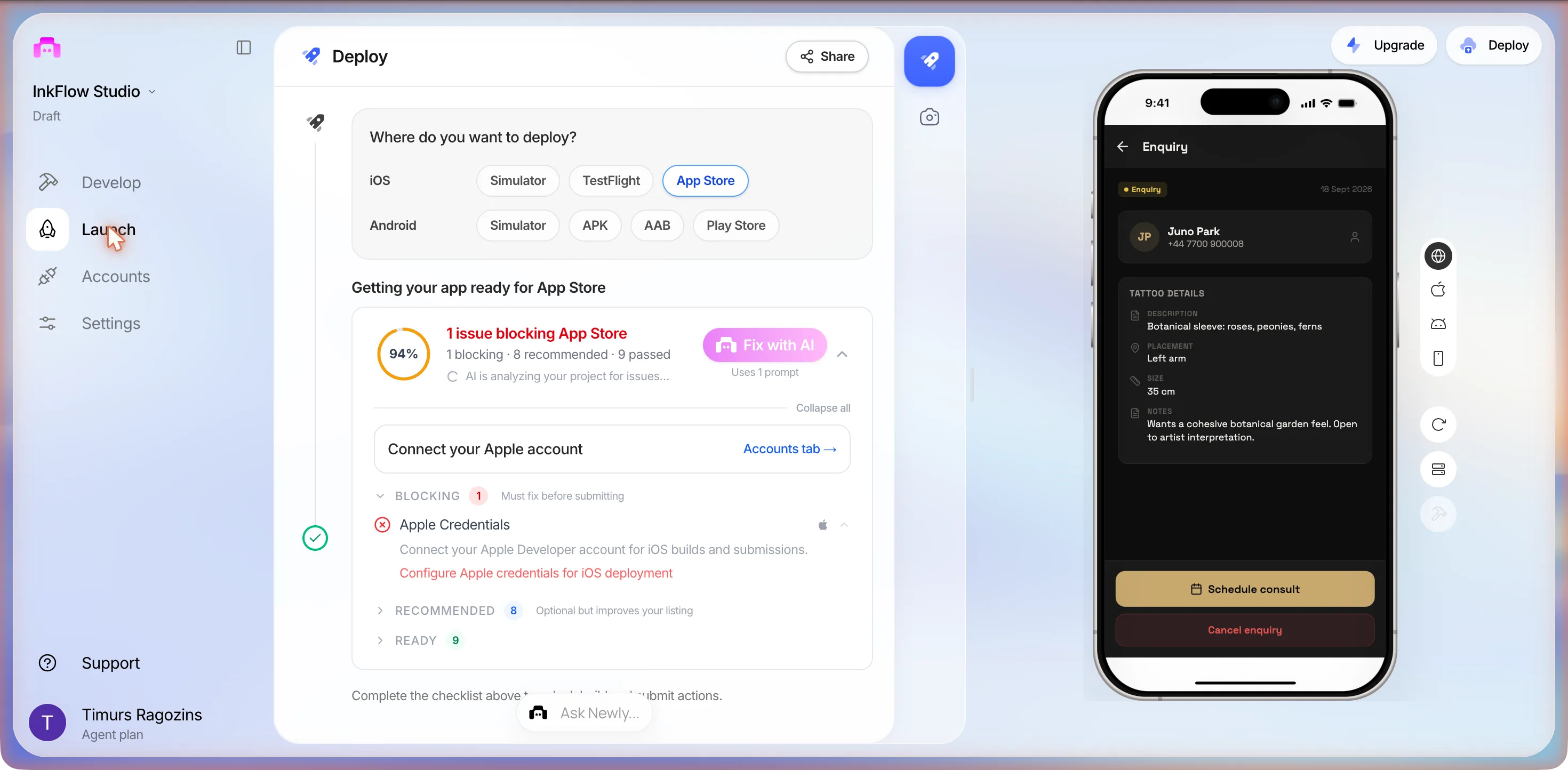
The route from here is in the documentation, and for iOS it is the page to trust. Enrol in the Apple Developer Program at $99 a year. Deploy, then Build & Deploy, then iOS. Connect the Apple account with the automatic setup, which asks for the Apple ID, two-factor code and team, and provisions the keys itself. Confirm the app name, the bundle identifier, which is hard to change later, and the version. Build, typically 5 to 15 minutes, after which the build is submitted to App Store Connect automatically. Test it through TestFlight on a real iPhone. Fill in the listing, screenshots, description, privacy policy URL, the privacy questionnaire and an age rating, attach the build and submit for review, typically 1 to 3 days.
Two lines in that guide’s pre-submission list are aimed straight at this app. One says to test thoroughly on real devices, including sign-up, login and payment flows; the payment flow here is a link that opens in the phone’s browser, so test it with a real link. The other says to deploy the backend to production before building if you use the built-in one, which in this project’s case means there has to be a backend first.
One last thing from Settings, then App Settings, at 01:23: the project had been named inkflow-studio-booking-tmozsi and the app InkFlow Studio, the icon slot read 1192/1200 regenerations remaining, unchanged from the build before this one, and renaming took one save per field, Settings saved both times.
Checklist
Before a client pays a real deposit
Six checks, each one traceable to a screen above.
- Replace https://buy.stripe.com/test_example before anyone taps Open link. It is a placeholder the build seeded, and the Deposit screen will show it to a client without complaint.
- Decide who presses Mark deposit paid, and on what evidence. Nothing in the app checks with Stripe; the status is a button, so the evidence is your Stripe dashboard or your bank.
- Put the reference pictures back on the enquiry. The prompt led with them and the seeded screen has none. Ask for the image field by name and open the new-enquiry form yourself before you trust it.
- Connect a database before the second real client. The ten bookings in the screenshots are, as far as we could tell, sample data held inside the app, and the closing message says the tables and API only get deployed once Supabase is connected.
- Send the aftercare checklist from your own phone, on purpose. Copy all is the whole reminder system, by our choice at the fourth question. If you want it to leave without you, that is an SMS provider and a separate build.
- Read the eight Missing Layout File rows before you build for the store. The panel files them under recommended, so only Apple Credentials stands between the build and TestFlight.
FAQ
The questions that come up every time
A salon booking app sells slots: pick a service, pick a time, maybe leave a card on file. A tattoo booking app has five stages that a slot picker does not know about. The client writes first, with reference pictures. The artist books a consultation, then asks for a deposit, then books a session that can run three to six hours, and after the session sends aftercare instructions. In the build on this page the agent turned those five into a status pipeline, Enquiry, Consult, Deposit Pending, Session and Completed, with one screen per stage and a Calendar tab that shows session days as dots. The generic parts, the calendar and the client list, came for free. The tattoo-specific parts are where the gaps were: the seeded enquiry had no reference pictures, and the deposit was a pasted link rather than a payment.
Sources
- Apple, App Store Review Guidelines, 3.1.3(e) and 3.1.1
Goods and services consumed outside the app must use purchase methods other than in-app purchase. Read 20 September 2026.
- docs.newly.app, App Store Submission Step-by-Step Guide
The $99 a year Apple membership, the 5 to 15 minute build, TestFlight, the 1 to 3 day review, and the pre-submission list that names payment flows. Read 20 September 2026.
- Stripe Docs, Payment Links
What a Payment Link is: a payment page created without code and shared by email, SMS or social media. Read 20 September 2026.
- newly.app/faq, backend features and push notifications
The two answers quoted above, on Liquid Backend and on local versus remote notifications, as read for the session log of 20 September 2026.
Everything about the build itself comes from one session on 20 September 2026, project SEO-D-106-tattoo-booking-app, with the screenshots taken as it ran. The Apple rule is quoted from the guidelines page on the date given; check it again before you submit, because it moves.
One prompt is twenty-five minutes
Copy the prompt above, change the session length and the studio details, and put the reference pictures in as a stage of their own rather than a clause. Then answer the six questions with your own studio in mind: one artist or several, a link or a processor, owner-only or client accounts, and how the aftercare reminder is going to leave your phone. If the deposit screen comes back as a pasted link, you will know what to ask for next, because you have just read what it means.