

Compare · Checked 10 September 2026
Newly vs Replit: which one gets you to the stores?

Founder, Newly
Replit builds and hosts web apps better than we do. Start there, because almost every Newly vs Replit comparison you can find was written before Replit shipped a real mobile track, and those comparisons are now wrong. Replit Agent generates React Native apps on Expo, streams an iOS Simulator into your browser, and walks an iOS build all the way into App Store Connect.
Our own older page on using Replit Agent for mobile apps predates that change and reads like it. So this page is narrower than a feature grid. It is about where each tool stops.
Replit reaches
A running web app, and the App Store.
Newly reaches
Both stores, with the Play build done for you.
Key Takeaways
- Replit hosts web apps better than Newly. A live URL is a destination Newly does not reach; if a browser tab is the product, Replit is the tool.
- iOS is close to parity. Both sign a build and put it into App Store Connect from inside their own flow.
- Google Play is the gap. Newly has a guided AAB wizard with keystore generation; Replit says it has no guided Play route yet.
- Replit is cheaper to try. Starter is free and Core is $20 a month; Newly is $25 a month for 100 credits with no free tier.
Four sentences, then you can stop reading.
- Replit
Your app is a URL people open in a browser. It is not close, and nothing further down this page will change that.
- Newly
Your app is a Google Play listing. Replit has no guided Play route yet, it says so itself. That is the one place the gap is wide.
- Either
Your app is iOS only. Both tools sign the build and put it into App Store Connect without leaving their own flow. That step is close to parity now, so decide this one on something else.
- Either
Your app is both stores. iOS is a wizard on both sides, and the Play Console upload is yours on both sides. Only the Android build differs.
Two tools, plotted honestly.
Neither of these is a point on a chart. Both cover a range, and the ranges overlap far more than either company’s homepage suggests. Tap any numbered step to see what it actually involves and where the claim comes from.
Launch wizard, straight into App Store Connect
Under Publishing, Start publishing to the App Store opens a wizard: confirm the Expo project, sign in with Apple, confirm the bundle ID, let Launch pick or create the distribution certificate and provisioning profile, then Launch to App Store. It can take up to 45 minutes. Note the prerequisite, the web app has to be published first, because that is the backend the mobile app talks to.
Source: Replit docs: Upload your app to App Store ConnectBoth have an iOS wizard. Only one has an Android one.
This is the part that decides it, and it is the part comparison tables flatten into a tick. Here is what each of the four routes actually asks of you.
Replit to the App Store: a wizard, in this order
- 1Publish the web app. This is a prerequisite, not a suggestion, the mobile app talks to that backend, so it has to be live first.
- 2Under Publishing, select Start publishing to the App Store.
- 3Confirm the Expo project name and slug, or point at an existing one.
- 4Sign in with the Apple ID enrolled in the Apple Developer Program.
- 5Confirm the app name and bundle ID. Read this one twice: after your first publish the bundle ID is tied to the project, and changing it makes the next publish fail.
- 6Launch selects a valid distribution certificate and provisioning profile, or creates them.
- 7Select Launch to App Store. The build compiles on Expo’s servers and lands in App Store Connect. Allow up to 45 minutes.
Steps from Replit’s own documentation. Seven steps, one tool, no file leaves your browser.
Replit to Google Play: no wizard at all
Replit does not hide this. Its documentation says publishing to Google Play is not supported through a guided experience yet, but can be accomplished manually. The manual version starts with a prompt.
Build a production release of PixelGames for Google Play.
Then you download the .aab, create the app in Play Console, pick a track, create a release, and upload the file. Replit’s own troubleshooting note tells you what will go wrong first: the version code has to increase on every upload, so a second attempt with the same number is rejected and you go back and ask Agent to bump it. None of this is hard. It is just yours to remember, every release, forever.
Newly to Google Play: the wizard is on this side
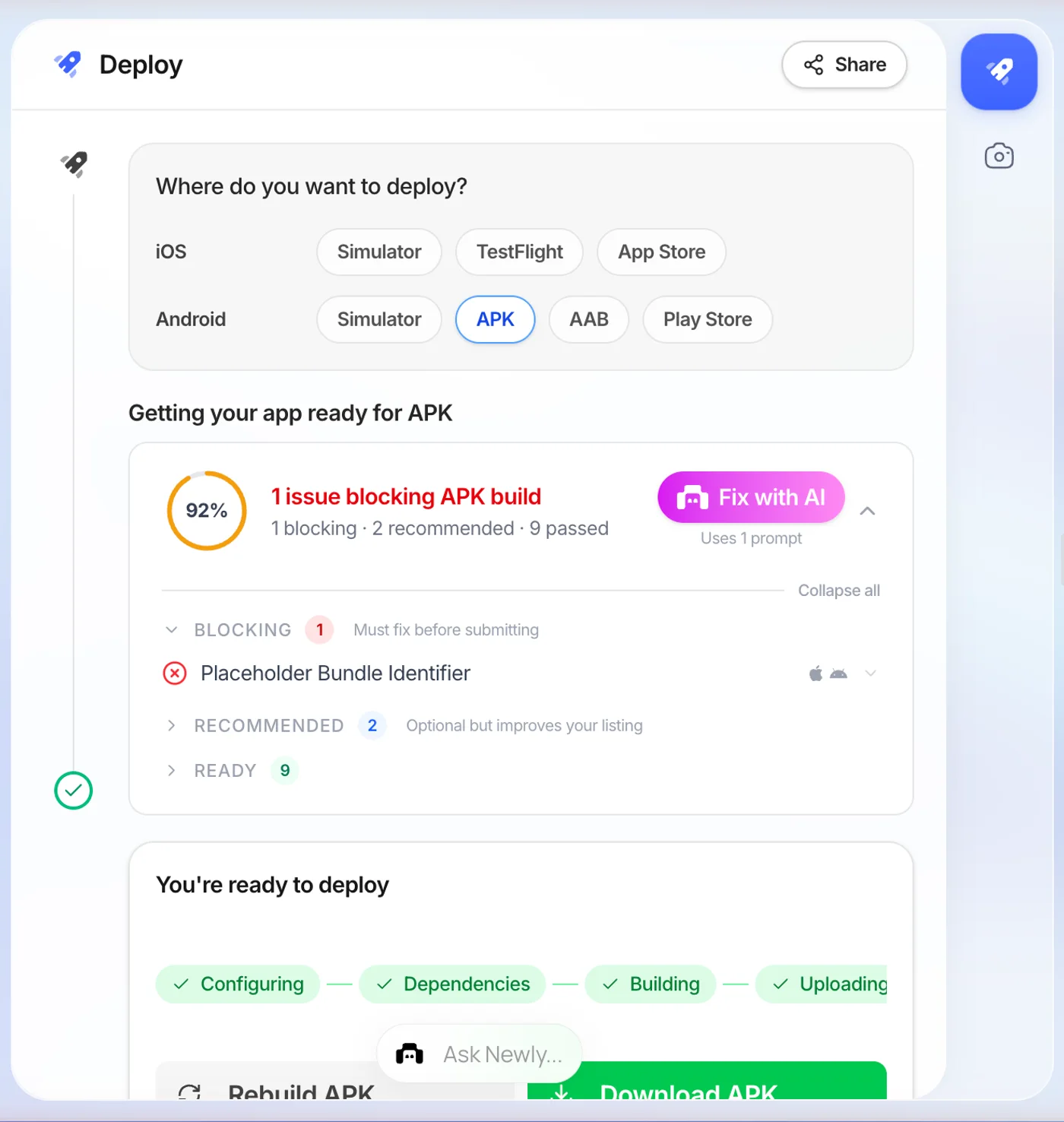
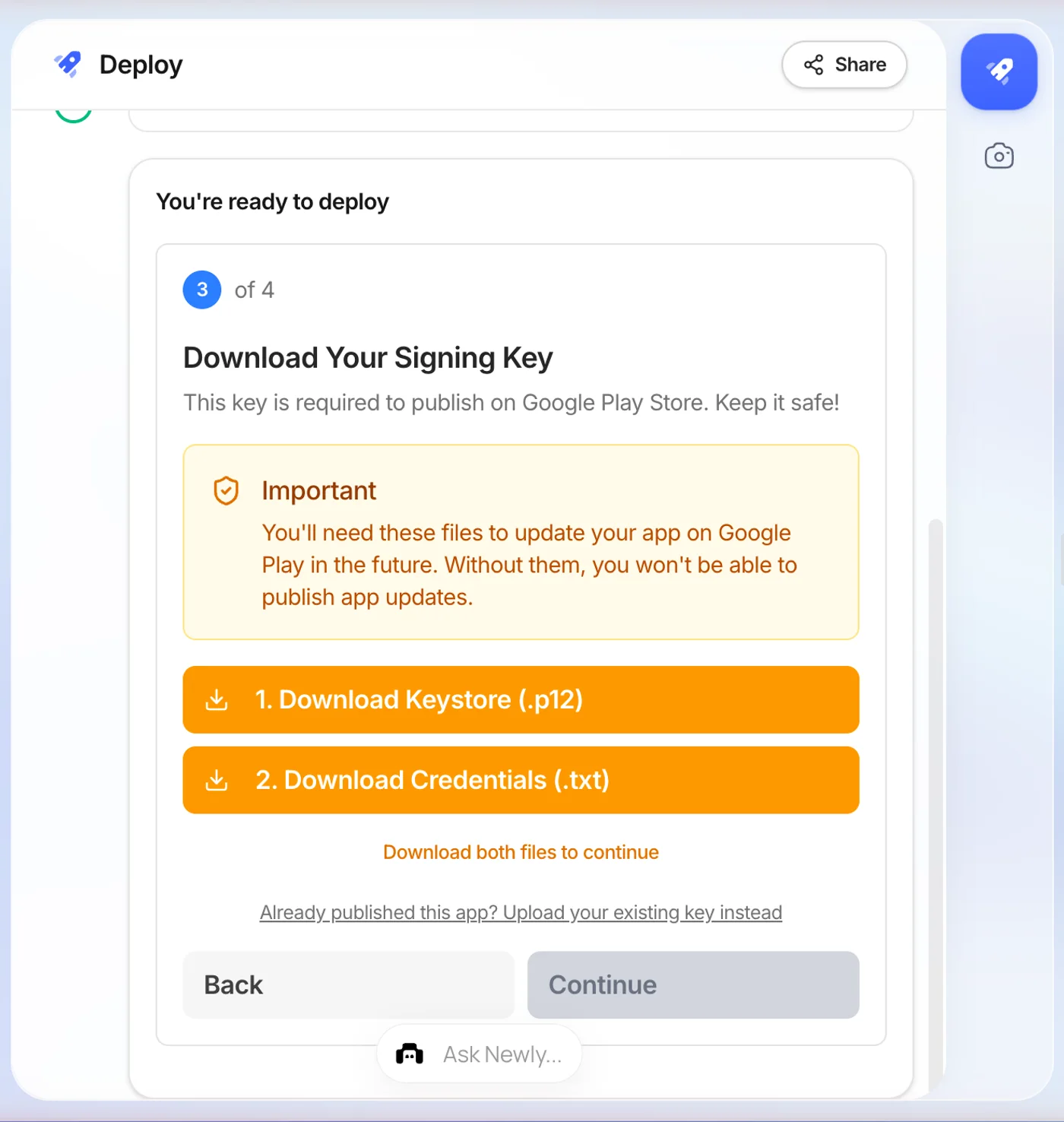
Four Android targets sit in the same Deploy panel, reached through Launch in the left nav, Simulator, APK, AAB and Play Store. Two of them are the ones that matter. APK asks for a bundle identifier and returns a download link in five to ten minutes, an APK installs on any Android device, so a tester needs the file and nothing else. AAB runs a longer wizard: bundle identifier, app version, then it generates your signing keystore and hands you the .p12 and the credentials file to download before it builds.
Save those two key files properly. Without them you cannot ship an update to that Play listing, you would have to publish a new app, with a new URL and no reviews. Everything after the build is the same on both tools: you upload the .aab in Play Console yourself.
Newly to the App Store: connect Apple, then press Build
Deploy, then Build & Deploy, then iOS. Sign in with the Apple ID enrolled in the Apple Developer Program, clear two-factor and pick your team; Newly auto-provisions the required keys and a checkmark appears for each one. Confirm the app name, bundle identifier and version, then press Build. It compiles in typically five to fifteen minutes and submits the build to App Store Connect for you, where it is ready for TestFlight or review. There is a manual path for people who would rather hold their own ASC, IAP and APNs keys. The $99-a-year Apple Developer account is still yours, as it is anywhere, and the bundle identifier is worth getting right the first time, changing it later is a two-step process.
Steps from Newly’s App Store submission guide; the manual key route is documented under App Store Connect setup.
The rows that actually differ.
Rows where the two are the same have been left in on purpose. A comparison that only lists differences is an advertisement.
| Dimension | Replit | Newly |
|---|---|---|
| What it generates | React Native on Expo for mobile; also web apps, APIs and background jobs | React Native and TypeScript on Expo, mobile only |
| A hosted web app | Yes, Publish gives you a public URL, billed by usage | No, export the code and host the PWA on Vercel, Netlify or similar |
| Device preview | iOS Simulator and Android Emulator streamed into the editor, plus Expo Go | Expo Go preview and in-platform preview |
| Android test build | Ask Agent; build runs on Expo servers, 10-15 min, you download the file | Launch → Deploy → APK, about 6 min, download link |
| Google Play build | Produces an .aab; no guided flow, you drive Play Console yourself | Launch → Deploy → AAB, wizard with version management |
| Android signing key | Let Google manage the signing key on first upload, Replit’s own advice | Newly generates the keystore; you download and keep the .p12 and credentials |
| iOS submission | Launch wizard builds, signs and uploads to App Store Connect, up to 45 min | Launch → Deploy → App Store, builds and submits, typically 5-15 min |
| Apple certificates | Launch selects a valid one or creates it | Auto-provisioned once the Apple account is connected, or upload your own keys |
| Backend | Postgres, App Storage, server routes, must be published for the mobile app to work | Newly Backend: agent-built API, sign-in, Postgres and file storage, hosted by Newly |
| Own and export the code | Yes | Yes, two-way GitHub sync or a ZIP download |
| Free tier | Yes, Starter | No |
| Entry paid plan | Core, $20/mo ($18/mo billed annually) | $25/mo for 100 credits |
| Charges after that | Usage-based publishing costs per request and compute unit | One credit per prompt; no hosted app to meter |
| Apple $99/yr + Google $25 | Required, and yours to set up | Required, and yours to set up |
Replit rows from docs.replit.com and replit.com/pricing, read on 10 September 2026. Both products move quickly, check both before you commit money to either.
Three things it does that we do not.
It hosts the thing, and that is not a small feature
Press Publish and there is a URL. Postgres, object storage, secrets and server routes come with it, and Replit will sell you a domain to point at it. If what you are making is a dashboard, an internal tool, a booking page or a landing page with a form behind it, this is the whole job and it is done. There is no equivalent here, the closest route is exporting your code and hosting the PWA yourself.
Real simulators, in the browser, immediately
An iOS Simulator and an Android Emulator both stream into the Project Editor from the cloud. Nothing to install, no Xcode, no Android Studio. For working on a screen until it feels right, that loop is hard to beat.
You can try it without paying
Replit has a free Starter plan with daily agent credits and one published project. There is no free plan here. If you want to type a prompt and see what comes back before spending anything, Replit lets you do that and we do not.
One entry a comparison like this used to carry is missing on purpose: the iOS route. Both tools now sign a build and put it into App Store Connect from inside their own flow, Replit through the Launch wizard, Newly through Deploy → iOS, so that step is close to parity and is not a reason to choose either one.
Three things, and one of them is only about Android.
The Android wizard is here
Signed APK for testers, signed AAB for the store, keystore generated and version numbers handled, all inside the Deploy menu. On Replit that is a prompt, a wait, a download and a Play Console session you drive yourself. If Google Play is where your users are, this is the only line in the comparison that matters.
There is no web app you have to keep alive
Replit’s iOS flow starts by publishing the web app because the mobile app depends on it. That is a second thing to run, monitor and pay for as long as the app exists. Here the backend is part of the project, so there is no separate deployment to keep warm.
One bill, not a bill plus a meter
Credits per prompt, builds included, nothing charged per request. Whether that is cheaper depends entirely on your traffic, which is the honest answer and the reason there is a whole page on what these tools actually cost.
The part we would rather not print
There is no free plan here, and no way to buy a handful of credits when you run out. Newly starts at $25 a month for 100 credits, and one credit is spent on every Build prompt whether the answer is right or wrong, a prompt that misreads you costs exactly what a prompt that works costs. Replit’s Starter plan lets you type something and see what comes back before you pay anything, and Core is $20. If your budget for finding out whether an AI builder suits you at all is zero, start over there.
For the same test applied to a builder that is mobile-only on both sides, see how Newly compares to Rork.
Six numbers, each with a source.
Subscription price is the smaller half of the question. Replit bills a published app by usage on top of the plan; the two store fees are unavoidable on either tool.
Apple states $99 per membership year and notes prices vary by region and are shown in local currency at enrolment. Google states a one-time US$25 registration fee with no yearly renewal.
Answer one question and the rest follows.
The question is not which tool is better. It is where the finished thing lives. If you already have a project on one side and are thinking about the other, there is a walk-through of moving a Replit project to a mobile app. Before you start, five things worth checking.
- Decide the destination first. A browser URL and a store listing are different products, not different exports of one product.
- Settle the bundle identifier before the first build. Replit ties it to the project and a later change makes the next publish fail; Newly’s documentation says changing it afterwards is a two-step process.
- Start the Google Play account verification now. Google checks name, address and a government ID, and it takes days.
- Budget the Apple Developer Program at $99 a year before you count tool subscriptions.
- Keep the Android keystore and credentials file somewhere you will still have them in two years. Lose them and the listing cannot be updated.
Newly vs Replit, answered plainly.
It builds mobile apps. Replit Agent generates a React Native app on Expo, previews it in an iOS Simulator or Android Emulator streamed into the browser, and puts an iOS build into App Store Connect through a Launch wizard. Comparisons written before that shipped, including older ones on this site, describe Replit as web-only, and they are out of date. What is still true is that the web app is the centre of gravity: Replit's own documentation has you publish the web app first, because that is the backend your mobile app talks to.
If the destination is a store listing, start on this side.
Describe the app, preview it on your own phone, and take the signed APK and AAB out of the Deploy panel. From $25 a month, with the React Native code yours to export whenever you want it.