

APKS to APK: your file is not broken. It is a container.


Founder, Newly
You downloaded something, tapped it, and Android did nothing at all. That is the normal experience of a .apks file. It is not corrupt and the download did not fail. It is an archive holding several APKs, and Android has no idea what to do with an archive. If you are fuzzy on what an APK file is in the first place, start there, then come back. Everything below assumes you know an APK is the thing that installs.
Which one did you download?
- .apk
- One app, one file. Tap it, allow the source, done. Nothing on this page applies to you.
- .apks
- An APK set archive from Google’s bundletool. Holds base.apk plus configuration splits. Will never install on its own.
- .xapk
- Not an Android format at all. APKPure invented it. Could be splits inside, could be an APK plus an OBB. Open it and look.
Key Takeaways
- Your file is not broken. A .apks or .xapk is a container of split APKs produced from an Android App Bundle.
- A device needs base.apk plus its matching splits. ABI, screen density and language each get their own split; the phone takes only the ones it fits.
- bundletool is the honest route.
build-apks --mode=universalgives one installable file;adb install-multipleinstalls a set. - Newly does nothing for a downloaded game. It builds apps from a description and has no import path for .apks, .xapk, .aab or an existing project.
The short version
There is no honest way to convert apks to apk unless you hold the original App Bundle.
A .apks archive is every version of an app at once: one base APK, plus small configuration APKs for screen density, CPU architecture and language. Your phone is supposed to take four of them and ignore the rest. If the app is yours, one bundletool command produces a real single APK. If you downloaded it from a mirror, no converter can build one for you, and the useful move is to install the set rather than fight it. Both routes are below, with the commands.
What is actually inside a .apks file
Google Play stopped shipping one APK to everybody years ago. A developer uploads an Android App Bundle instead, and Play generates per-device APKs from it: a base APK that every device gets, then configuration APKs carrying only the artwork for your screen density, only the machine code for your chip, and only the strings for your language. Android has treated multiple installed APKs as one app since Android 5.0, API level 21. The archive you downloaded is that whole matrix in one file, which is exactly why it will not install.
Switch devices in the diagram and watch what changes. Most of the file is not for you.
base.apk; the other six exist for other people’s phones. That is why no single file inside a .apks is “the app”, and why pulling one out and renaming it gets you nowhere. Split names follow Android’s configuration-APK model, the exact filenames vary between builds.Two things follow from this picture, and they are the two things people get wrong. First, base.apk is not a stripped-down version of the app you can install and live with, it is missing the machine code for your processor. Second, the archive itself came from the App Bundle these splits come from, and the bundle is the only artefact that can be turned back into a single working APK.
Four moves to find out what you are holding
Do this before you download a single tool. It costs a minute and it decides everything after it.
- 1
Read the extension properly
Windows hides known extensions by default, and a browser will happily save something called my-game.apk that is really an archive. In File Explorer, turn on View, Show, File name extensions. On Android, most file managers show the true name in the file details sheet. Four letters, .apks, is a different animal from three.
- 2
Copy it and rename the copy to .zip
Both .apks and .xapk are ZIP containers, so any unarchiver opens them. Do this on a copy, not the original. What you see next tells you which of the routes below applies to you, and it takes about ten seconds.
- 3
Look at the file names inside
base.apk plus a pile of split_config entries means split APKs, and the whole set has to be installed together. One APK plus a .obb file and a manifest.json means the old APKPure style, where the APK installs normally and the OBB is data. A single .apk on its own means someone wrapped a plain APK for no reason, and you can just install that.
- 4
Then, and only then, pick a route
Nearly every wasted hour on this problem comes from skipping the three steps above and trying converters at random. The table underneath is ordered by what you already have, not by what sounds easiest.
unzip -l my-app.apks
unzip -l my-app.xapk
Six routes, and only two of them end in one APK
The row that matters is whichever one matches the column headed “what you must already have”. If you are converting between other Android formats rather than dealing with a split bundle, take the other conversion routes instead, this page is only about split sets.
One row is marked as a dead end on purpose. It is the row that most search results for an apks to apk converter are quietly selling.
| Route | What you must already have | What you end up with | The catch |
|---|---|---|---|
| Split installer app on the phone | The .apks or .xapk, on the device | The app installed, still as splits | Not a conversion. You are trusting a third-party installer with package-install rights. |
| adb install-multiple | A computer, USB debugging, the unzipped APKs | The app installed | You have to pass the right splits and only the right splits. Wrong ABI, no install. |
| bundletool install-apks | The .apks and a connected device | The app installed, picked for that device | Needs Java and the bundletool jar. Still no single APK at the end. |
| bundletool build-apks --mode=universal | The original .aab | A genuine single universal APK | Only the developer has the .aab. The output is debug-signed unless you pass a keystore. |
| An apks to apk converter onlineDead end | A website and optimism | The archive unzipped, nothing more | base.apk on its own will not install. Since Android 10 that failure is guaranteed, not luck. |
| Build the APK from your own project | The source, or a builder like Newly | A real installable APK, every time | Only works if the app is yours. It is also the only route with no archive to unpack. |
Route A: install the set instead of converting it
This is what almost everyone actually wants. You do not need one APK; you need the app on your phone. A split installer unzips the archive and hands all the right pieces to Android’s package installer in a single session, which is precisely how Google Play does it. The best-known one is Split APKs Installer, usually written SAI, which is open source under Aefyr/SAI on GitHub and handles .apks, .xapk and plain zips. Read its README before you rely on it: the author says the project is largely dormant and that XAPK support is partial.
If you have a computer nearby, skip the installer app entirely. Unzip the archive, then hand the pieces to adb in one command. Android documents this exact case: install-multiple exists for installing all of an app’s APKs for a specific device.
adb install-multiple base.apk split_config.arm64_v8a.apk split_config.xxhdpi.apk split_config.en.apk
Route B: the only real conversion, with bundletool
bundletool is Google’s own command-line tool, the same one Android Studio and Google Play use to turn a bundle into APKs. Give it your .aab and ask for universal mode, and it builds a single APK containing all of your app’s code and resources, compatible with every configuration the app supports. That is a genuine apks to apk conversion. It is also the reason the word “converter” is misleading: the input is the bundle, not the archive.
bundletool build-apks --bundle=/MyApp/my_app.aab --output=/MyApp/my_app.apks --mode=universal
Already holding a .apks and a phone on a cable? bundletool will work out the device’s configuration and install the correct subset for you, which is Route A with fewer moving parts.
bundletool install-apks --apks=/MyApp/my_app.apks
One line in the bundletool docs catches people out: with no --ks and --ks-key-alias flags, bundletool signs the APKs with a debug key automatically. It will install on your own phone and it is useless for distribution. That is a whole subject on its own, why the reassembled APK still needs signing picks up where this page stops.
Route C: an .xapk is somebody else’s idea
Worth being blunt, because a lot of pages are vague about it: XAPK is not an Android format. Google never defined it and Android has no handler for it. APKPure created the container so that a large game and its data could be downloaded as one file, and APKPure’s own page says as much. What is inside varies. Older ones hold an APK plus an .obb expansion file and a manifest.json describing where the OBB goes. Newer ones just hold split APKs, which puts you back on Route A.
So xapk to apk has two answers and you cannot know which one you need until you look inside. That is the whole trick, and it is why every tool promising a single button for it is guessing on your behalf.
If it is the old kind, the conversion is trivial and needs no tool: install the APK the normal way, then copy the OBB into Android/obb/<package.name>/ on the device, keeping the file name exactly as it is. Rename that file and the game will download the data again from scratch, which defeats the whole point.
Route D: why the online converters cannot work
An online apks to apk converter has the same archive you do. It can unzip it and hand you base.apk. It cannot merge nine differently targeted APKs into one valid package, and even if it produced something, re-signing would break the app’s update path. The failure is not a matter of a better tool coming along, either. Android’s App Bundle documentation is explicit that partial installs of sideloaded apps, apps missing one or more required split APKs, fail on all Google-certified devices and on anything running Android 10, API level 29, or higher.
So a converter that gives you a working single APK for a Play Store game is not a converter. It is either the wrong file, a repack of somebody else’s work, or an installer with a misleading name.
Can I just rename .apks to .apk?
No, and it makes things worse rather than better. Before renaming, Android ignores the file and nothing happens. After renaming, the package installer accepts it, tries to parse a ZIP full of ZIPs as a single package, and fails, usually with the message that there was a problem parsing the package. People then conclude the download is corrupt and fetch it again, four times, on mobile data. The extension was never the problem. Android reads what is inside the file, not the three letters at the end of its name.
Before you install anything you downloaded
Split archives circulate mainly through app mirrors, and the mirroring is the risky part, not the file format. Five things worth being able to answer yes to.
- You know which site the file came from, and it is not a mirror you found in a search result
- The package name inside base.apk matches the app you think you are installing
- You are not sideloading a paid app you did not pay for, it is the reason most of these files exist
- You accept that a sideloaded app gets no Play Store updates and no Play Protect scan history
- You have somewhere to put the original file, because a botched install often means starting over
If the app is yours, you never needed a converter
A decent share of people searching this are not trying to install somebody else’s game. They built an app, got a .apks out of their toolchain, and now want something a tester can tap on a phone. In that case the archive is a detour. Ask the build for an APK in the first place.
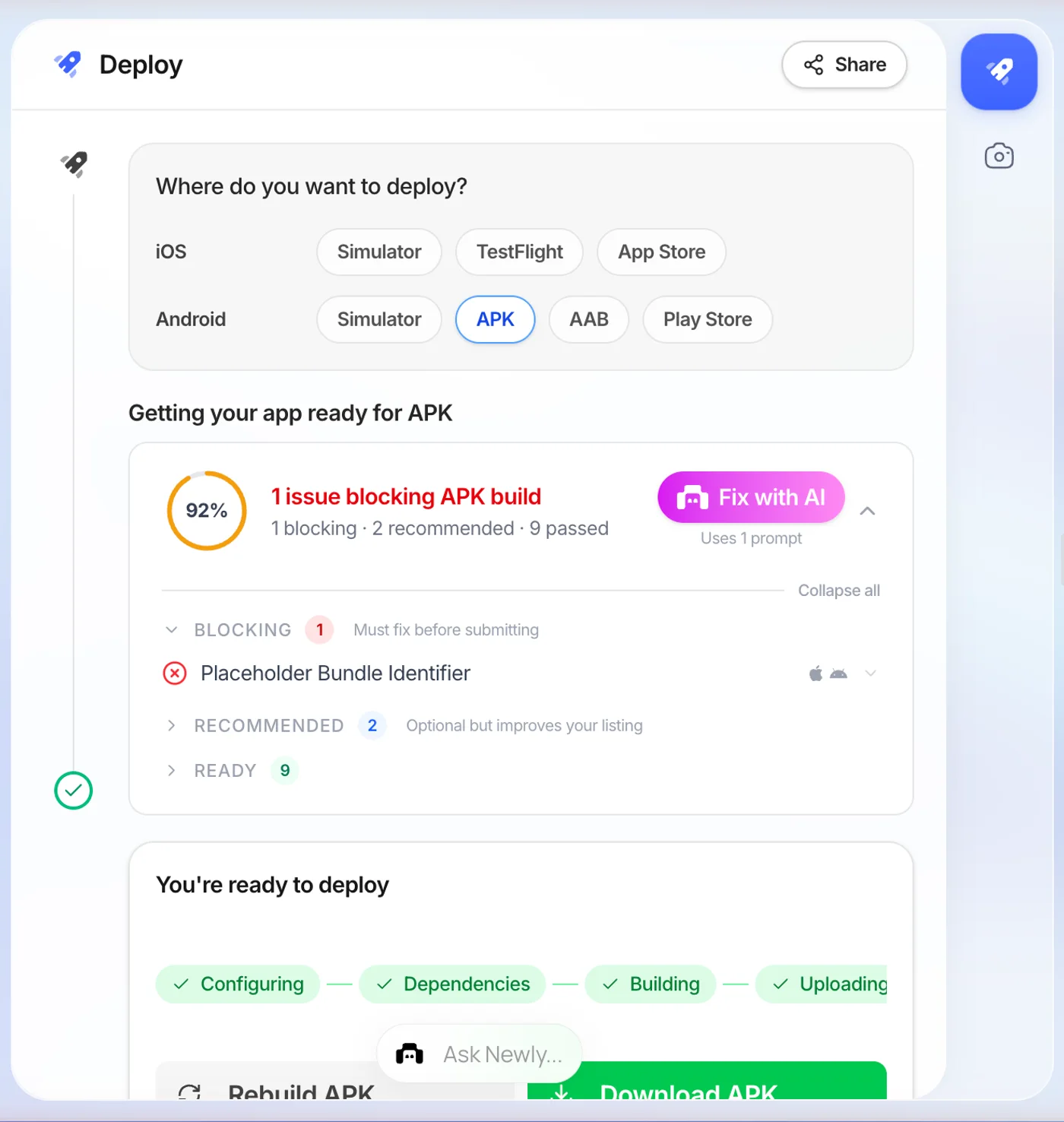
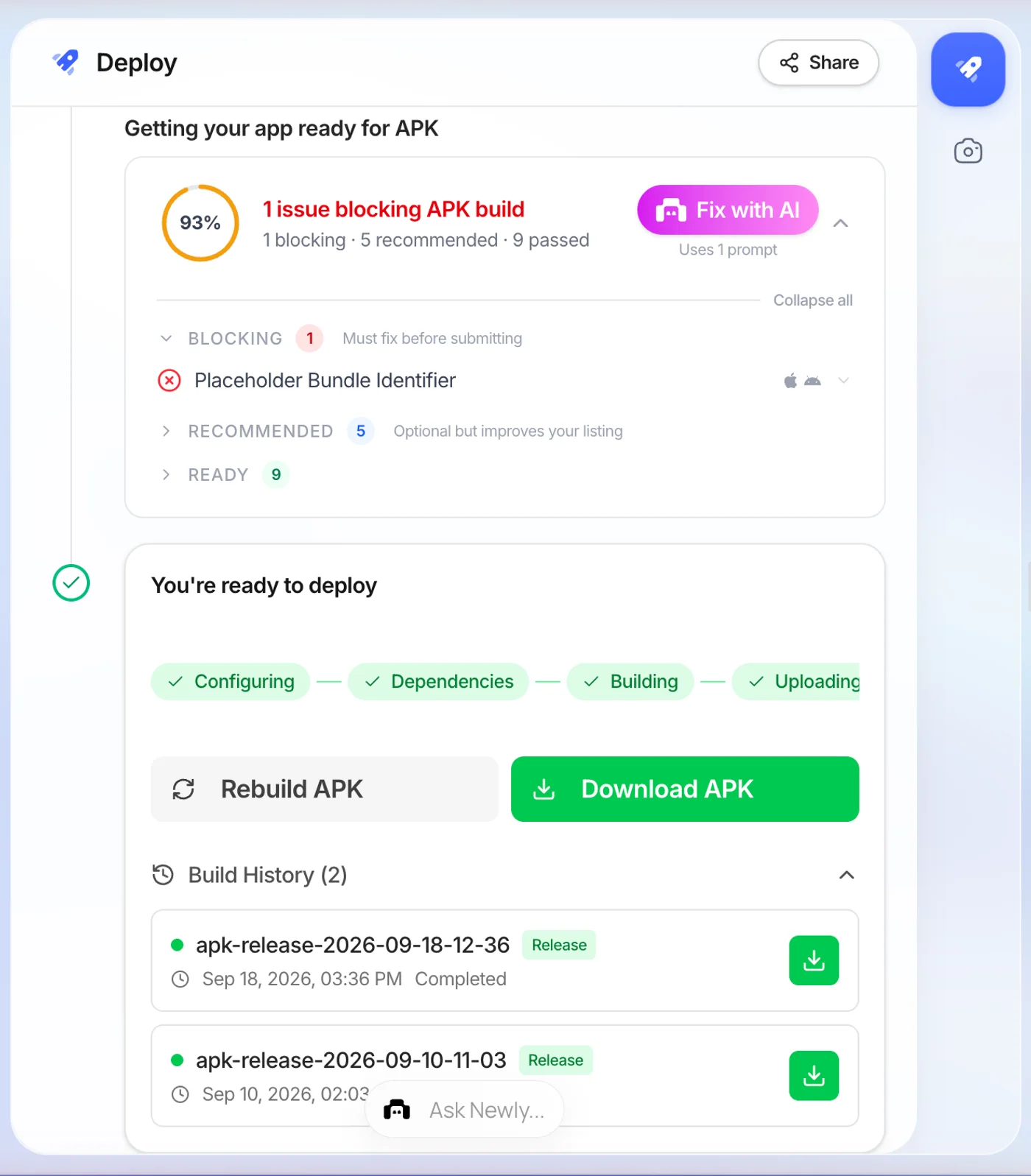
In Newly, that is a build target rather than a conversion step. Open Launch in the left nav, pick APKfrom the four Android targets, enter a bundle identifier and start the build. It took about six minutes on the build I ran, and what arrives is an ordinary APK that installs by tapping it. The Play Store build is a separate target in the same panel, because Google Play wants an AAB and testers want an APK, and those are different files.
The limitation, plainly
Newly cannot open a file you already have. There is no import path for an existing .apks, .xapk, .aab or Android project, it builds apps from a description, and that is the only way in. If you landed here holding somebody else’s download, Newly does nothing for you, and Route A above is your answer. There is also no free tier: it starts at $25 a month.
Where these claims come from
- The Android App Bundle format
The split APK mechanism, base APK and configuration APKs, and the Android 4.4 multi-APK fallback.
- About Android App Bundles
Why a sideloaded app missing one of its required splits fails to install.
- bundletool
build-apks, --mode=universal, install-apks, get-device-spec and extract-apks, with the signing flags.
- APKPure: what is XAPK
The origin of the .xapk container, from the people who created it.
APKS to APK, the short answers
A .apks file is an APK set archive. Google's bundletool produces one from an Android App Bundle, and bundletool's documentation describes it as a container holding the generated APKs for every device configuration the app supports. Inside are base.apk and a set of configuration splits covering screen density, CPU architecture and language. It is not a single installable app and Android has no handler for the extension, which is why tapping it does nothing.
Chasing a converter for an app you did not make?
Install the split set and move on, that part is solved. If the reason you are here is that you wanted the app itself and it does not exist yet, describe it and get a real Android build, APK included, at the end of it.
Build your own app instead