

APK converter: four different jobs, one word


Founder, Newly
Search for an apk converter and you land on a row of upload boxes. Drop a file in, get an app out. It is a good business, because four unrelated groups of people type that phrase and only one of them is holding a file that can be converted at all.
The other three need a build, a wrapper, or an app that does not exist yet. Sorting yourself takes about ten seconds and saves an afternoon spent feeding a zip to sites that were never going to return anything installable. If you already know your case, you want a signed build and you are not installing Android Studio to get one, Newly’s APK builder does that end to end. Everyone else: start with the router.
Four searches. One phrase. Almost no overlap in what has to happen next.
Find your caseKey Takeaways
- One word, four jobs. “APK converter” covers a zip of source, loose code, a live website and a .apks bundle, and each has a different real route.
- Nothing converts an arbitrary zip. The manifest, bytecode and signature have to be built; no tool can rename them into existence.
- bundletool is the only converter that exists. It turns Play bundles into APKs. Everything else marketed as a converter is a builder or a wrapper.
- Most people should not convert at all. Describing the app and letting a builder compile it is faster than reassembling files by hand.
Start with what is on your disk.
These are not four variations on one method. They share the file extension at the finish line and nothing else, different tools, different failure modes, wildly different odds of working.
What have you actually got?
One question. The answer decides whether a converter is even the right kind of tool.
Open the zip before you do anything else. If you can see a build.gradle, an app.json or a package.json in there, you are holding source code and the route is a build, not a conversion. If you see photos, PDFs, a few HTML files or one component someone pasted for you, no tool on the internet can turn that into an APK, because there is nothing in the archive that a compiler could ever have produced a classes.dex from.
Step 1
your-project.zip
unknown contents
Step 2
Unzip and check
is it a project?
Step 3
Build it
Gradle, or a service
Step 4
Signed APK
installs on a phone
Scroll the route sideways to see every step.
- Realistic time
- 20-60 minutes the first time, most of it spent installing a toolchain
- The bit that catches people
- Renaming the file to .apk does nothing. An APK is a zip, but one holding compiled dex bytecode, a binary manifest and a signature block, none of which appear because you changed four characters.
This is the most common thing behind the search, and the one with no honest tool. You have working logic, a scraper, a couple of React screens, something an assistant wrote for you, and no project around it: no manifest, no entry point, no icon, no signing config, no dependency graph an Android build can resolve. The gap between those two states is authoring an app. It is not a file format problem, so a file converter cannot touch it.
Step 1
Loose code
no project around it
Step 2
Make it an app
manifest, screens, deps
Step 3
Build it
toolchain or cloud
Step 4
Signed APK
installs on a phone
Scroll the route sideways to see every step.
- Realistic time
- Days by hand. Minutes if you describe the app and let something build it.
- The bit that catches people
- Every site ranking for this phrase either quietly means the case above, or wraps your code in a WebView and hands back an app that shows a blank screen.
Next: Newly’s APK maker.
Google publishes the tool for this. Bubblewrap is a Node command-line tool that reads your web manifest and generates an Android project that opens your site in a Trusted Web Activity, then builds it. What lands is app-release-signed.apk. What it contains is your website, running in Chrome without the browser chrome, so it needs a connection, and it reaches only the APIs the browser exposes to a page.
Step 1
Your site
plus a web manifest
Step 2
bubblewrap init
generates the project
Step 3
bubblewrap build
app-release-signed.apk
Scroll the route sideways to see every step.
- Realistic time
- About an hour, and you must host assetlinks.json on the domain
- The bit that catches people
- Without the Digital Asset Links file at /.well-known/assetlinks.json the app still runs, but with a browser address bar across the top, which is exactly the thing you were trying to hide.
Of the four, only this is what the word converter actually describes. An Android App Bundle is a publishing format, Google Play generates the per-device APKs from it, so a phone will not install one. Android ships bundletool for exactly this, and build-apks with --mode=universal produces one APK that runs on every configuration your app supports. It takes a JDK and a single command.
Step 1
app.aab / .apks
will not install
Step 2
bundletool
--mode=universal
Step 3
universal APK
installs on a phone
Scroll the route sideways to see every step.
- Realistic time
- Under five minutes once the JDK is there
- The bit that catches people
- Pass --ks or bundletool signs with a debug key. That is fine for a tester and useless for Google Play, which will reject it.
Renaming the file never works. Here is the reason.
An APK is a zip. That one true fact has probably cost more wasted evenings than any other piece of Android trivia, because the obvious next thought is that the reverse must also hold. It does not. A zip becomes an APK the way a pile of bricks becomes a house: the parts are related and the work is all of it.
Open a working APK with any archive tool and you find five things a renamed folder cannot contain.
- classes.dex
- Your code, compiled to Dalvik bytecode. A compiler produced this. Nothing in a zip of source files becomes it by being renamed.
- AndroidManifest.xml
- The binary form, not the readable XML in your project. It declares the package name, the launcher activity and every permission.
- resources.arsc and res/
- The compiled resource table plus the assets it points at. Strings, layouts, densities, and the mapping between them.
- lib/
- Native libraries, one folder per CPU architecture. This is a large part of why one app can ship as several different APKs.
- META-INF/
- The signature block. Without it the package installer stops before it starts, and no amount of retrying the download helps.
The last one is the wall. Android’s platform documentation states it without hedging: every app that is run on the Android platform must be signed by the developer, and packages that are not get rejected by Google Play or by the device’s installer. So a converter that hands back an unsigned file has handed you a file, not an app.
Six things people call converting
Ranked by nothing. Read the row that matches what you have, and ignore the rest, the times are what these actually take on a laptop that has never built an Android app before.
| Route | What it actually does | What you need | Time | Publishable? |
|---|---|---|---|---|
| Renaming .zip to .apk | Changes four characters in a filename. | Nothing | 10 seconds | No. Parse error on install. |
| An online converter site | Either runs a real build of a project it found in your upload, or wraps your files in a WebView. | An upload, and trust | Minutes, or a failed build | Usually not. Signed with their key, if at all. |
| bundletool build-apks | Turns an .aab or .apks into APKs a device can install, including one universal APK. | A JDK and the bundletool jar | Under 5 minutes | Yes with --ks. A debug key otherwise. |
| Gradle assembleRelease | Compiles a real Android project into an APK on your machine. | JDK, Android SDK, the project itself | 20-60 minutes the first time | Yes, once a signing config exists. |
| Bubblewrap | Generates and builds an Android app that opens your website in a Trusted Web Activity. | Node, a JDK, Android command-line tools | About an hour | Yes. It outputs app-release-signed.apk. |
| A cloud build service | Builds the project on someone else's machine, so nothing is installed on yours. | An account and a project it can read | 5-15 minutes per build | Yes, when you hold the key. |
Toolchain requirements and command names checked against Android and Chrome developer documentation, September 2026. Times are from first-run installs, not warm caches.
A bundle to an APK is the only real conversion here
You downloaded something and your phone refuses it. Check the extension. If it ends in .aab, .apks or .xapk, you are holding a publishing format rather than an app, and the fix is mechanical.
Why the phone says no
An Android App Bundle carries every version of your app’s code and resources in one container, and Google Play slices it into the specific APKs each device needs. A phone has no slicer. bundletool is the slicer, published by Google, and it is the same one Android Studio and Play use internally. Point it at a bundle with --mode=universal and it builds a single APK that covers every configuration your app supports.
bundletool build-apks --bundle=/MyApp/my_app.aab --output=/MyApp/my_app.apks --mode=universal
The whole procedure
- 1Install a JDK if you do not have one. bundletool is a jar, so java -version has to answer.
- 2Download bundletool from the Android developer site and keep the jar somewhere you can type the path to.
- 3Run build-apks with --mode=universal against your .aab, pointing --output at a .apks file that does not exist yet.
- 4Unzip the .apks, it is an ordinary zip, and take the single APK the universal mode left inside, or run install-apks to push it to a connected device.
- 5Only if this build is going to a store or a real tester: pass --ks, --ks-key-alias and the password flags, so it is signed with your key rather than a debug one.
One caveat about .xapk and .apkm: those are not Android formats at all. Third-party download sites invented them to ship an APK plus its split or OBB files together, so the honest description is unpack, not convert. Rename to .zip, open it, and the APK is usually sitting right there.
A website is content you wrap, not code you convert
Google publishes a tool for this and it is genuinely good. Bubblewrap is a Node command-line tool that reads your web manifest, asks you to confirm the values it pulled out, generates an Android project around them and builds it. Two commands, and the second one leaves app-release-signed.apk on disk.
bubblewrap init --manifest=https://my-twa.com/manifest.json
bubblewrap build
The catch is a file, and it is the step people skip. A Trusted Web Activity only drops the browser address bar once your domain hosts an assetlinks.json that names the app. Miss it and the build still installs, still runs, and still looks like a browser, which was the one thing you were trying to avoid.
Be clear-eyed about what this gets you. It is your site, in an app shell, reaching the APIs a browser exposes to a page and no others. For a content site that is exactly right and takes an hour. For anything that needs the camera roll, background location or a native share sheet, wrapping is the wrong shape and you will feel it in week two.
“Code to apk converter” splits in two
Whether this is a five-minute job or a fortnight depends on one question: is what you have already an app?
If it is a real project, you want a build
A zip with build.gradle.kts and a settings file in it is an Android project, and the conversion you are looking for is one Gradle task. Android’s command-line build docs spell it out: ./gradlew assembleDebug produces a debug APK signed with a debug key, in project/module/build/outputs/apk/, and assembleRelease produces the one you can ship once a signingConfig exists in your module’s build file. A React Native or Expo project answers to a different toolchain, but the shape is the same, resolve dependencies, compile, sign.
The first run is slow and the failures are dull: a JDK version mismatch, an SDK licence you have not accepted, a dependency that wants a newer Gradle plugin. None of it is conceptually hard. It is just an afternoon.
If it is not an app yet, no converter can save you
This is the case most people are actually in, and the reason “code to apk converter” converts so well as a search: you have working logic and nothing around it. No manifest. No launcher activity. No navigation, no icon, no dependency graph an Android build could resolve, no keystore. The distance between a folder of code and an APK is authoring an app, and file converters do not author anything.
So the realistic options are to build the app around your logic by hand, or to describe the app and have it generated and built for you. The second one is what Newly does: you write what the app should do in plain English, it generates a React Native project, and the Android build runs in the cloud rather than on your laptop.
What the build step looks like
Newly’s documented flow for an Android test build is four inputs long: open your project, click Deploy, choose APK, enter your bundle identifier, and start the build. A download link comes back in five to ten minutes. Nothing is installed locally, no Android Studio, no SDK, no Gradle daemon eating your battery.
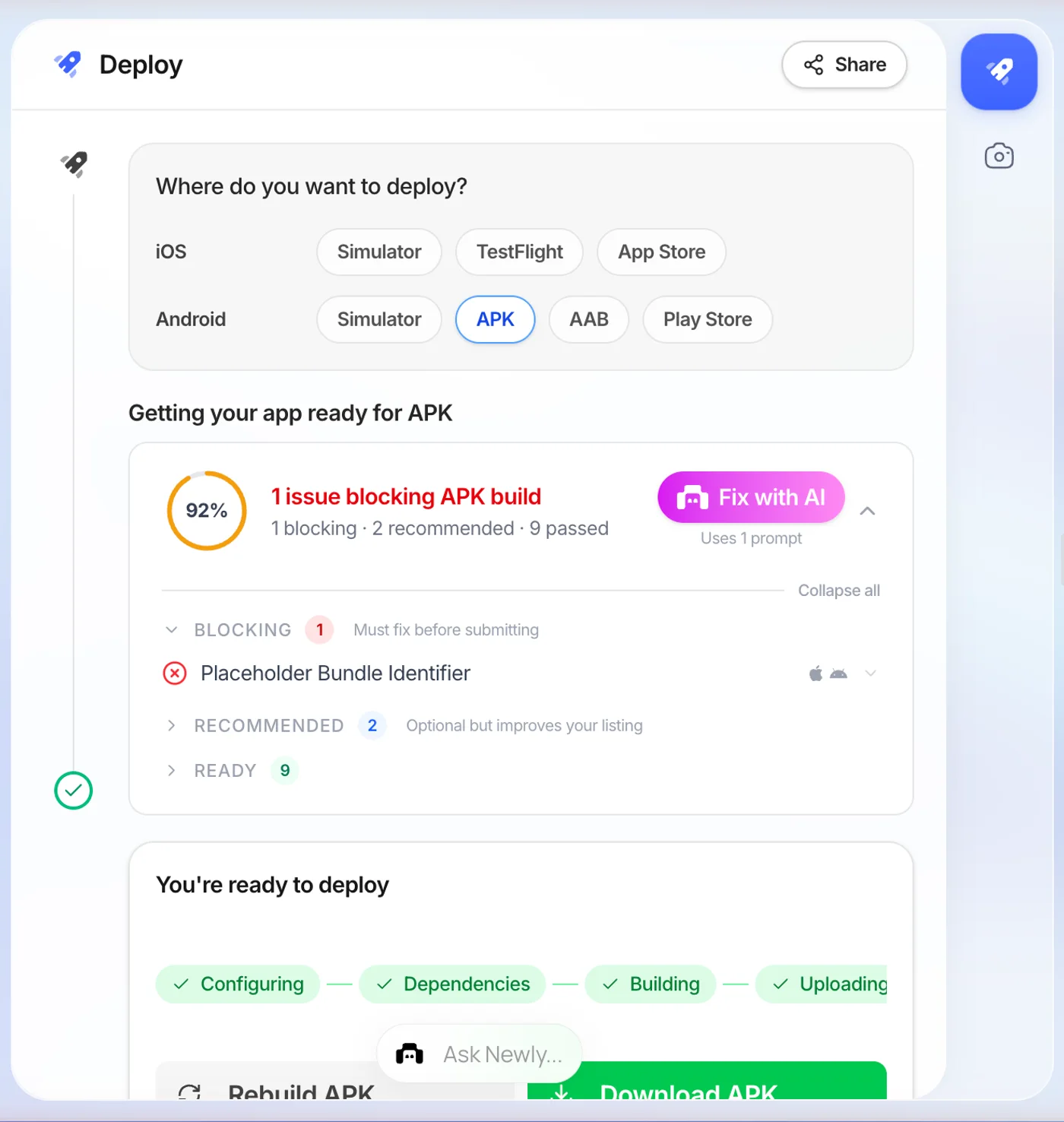
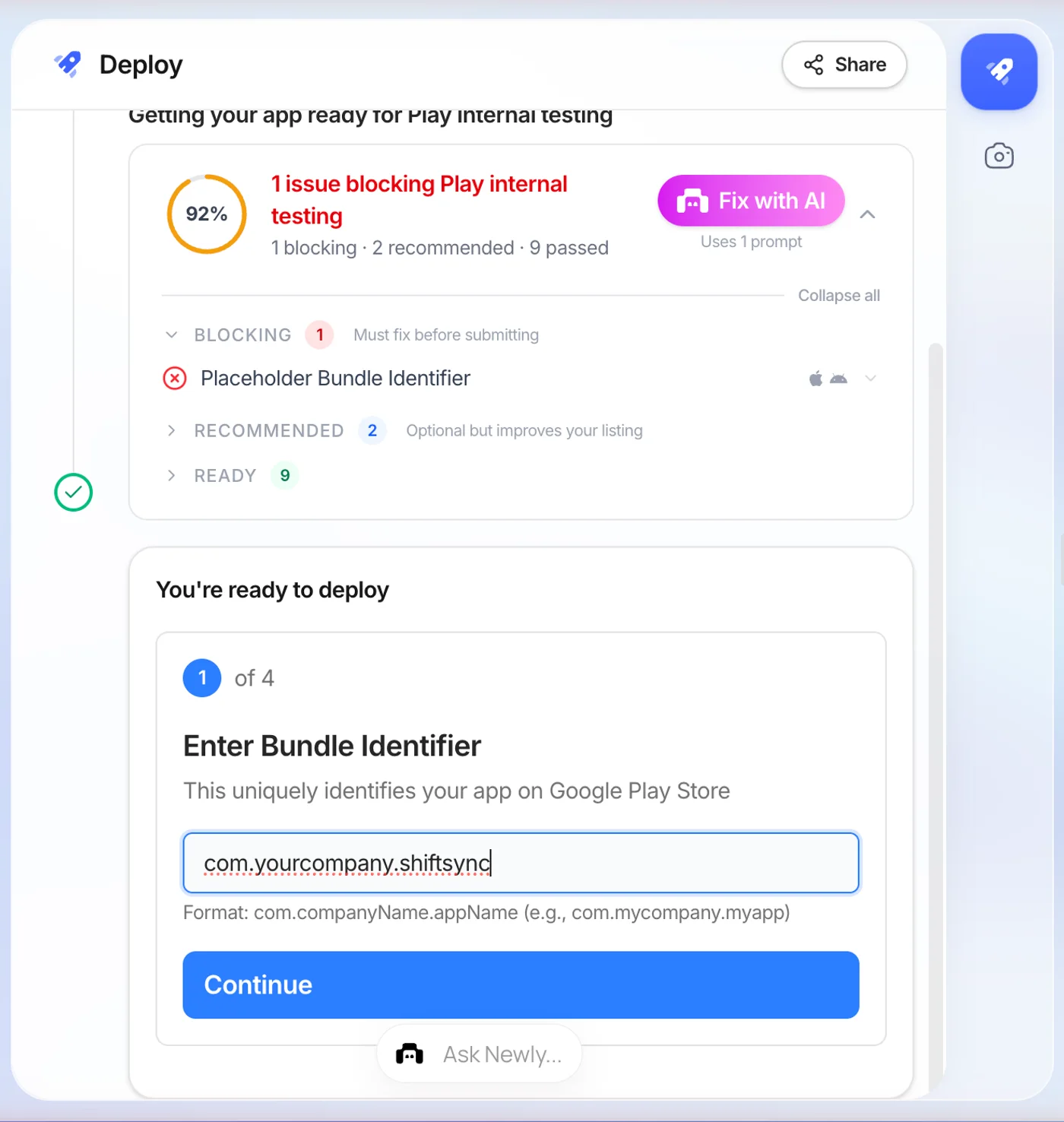
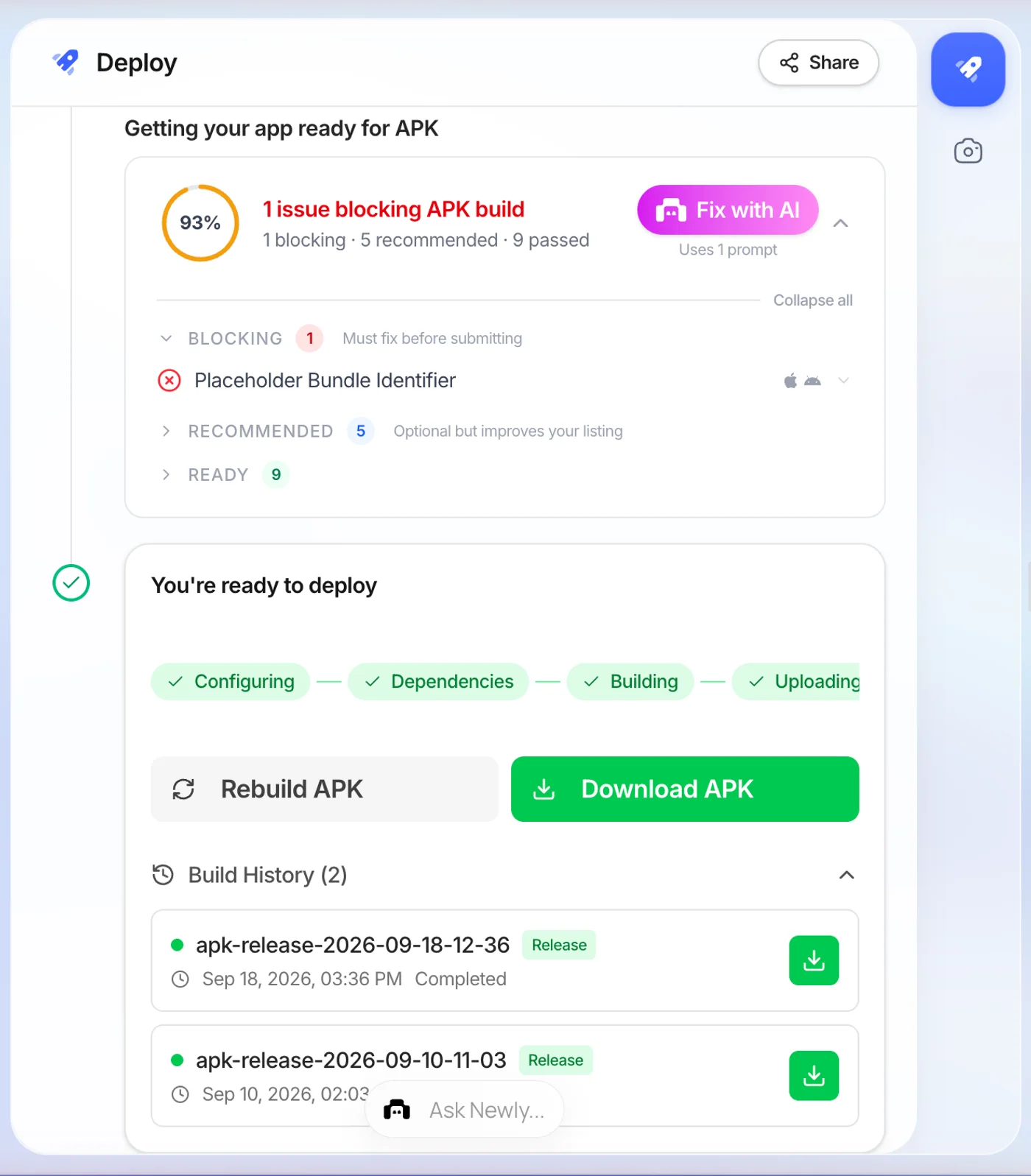
For Google Play you pick the AAB target instead, and the wizard adds three inputs: your app version, and the generation and download of a signing keystore. Save both files it gives you. That keystore is what proves the next version came from you, and there is no recovery if it is lost.
The limitation, stated plainly
Newly is not a converter and has no free tier. There is no upload box that takes your existing zip and returns an APK, the input is a description of the app you want, not the files you already have. And it starts at $25 a month for 50 credits, with one credit spent per prompt, so you cannot try it first and decide afterwards. If your zip really does contain a buildable project, Gradle on your own machine is free and it is the better call.
Is an apk converter online safe to use?
Depends entirely on which of the four jobs it is doing. A site that runs bundletool on your .aab is doing a mechanical, verifiable thing, and you can check the result yourself. A site that promises an APK from any zip is either running a build it has not described or wrapping your files in a WebView, and neither is what you asked for.
The part that costs real money is signing. Android identifies your app by the key it was signed with, so a release signed by a stranger’s key is an app you can publish once and never update. Before you upload anything:
- The site says which build it runs, and names the toolchain. A converter that will not say what it does with your files is telling you something.
- You keep the signing key, or the output is explicitly a debug build for testing only.
- It promises an APK from any zip. That promise cannot be kept, so something else is going on.
- It signs the release for you with a key you never see. That app can be installed once and updated never.
- You are uploading a client's unreleased source to a site with no company name on it.
Common questions
The ones people actually ask.
No, and it is worth being blunt about why. An APK is a zip archive, but the things inside it are compiled: dex bytecode produced by a compiler, a binary AndroidManifest.xml, a resources.arsc table, and a signature block. A zip of photos, PDFs or HTML files contains none of that, and no tool can generate bytecode for code that was never written. A zip to apk converter only ever works when the archive already holds an Android or React Native project, and in that case the tool is not converting anything, it is building the project for you.
If there was never a file to convert
Two of the four cases on this page end the same way: the app has to be built, because it does not exist yet. Writing it down in plain English is a faster start than installing a toolchain, and the APK comes back from the cloud in minutes.